Your open rate is lying to you. Not maliciously. It just can’t tell the difference anymore between a real human who cares about your newsletter and a corporate spam filter pinging every link in the email to check it’s not malware.
Security bots have been inflating click and open numbers for years now, and most bloggers are still building their whole strategy around a metric that’s basically noise. Industry estimates from Adestra put the share of clicks coming from automated security scanners rather than actual readers as high as 20 to 60 percent, depending on the sender.
So here’s the question I started asking myself a few months back: if I can’t trust what people do, what happens if I just ask them what they want?
That’s zero-party data. It sounds like a buzzword some agency invented to sell you a new dashboard, and honestly, it kind of was. But strip away the jargon and it’s the oldest trick in marketing: ask the person directly, instead of guessing from their behavior.
Zero-Party Data vs. First-Party Data: The Distinction That Actually Matters
Marketers throw these terms around interchangeably. They’re not the same thing.

First-party data is what you infer. Someone clicked a link about VPS hosting, so you assume they’re interested in server stuff. Someone opened three emails about WordPress plugins in a row, so you tag them as a “plugin person.” Pure guesswork. Dressed up as insight, sold as strategy.
Zero-party data is different because there’s no guessing involved. The subscriber tells you flat out: “I run a WordPress blog and I’m trying to move off shared hosting.” No inference. No behavioral modeling. Just a straight answer to a straight question.
The reason this matters more in 2026 than it did five years ago isn’t really about privacy law, though that’s part of it. It’s that behavioral data has gotten unreliable. Bot clicks. Privacy-protected opens. VPNs masking location. The signals you used to lean on are noisier than ever, and zero-party data sidesteps the whole mess because it comes straight from the source.
The three data types actually stack up like this for a blogger’s list:
| Data type | Where it comes from | How reliable is it now |
|---|---|---|
| Zero-party | Subscriber tells you directly | High, no inference involved |
| First-party (behavioral) | Clicks, opens, time on page | Dropping, bot traffic and privacy tools distort it |
| Third-party | Purchased or aggregated lists | Not really available to a solo blogger anyway |
That last row is worth sitting with for a second. Most “which data type should I use” content gets written for enterprise teams weighing first-party against third-party. Not you. You never had third-party data to lose in the first place. The real fight in front of you is zero-party versus behavioral guesswork, and guesswork just took a beating it won’t recover from.
Why This Doesn’t Require Any New Tools
The part that surprised me when I actually dug into this: every guide out there frames zero-party data as an enterprise thing, something you need a customer data platform for. You don’t.
A preference center selection can trigger a segment the same day it’s captured. No model training. No six months of behavioral history. No dependency on tracking infrastructure that breaks the next time Apple ships a privacy update.
For a solo blogger running a list of a few thousand people, this is actually simpler than what most people are already doing with tags and behavior-based automations. No lead-scoring model. No dashboard to babysit. You’re adding one question to a form.
The One-Question Welcome Email

I tested this on a small list a few weeks back. Added a single question to the welcome sequence, right after the opt-in confirmation step, nothing fancy:
“What brought you here: WordPress tips, hosting and VPS stuff, or email automation?”
Three buttons. Each one tags the subscriber and drops them into a different content track. That’s it. No survey tool, no third-party plugin, just three links pointing to the same landing page with a different hidden parameter on each.
The completion rate was higher than I expected. People will answer a single, specific question when it’s obviously going to make their inbox better. What they won’t do is fill out a five-page onboarding quiz. Keep it to one question if you can. Two, tops.
A few formats that work well for this first touch:
- Single-question button click in the welcome email, lowest friction and highest completion
- Signup form dropdown: “What’s your biggest blogging challenge right now?”
- Post-signup landing page with buttons: 3-4 quick visual options instead of a form field
- Post-signup landing page with plain text links: same idea, no design work required
Don’t overthink the UI. A plain text question with three hyperlinks converts fine. You don’t need a fancy quiz builder for this to work.
What If You Already Have 3,000 Subscribers and Zero Preference Data
The welcome-email approach only covers new signups. If you’ve been running a list for a year or two already, you’ve got a bigger pile of people who’ve never been asked anything. That’s the norm, not the exception. It’s honestly the more common situation I run into when I look at other bloggers’ setups.
Don’t try to retrofit this with a giant survey blast. A cold ask to your whole list, out of nowhere, gets ignored or triggers unsubscribes. Instead:
- Send a short, standalone email that’s just the question, not tacked onto your regular newsletter. Something like “quick one, what do you want more of?” with three buttons.
- Frame it as them getting a better inbox, not you doing research. “So I stop sending you stuff you don’t care about” converts better than “help us improve.”
- Expect a lower response rate than a welcome email. On my own list, the cold-list version landed at roughly a third of what the welcome-email version pulled, and that’s fine. Even partial coverage beats none.
- Anyone who doesn’t answer just stays on your general track, no forced choice. Fold a repeat ask into a regular send every quarter for anyone still untagged, and let it build over time.
You’ll never get 100% of an existing list tagged this way. You don’t need to. Even getting a third of your list segmented by real stated interest beats sending the same generic email to all 3,000 people forever.
Preference Centers That Aren’t Just a Frequency Toggle
Most preference centers are useless. I say that as someone who built exactly this kind of useless one for years. “How often do you want emails: daily, weekly, monthly?” is not personalization. It’s a snooze button.
A preference center that actually collects zero-party data asks about content, not just cadence. Something like:
- Which topics do you want more of, check all that apply
- What’s your current setup: shared hosting, VPS, managed WordPress
- Are you technical enough to follow code snippets, or do you want plain-English walkthroughs
- What’s the one thing you’re stuck on right now, an open text field works best here
That fourth question is the one nobody adds, and it’s the most valuable one on the whole list. Open-ended answers are messy to process at scale, sure. But when you’re running a blog with a few thousand subscribers, you can actually read them. I’ve pulled entire post ideas straight out of preference-center free-text answers. Half the ideas list I gave you last week? Some of it came from questions readers asked in exactly that kind of field.

Link to your preference center from every single email footer. Not buried three clicks deep in an account settings page. Right there, next to unsubscribe.
Turning One Answer Into Two Different Welcome Sequences
Once you’ve got the topic preference, segment your welcome sequence around it immediately. Don’t wait to “build a bigger dataset” first, that’s enterprise-brain thinking and it doesn’t apply to you.
Say someone picks “hosting and VPS stuff.” Their welcome sequence should lead with your migration walkthrough, not your generic “welcome to the blog” email that goes to everyone. Someone who picked “email automation” gets pointed at your automation setup guide instead. The flow is simple:
New subscriber → picks a topic → tag applied → matching sequence enrolled
This is where the payoff shows up. Segmented campaigns have been shown to drive several times the revenue of one-size-fits-all sends, and the gap isn’t subtle. Not a small edge, either. It’s the difference between an email that gets deleted on sight and one that actually gets read, because it showed up already knowing what the person cares about.
Most email platforms handle this with a simple tag-based condition, no custom code needed. Conceptually it looks like this:
IF subscriber.tag == "vps_interest" THEN enroll in sequence: "vps-migration-track"ELSE IF subscriber.tag == "wordpress_interest" THEN enroll in sequence: "wordpress-basics-track"ELSE IF subscriber.tag == "automation_interest" THEN enroll in sequence: "automation-templates-track"ELSE THEN enroll in sequence: "general-welcome-track"
If your platform supports hidden-field capture on link clicks, Klaviyo and a few others do this natively, you can skip the extra landing page step entirely and set the tag straight from the button click in the welcome email.
| Segment | First automated email | Second automated email |
|---|---|---|
| WordPress-focused | Plugin bloat audit guide | Backup and security guide |
| VPS/hosting-focused | Hosting comparison guide | Migration walkthrough |
| Email automation-focused | 25 email marketing best practices | Automation tools comparison |
That’s a fifteen-minute setup in most email platforms. Tag on signup, condition on tag, different email sequence per branch. You don’t need anything exotic.
Keep It Short, or Nobody Answers
There’s a real ceiling on how much you can ask before people bail. Four to six questions max for any single form, and honestly, for a blog audience, I’d cut that in half. Every additional field drops your completion rate. A long form built to “capture everything” usually captures nothing, because people close the tab halfway through.
If you want to go deeper, do it progressively. Ask one thing at signup. Ask a second thing three weeks later once they’ve read a few emails and trust you a bit more. Ask a third thing after they click through to a specific type of post. I built mine this way after my first attempt at a single long-form onboarding survey flopped, completion was under 10%, and splitting it into three small asks over a month roughly tripled that. You end up with a richer profile than any single long form would’ve given you, and nobody felt interrogated at any point in the process.
Preferences Have a Shelf Life
Here’s the thing nobody mentions in the beginner guides: what someone tells you in month one isn’t necessarily true in month six. Someone who signed up interested in WordPress basics might be running their own VPS by the time they’ve been reading for half a year.
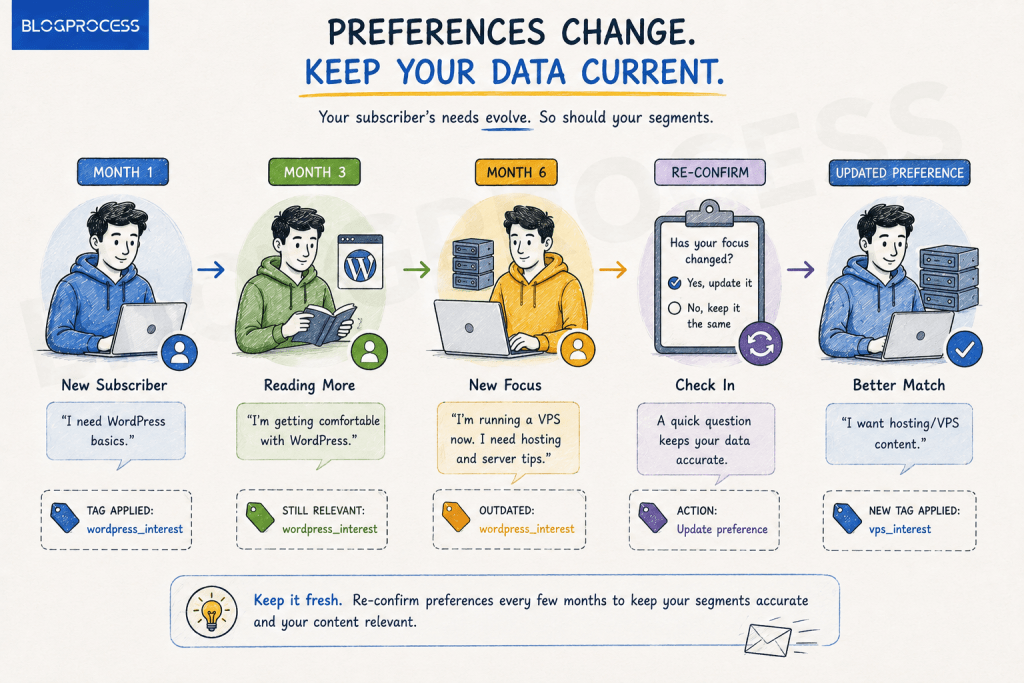
Build a light re-confirmation loop. I run mine every six months, timed to land right after a big content push so people have something fresh to react to. Takes about ten minutes to set up in the automation builder, and it keeps your segments from going stale, which is a problem literally every list has and almost nobody addresses. The first time I ran it, close to 15% of tagged subscribers updated their answer. That’s a chunk of your list that would’ve kept getting the wrong content indefinitely if I hadn’t asked twice.
Conclusion
Skip the CDP. Skip the AI personalization platform some tool is trying to sell you. Add one question to your welcome email this week: a simple button-click, three options, done by Friday. Watch what people click. Build your next welcome sequence branch around it.
That’s the whole system. No enterprise budget required, no six-month data pipeline. Just ask.