

Most guides to “WordPress marketing automation” are actually CRM roundups wearing a marketing hat. They list HubSpot, WP Fusion, and tagging tools, mention “sync your leads,” and move on before explaining what should actually happen once that lead lands in your system. That’s one gap.
The second is the channels those roundups skip almost entirely: push notifications, on-site personalization, and behavioral popups that respond to what a visitor does in real time.
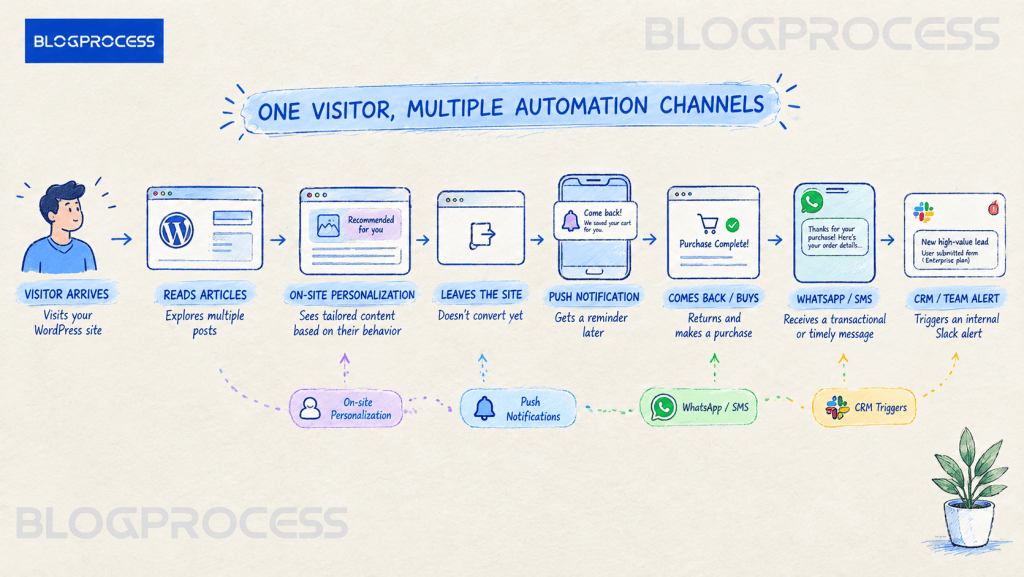
Email is one channel. It’s not the whole stack. A visitor who never opens a newsletter might still respond to a push notification, get nudged by an on-site popup timed to their scroll depth, or trigger a Slack alert to your sales team the moment they fill out a high-value form. None of that touches an inbox.
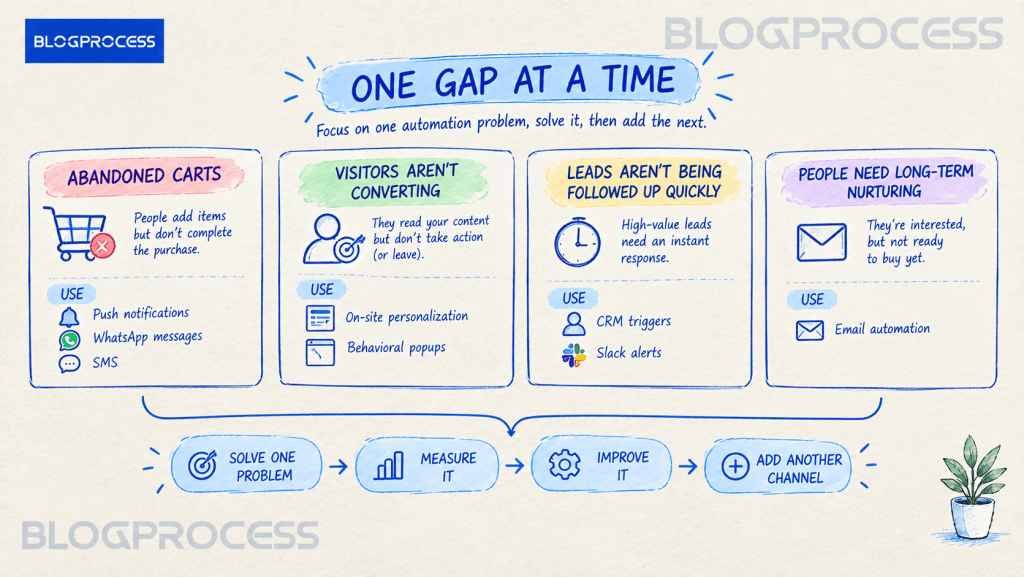
Push notifications, on-site personalization, CRM triggers, and behavioral popups each earn their place separately, and email still has a role once the rest of the stack is built around it. The pattern that shows up across sites running more than one channel: the ones getting real value picked one gap and automated it properly before touching a second tool. The ones with five half-configured plugins and no clear lift are almost always the ones that grabbed every channel at once.
What Counts as Marketing Automation Beyond Email
Automation, stripped down, is just a rule: something happens, so something else happens automatically.
WordPress itself only handles the “something happens” half. A form gets submitted, a cart gets abandoned, a page gets viewed for the third time this week. What fires in response depends entirely on which tool you’ve connected to catch that event.
Four broad categories cover most of what falls outside email:
→ On-site personalization, showing different content to different visitor segments → Push, SMS, and WhatsApp notifications, reaching people who never gave you an email address → CRM and cross-platform triggers, routing leads and alerts to your team, not your subscribers → Behavioral popups, responding to what a visitor does in real time, not on a schedule
Each of these solves a problem email genuinely can’t.

On-Site Personalization for WordPress Visitors
A first-time visitor and someone on their fifth visit this month shouldn’t see the identical homepage. One needs an introduction. The other already knows who you are and probably wants a reason to convert, not another explainer.
Tools like OptinMonster and Icegram Engage let you build rules based on behavior, referral source, or custom attributes. You can swap out content, offers, or calls-to-action without touching your theme code.
Personalized experiences consistently outperform generic ones in vendor-reported testing. Exact lift numbers vary a lot by industry and traffic quality, so treat any single percentage you read as a starting point rather than a guarantee for your own site.
The practical version for a blog or small business site: a returning visitor who’s read three posts in your pillar topic gets a content upgrade offer tied to that topic specifically, instead of the same generic newsletter signup everyone else sees.
Sites that set this up and then never revisit it tend to see the lift fade after a few months, since visitor behavior shifts and a rule built for last year’s traffic mix stops matching who’s actually showing up. Treating personalization as a quarterly check, not a set-and-forget install, is what separates the setups that keep working from the ones that quietly stop.
Push Notifications and SMS Automation for WordPress
Push notifications solve a real problem: getting a subscriber’s attention without needing their email address at all. A visitor clicks “allow” in their browser, and that’s the entire opt-in. No form, no confirmation email, no double opt-in friction.
Push and WhatsApp Notifications
PushEngage is the tool most commonly recommended here, and it’s worth being precise about what it actually is. It’s not SMS.
It delivers browser push, genuinely free since it rides on the browser opt-in, and WhatsApp messages through Meta’s own messaging platform.
WhatsApp is a different story: it skips traditional SMS carrier billing, but Meta charges its own per-message fee for template messages once you’re past the free customer-service window, so it’s not a free channel just because it isn’t SMS. For WooCommerce stores specifically, tools in this category typically pair a push alert with a WhatsApp follow-up as a two-channel abandoned cart sequence, timed independently of whatever your email platform is doing. Exact delay windows are configurable, so treat any specific timing you read elsewhere as a starting template rather than a fixed standard.
SMS Automation Through Carrier Gateways
True SMS, the kind that goes through carrier networks, usually means connecting a gateway like Twilio through a plugin such as WP SMS. A few platforms build that connection straight in instead. Omnisend bundles email, SMS, and push into one automation flow natively, though WhatsApp on Omnisend still requires a separate third-party connector. FluentCRM takes a similar approach: you still need your own Twilio, Meta WhatsApp Business, or Amazon messaging account behind the scenes, but you connect it directly inside FluentCRM’s own settings instead of installing a second WordPress plugin to manage it.
FluentCRM in particular lets you set triggers so SMS or WhatsApp fires based on the same conditions driving your email sequences. Everything sits in one dashboard instead of three.
The failure mode worth watching for with SMS specifically: it’s the one channel where over-messaging burns trust fast, since a text lands with more urgency than an email ever will. Sites that reserve SMS for genuinely time-sensitive triggers, like shipping updates, cart recovery, and appointment reminders, hold onto their opt-in list far longer than ones that treat it as a second email channel.
| Channel | Best For | Opt-in Friction |
|---|---|---|
| Long-form content, nurture sequences | Medium, requires an address and often confirmation | |
| Browser push | Quick alerts, cart recovery nudges | Very low, one click, no personal data |
| SMS | Time-sensitive offers, shipping updates | Medium, requires a phone number |
| Conversational follow-up, order updates | Low to medium, depends on platform |
CRM Triggers and Cross-Platform Automation
Not every automation is meant for a subscriber. Some of the highest-value ones are meant for your own team.
Internal Alerts That Skip the Inbox Entirely
A high-budget lead fills out a service inquiry form. Instead of sitting in a queue with everyone else, a tool like Uncanny Automator can tag that submission, post an alert directly to your team’s Slack channel, and kick off a shorter, higher-touch nurture sequence. All from one workflow, no manual triage required.
That’s automation working entirely behind the scenes. The visitor never sees any of it happen.
The setups that actually hold up long-term route to a specific person or channel based on lead value, not a single catch-all Slack channel everyone tunes out within a week. A high-budget inquiry going to a dedicated alert gets acted on. The same alert buried in a channel with fifty daily pings from every form on the site gets ignored, which defeats the entire point of building the automation in the first place.
AutomateWoo Triggers for WooCommerce Stores
AutomateWoo, built by Prospress and developed under Automattic since the team joined in 2019, is worth a closer look here, but not for the reason it usually gets cited. Most of its best-known triggers, like win-back campaigns and review-reward requests, are actually built around sending an email by default. That’s standard ecommerce email automation, and it’s already covered by the pillar post on WordPress email marketing automation linked further down.
The part of AutomateWoo that genuinely sits outside email is narrower and easy to miss:
- SMS notifications that can attach to almost any trigger in its library, not just order and shipping updates, once a paid Twilio account is connected
- Card expiry alerts that warn a customer before a saved payment card lapses, commonly sent by email but just as capable of going out over SMS through the same Twilio connection
- Automatic VIP status assigned once a customer crosses a spend threshold, a backend account change with no message involved at all
- Points and Rewards integration, adding or removing loyalty points automatically based on customer actions, another action that never touches an inbox
- Refer-a-friend rewards, sold as a separate add-on, where advocates share a link over email or social themselves, but the store credit issued back to them lands as a backend account credit rather than a message you have to send
- Subscription event actions covering status changes and failed payments, which can route to email, SMS, or an internal notification depending on how the workflow is built
The honest takeaway: AutomateWoo is an email tool first, with SMS and a handful of backend account actions bolted onto the same trigger library. That’s a real value, just not the “zero email” story it sometimes gets sold as.
Behavioral Popups and Exit-Intent Automation
A generic popup that fires the second someone lands on your page annoys people. A popup that fires because someone’s cursor just moved toward the browser’s close button is responding to an actual signal instead of guessing.
Exit-intent detection, scroll-depth triggers, and time-on-page rules are the three most common conditions tools like OptinMonster and Icegram build around. None of it requires a subscriber’s email to function.
The offer can be a discount code, a content upgrade, or simply a different call-to-action than what’s in your main content. It can change based on which page triggered it.
This is also where campaign scheduling earns its keep. A promotion that should only run for 72 hours can turn itself on and off on a set date without anyone remembering to log in and flip a switch. Worth knowing before you budget: OptinMonster includes this on its paid plans, and Icegram requires stepping up from its free tier to Pro to get the same scheduling controls.
The recurring mistake with behavioral popups isn’t the trigger logic, it’s frequency. A visitor who dismisses an exit-intent offer and then gets the identical popup again five minutes later on a different page isn’t experiencing personalization, they’re experiencing a bug that happens to be technically working as configured. Capping how often any one visitor sees a popup, regardless of how many pages they touch in a session, is the detail that keeps this channel from turning into the thing people install ad blockers to avoid.
WordPress Marketing Automation Tools by Category
Before layering channels on top of each other, it helps to see which tool actually owns which problem. Several of these overlap in ways that create redundant work if you’re not careful.
| Category | Common Tools | Primary Job | Typical Starting Cost |
|---|---|---|---|
| On-site personalization | OptinMonster, Icegram Engage | Show different content to different visitor segments | Icegram has a real free tier; OptinMonster is paid-only, and its advertised rate is usually an introductory price well below what you’ll pay at renewal |
| Push and WhatsApp | PushEngage | Reach visitors via one-click browser push with no data required, or WhatsApp for those who opt in with a number | Push is free to send; free plan covers small scale, low double digits per month once you outgrow it. WhatsApp adds Meta’s own per-message fee on top of whatever PushEngage charges |
| SMS via carrier | WP SMS, Twilio integrations | Time-sensitive alerts requiring a real phone number | Plugin itself is often free or cheap, but you separately pay the SMS gateway per message sent |
| Multi-channel ecommerce | Omnisend, FluentCRM | Combine email, SMS, and push in one automation flow | Both have functional free tiers before you hit a subscriber or contact limit, though FluentCRM’s SMS and WhatsApp still need your own paid Twilio or Meta account behind the scenes |
| WooCommerce-specific | AutomateWoo | SMS extension, VIP status, and points automation layered onto its mostly-email trigger library | No free tier, roughly $99 a year for the core plugin, more once you add the separate Refer-a-Friend add-on or a paid Twilio account for SMS |
| Cross-platform triggers | Uncanny Automator | Internal alerts and CRM actions with no visitor-facing message | Free version runs unlimited basic recipes; Pro adds scheduling, conditional logic, and hundreds of additional integrations |
None of these require writing code to set up. Every tool listed above is built around a drag-and-drop or point-and-click interface, and most vendors advertise a basic setup taking well under an hour for someone doing it for the first time. Uncanny Automator’s workflows are called “recipes” in its own interface, a trigger paired with one or more actions, but the concept is the same no-code building block regardless of what the plugin calls it.
Where Email Still Fits Into Your Automation Stack
None of this replaces email. It surrounds it.
A well-built automation stack uses push notifications and SMS for speed, on-site personalization for relevance, and CRM triggers for internal routing. Email still handles the long-form nurture work none of those channels do well.
If you’re building out the email-specific side of this separately, our breakdown of email marketing automation for WordPress blogs covers the trigger-condition-action model in more depth, along with the specific plugins worth using for that piece alone. And if delivery mechanics are the part you haven’t sorted yet, how WordPress email automation actually works under the hood is worth reading before you add more channels on top of a foundation that isn’t solid yet.
The mistake worth avoiding is treating every channel as equally urgent from day one. Pick the gap that’s actually costing you something, whether that’s leads going cold before a human sees them or cart abandoners never getting a second touch. Automate that one thing well before adding a fourth channel nobody’s monitoring.
Questions People Ask About WordPress Marketing Automation
Does WordPress marketing automation require email? No. Push notifications, SMS, on-site personalization, and CRM-triggered actions can all run independently of any email platform, though most sites eventually use email alongside these other channels rather than instead of them.
What’s the difference between push notifications and SMS in WordPress? Push notifications deliver through a visitor’s browser after a one-click opt-in with no personal data required, while SMS requires a phone number and typically routes through a carrier gateway like Twilio. Push tends to have far lower opt-in friction.
Can I automate actions that aren’t customer-facing, like internal alerts? Yes. Tools like Uncanny Automator connect WordPress events to internal actions such as Slack notifications, CRM tagging, or team task creation, none of which the site visitor ever sees.
Is AutomateWoo only for WooCommerce stores? Yes, it’s built specifically for WooCommerce. Most of its triggers send email by default, but its VIP status assignment, points automation, and SMS extension are ecommerce-only capabilities that wouldn’t apply to a non-store WordPress site.
Do exit-intent popups actually work, or are they just annoying? They work better than generic time-delayed popups because they respond to a specific behavioral signal rather than an arbitrary timer. Overusing them on every page can still hurt user experience if the offer isn’t relevant to that page.
Where should a small blog start if it wants automation beyond email? Behavioral popups and on-site personalization tend to have the lowest setup effort and don’t require building a phone number or CRM infrastructure first, making them a reasonable starting point before adding SMS or dedicated CRM triggers. Both also have free or low-cost entry tiers, which matters if you’re testing the idea before committing budget to it.
Conclusion
Email earns its reputation because it’s cheap and it works. It’s just not the only tool in the box, and treating it that way means leaving real engagement on the table from visitors who’ll never hand over an address.
Start with whichever gap is actually bleeding you leads or revenue right now, whether that’s cart abandoners with no second touch or high-value form submissions sitting unnoticed for hours. Build that one channel properly, confirm it’s actually firing correctly, and only then layer on the next one. A messy four-channel stack that half-works loses every time to a clean two-channel stack that’s actually monitored and tested.