

I added a new transactional email tool to one of my sites on a Tuesday. By Thursday, half my outbound mail was landing in spam, and none of it had anything to do with the tool itself. I’d added its sending server to my SPF record wrong, and that one bad line quietly broke authentication for every email leaving the domain, not just the new tool’s.
Whether you’re running email marketing campaigns, newsletters, or transactional emails, one DNS record can ruin everything.
That’s the part nobody explains well. These records don’t work in isolation. Get one wrong and it doesn’t just weaken that one protection, it can silently fail the whole authentication chain. Here’s what each record actually does, and what specifically breaks when it’s missing or misconfigured.
Why One Missing Record Breaks Everything
Email authentication is a system, not five independent checkboxes. Every email marketing platform and transactional sender relies on these DNS records working together before mailbox providers decide whether to trust your messages.
Here’s the whole set at a glance before the detail:
| Record | Direction | What It Does | Who Usually Controls It |
|---|---|---|---|
| MX | Inbound | Routes mail addressed to your domain | You, in DNS |
| SPF | Outbound | Lists authorized sending servers | You, in DNS |
| DKIM | Outbound | Signs messages to prove they weren’t altered | You, per sending tool |
| DMARC | Outbound | Decides what happens on authentication failure | You, in DNS |
| PTR | Outbound | Maps your sending IP back to a hostname | Your hosting provider |
MX: Where Your Replies Actually Go
MX records control inbound mail, the opposite direction from everything else on this list. They tell the internet which server should receive email addressed to your domain. Skip this or get it wrong, and it’s not your outbound sends that suffer, it’s every reply, bounce notification, and inbound message that never arrives. A surprising number of third-party senders also check that your MX records exist and resolve before they’ll even let you send, since a domain with no way to receive mail looks suspicious to begin with.
SPF: Who’s Allowed to Send as You
SPF lists which servers are authorized to send mail on your domain’s behalf. This is the record I broke. It has a hard limit of 10 DNS lookups total per RFC 7208, and every include:, a, mx, and exists: directive inside it counts against that limit. Stack a marketing tool, a CRM, a helpdesk, and a transactional sender without checking the math, and you’ll blow past 10 fast. When that happens, receiving servers return a PERMERROR and treat your SPF as if it doesn’t exist at all, not just the part that pushed you over.
In my case, I’d nested one provider’s include inside another instead of adding it as its own top-level entry, which quietly doubled the lookups that single line accounted for. One line. Whole record down. Nothing in the DNS panel warned me, and nothing in the sending tool’s setup instructions mentioned checking my existing count first.
The other trap: you can only have one SPF record per domain. Adding a second v=spf1 line instead of merging into your existing one doesn’t add coverage, it invalidates both records simultaneously, since the spec treats multiple SPF records as equivalent to having none.
DKIM: The Signature Nobody Sees
DKIM attaches a cryptographic signature to every email you send, proving the content wasn’t altered in transit. Unlike SPF, DKIM isn’t one record, it’s one per sending tool, each with its own selector, which is why you’ll see multiple DKIM entries in your DNS if you’re running a newsletter tool alongside a transactional sender and a helpdesk. Some providers simplify this by having you add a CNAME record instead of a raw TXT value, which points to a key they manage and rotate on their end. That approach sidesteps the character limits some DNS hosts impose on TXT records and means you’re not the one responsible for rotating keys manually down the line.
Skip DKIM for a tool and its mail can still pass SPF if the sending IP is listed there, but it loses a layer of trust that increasingly matters as inbox providers weigh multiple signals together rather than accepting a single pass as good enough. I’ve seen mail pass SPF alone and still land in spam, which is exactly the scenario DKIM exists to close.
DMARC: The Record That Decides What Happens on Failure
DMARC ties SPF and DKIM together and tells receiving servers what to actually do when a message fails alignment, ignore it, quarantine it, or reject it outright. DMARC adoption reached 53.8% of domains in 2024, up from 42.6% the year before, and the gap keeps narrowing as Gmail, Yahoo, and Microsoft treat its absence as a real deliverability signal, not a formality. Starting at p=none and monitoring the aggregate reports before tightening to quarantine or reject is the standard, careful path. Publishing p=reject on day one, before you’ve confirmed every legitimate sender is properly aligned, is how people accidentally block their own newsletter.
PTR: The One Your Host Controls, Not You
PTR records map an IP address back to a hostname, the reverse of what every other record on this list does. This is the one most site owners can’t touch directly, since it’s tied to the IP itself, which usually means it’s controlled by your hosting provider, not your domain’s DNS settings. A missing or mismatched PTR record is a common, invisible reason mail from a given IP gets treated with suspicion, and it’s also why the host you’re on matters for deliverability in ways that go beyond just SMTP configuration.
The Records Most Guides Skip
BIMI: Your Logo in the Inbox
BIMI lets a verified brand logo show up next to your emails in supporting inboxes, but it’s built on top of DMARC, not a replacement for it. You need DMARC enforced at quarantine or reject before BIMI does anything at all, which is why it’s usually the last record worth setting up, not the first.
MTA-STS: Forcing Encrypted Delivery
MTA-STS tells other mail servers to require TLS encryption when delivering to your domain, refusing the connection rather than falling back to an unencrypted one. All email connections to Gmail now need to be encrypted using TLS, and MTA-STS is the record that makes that requirement enforceable on your end rather than just hoped for.
The Mistake That Breaks Everything Silently
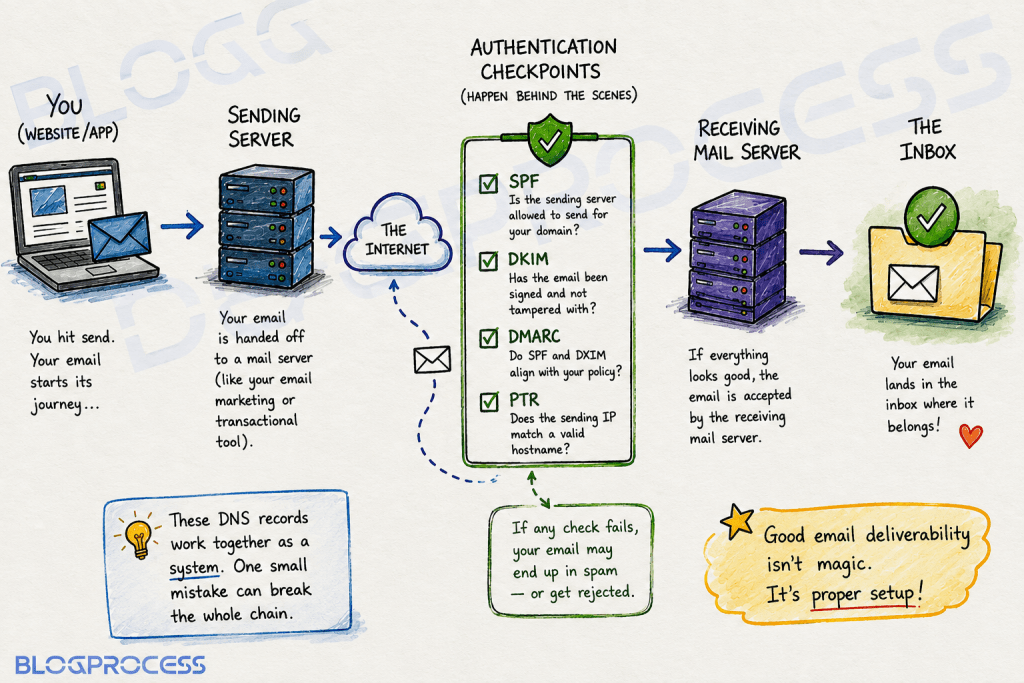
The SPF lookup limit is the one that gets people, because nothing warns you as you approach it. You add tools one at a time over months, each addition seems harmless, and then a completely unrelated fifth or sixth integration tips you over 10 lookups. Every single sender listed in that record fails at once, including ones that were working fine yesterday.
A few signs it’s worth checking your count specifically, rather than assuming the problem is somewhere else:
→ Deliverability drops right after adding a new tool, and you haven’t touched hosting, content, or your list.
→ Some emails from your domain pass authentication while others fail, with no obvious pattern by content or send time.
→ You’ve added more than three or four third-party services that send on your domain’s behalf, and never counted the lookups since.
→ A tool’s own setup guide told you to “just add this include” without mentioning what it costs you against the limit.
If your deliverability tanks right after adding a new tool and you didn’t touch anything else, check your SPF lookup count before you check anything more exotic.
How I Actually Check Mine
I keep this simple: send a test email to a Gmail address I control, open it, click the three-dot menu, and choose “Show original.” SPF, DKIM, and DMARC all show their pass or fail status right there, no separate tool required. If any of them come back FAIL or NEUTRAL, that’s my starting point for troubleshooting, not a guess.
For a deeper check, especially the SPF lookup count itself, a DNS diagnostic tool like MXToolbox will actually count the lookups for you and flag when you’re close to the limit, which is faster than counting include: statements by hand and far less error-prone. I run this check any time I add a new sending tool now, not just when something’s already broken.

I also learned to respect TTL propagation the hard way. DNS changes don’t take effect everywhere at once, some resolvers pick up new records almost immediately while others keep serving cached answers until the TTL expires. I’ve genuinely panicked over a “broken” record that was actually just still propagating, so now I wait it out before assuming a change failed. A few hours of patience beats an afternoon of re-editing a record that was never wrong to begin with.
Questions People Ask About Email DNS Records
What’s the difference between SPF and DKIM? SPF authorizes specific servers to send on your behalf, based on IP address. DKIM proves the message content wasn’t altered, using a cryptographic signature. They check different things, which is why both matter and neither replaces the other.
Why did my email deliverability drop after adding a new tool? Check your SPF lookup count first. Adding a new sending service’s include: can push you past the 10-lookup limit, which silently fails authentication for every sender in that record, not just the new one.
Do I need a PTR record if I use a WordPress host? Yes, but you usually can’t set it yourself. It’s tied to the sending IP, so it’s your host’s responsibility. If deliverability issues persist after fixing SPF, DKIM, and DMARC, ask your host to confirm the PTR record matches your sending domain.
Should I set DMARC to reject right away? No. Start at p=none and monitor the reports for a few weeks to confirm every legitimate sender passes alignment. Moving straight to reject before you’ve verified that can block your own mail.
Is BIMI worth setting up for a small blog? Only after DMARC is already enforced at quarantine or reject. BIMI depends entirely on DMARC being in place first, so it’s a later step, not a starting one.
Conclusion
Check these five records in order: MX for inbound, SPF and DKIM for outbound authentication, DMARC for what happens when either fails, and PTR through your host if the first four check out and problems persist.
Don’t add a new sending tool without counting your SPF lookups first. That single oversight is the most common way I’ve seen authentication break for people who thought they’d already done everything right before starting an email marketing campaign.
If you’re still working through broader deliverability issues beyond DNS, start with the hosting-level problem first, since a clean set of DNS records won’t fix a shared IP with a bad reputation sitting underneath it.
And if you’re setting these records up across several sending domains for cold outreach rather than just one, how many sending domains you actually need is worth working out before you configure any of them.