

I almost gave every client I have a very bad week.
Not because the plan was wrong. Because the first version of the plan was wrong. There’s a version of “host multiple client sites on one VPS” that’s a genuinely smart move, and there’s a version that’s a countdown to an incident report. The difference isn’t the VPS. It’s everything you do (or don’t do) after you get root access.
Here’s the honest breakdown: what pushed me toward doing this, the version I almost built that would have been a mistake, the version I actually built instead, and where the whole idea still has a real weak point I’m not going to pretend doesn’t exist.
The Math That Makes This Tempting
Managed WordPress hosting is priced per site. That’s fine at two or three clients. It stops being fine fast.
Most production-tier managed WordPress plans from established providers land somewhere between $25 and $35 a month once you’re past intro pricing and into real resource allocations, backups, and staging environments, with premium tiers running higher. Multiply that by 15 client sites and you’re carrying $375 to $525 a month in hosting costs before a single invoice goes out. If you’re still weighing which provider to start with, our breakdown of the best WordPress hosting providers covers what each one actually includes at that price point.
| Setup | Monthly Cost (15 sites) | What’s Included |
|---|---|---|
| Managed WordPress hosting, per-site | $375–$525 | Per-site isolation, backups, support, staging |
| Single VPS + management panel | $35–$95 | Shared infrastructure, backups (self-managed), no per-site support |
| Bare VPS, no panel | $17–$48 | Nothing beyond raw compute, you build everything |
That gap is real money if you’re running an agency or managing sites for clients as a service. It’s also exactly the gap that pushes people toward the bad version of this idea, because the cheapest row in that table looks the most attractive right up until something breaks.
It’s also not a fringe move. A 2026 survey of 210 WordPress agencies and freelancers found that 42% run exclusively on self-managed VPS or dedicated servers, against 38% on managed hosting, and that share climbs to 90% among agencies managing more than 100 client sites. This is a control decision as much as a cost decision: agencies that own the server can standardize security and performance across every site instead of solving each one individually, and larger clients often need configurations managed hosts won’t accommodate. The same survey found that keeping plugins and themes updated across a portfolio is the single biggest ongoing time cost agencies report, worth noting since a panel with automated update tooling addresses that directly.

The Version of This That’s a Genuinely Bad Idea
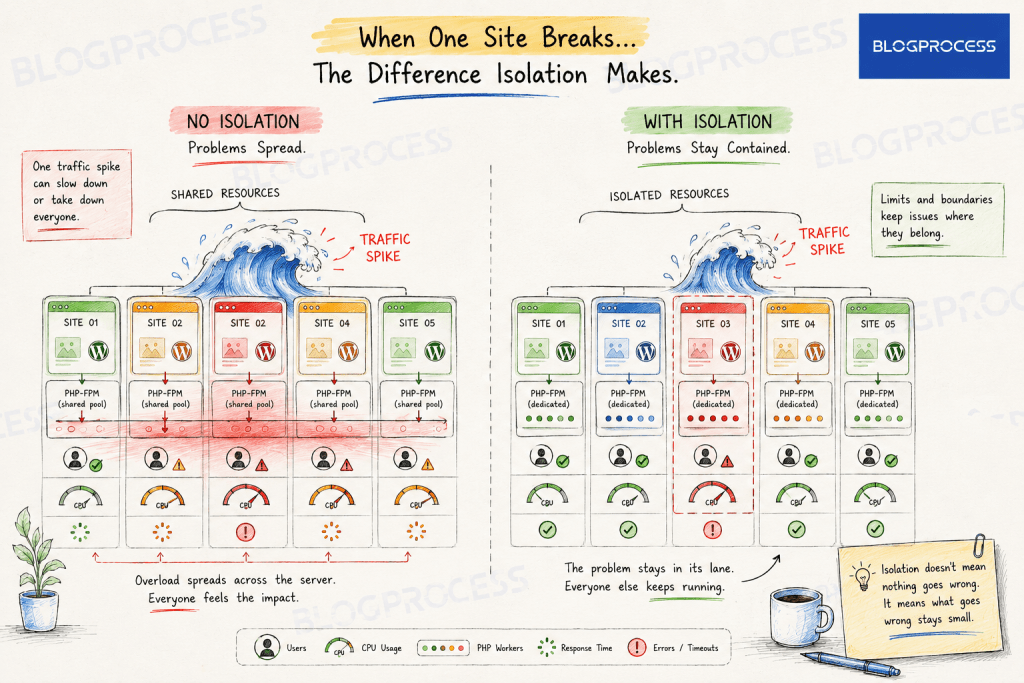
Let’s be direct about it. A bare VPS with 15 WordPress installs dumped onto it, one shared Nginx config, one PHP-FPM pool, one MySQL instance, no real separation between sites, is a bad idea for client work. Not a shortcut. A liability.
What Actually Happens on a Bare VPS
Here’s what actually happens on that setup:
→ One client’s traffic spike (a product launch, a viral post, a bot attack) eats the shared PHP-FPM workers and every other site slows to a crawl or times out.
→ One compromised plugin can, depending on file permissions, potentially reach files belonging to other sites on the same box.
→ No automated resource ceiling anywhere. A runaway process on client #7’s site has nothing stopping it from starving client #1 through #14.
→ You’re the only backup plan. No support team, no automated failover, no one to call at 2am.

If someone reads “host client sites on one VPS” and does this version of it, that’s bad advice with real consequences for their client relationships. I want to say that plainly before getting into what actually works, because the phrase “multiple sites on one VPS” gets thrown around like it’s inherently a hack, and the bare version genuinely is.
What Actually Makes Resource Isolation Work
The fix isn’t a different VPS. It’s a management layer sitting between the raw server and your WordPress installs. Tools like GridPane, RunCloud, SpinupWP, and ServerPilot exist specifically to solve this problem. On pure cost math the breakeven against per-site managed hosting happens fast, often within just a handful of sites, but the real threshold most agencies wait for is effort, not dollars: setting up proper isolation takes real time upfront, so it tends to pay off once you’re managing enough sites (agencies commonly cite somewhere around 8 to 10) that the time investment stops being the bottleneck and the per-site savings start compounding.
What a proper panel setup actually does differently from a raw VPS:
- Separate PHP-FPM pools per site, so one site’s PHP processes can’t starve another’s
- Isolated system users per site, no shared www-data account, so file permissions actually mean something instead of every site technically being able to touch every other site’s files
- Per-site
open_basediranddisable_functionsscoping, so even if one site gets compromised, PHP on that pool physically can’t read files outside its own directory or shell out to the rest of the server - Per-site resource caps, so you set a ceiling on memory and CPU before a runaway process becomes everyone’s problem
- Automated firewall rules and malware scanning applied uniformly instead of configured once and forgotten
- Scheduled, verified backups per site, not one big backup job you’re hoping covers everything correctly
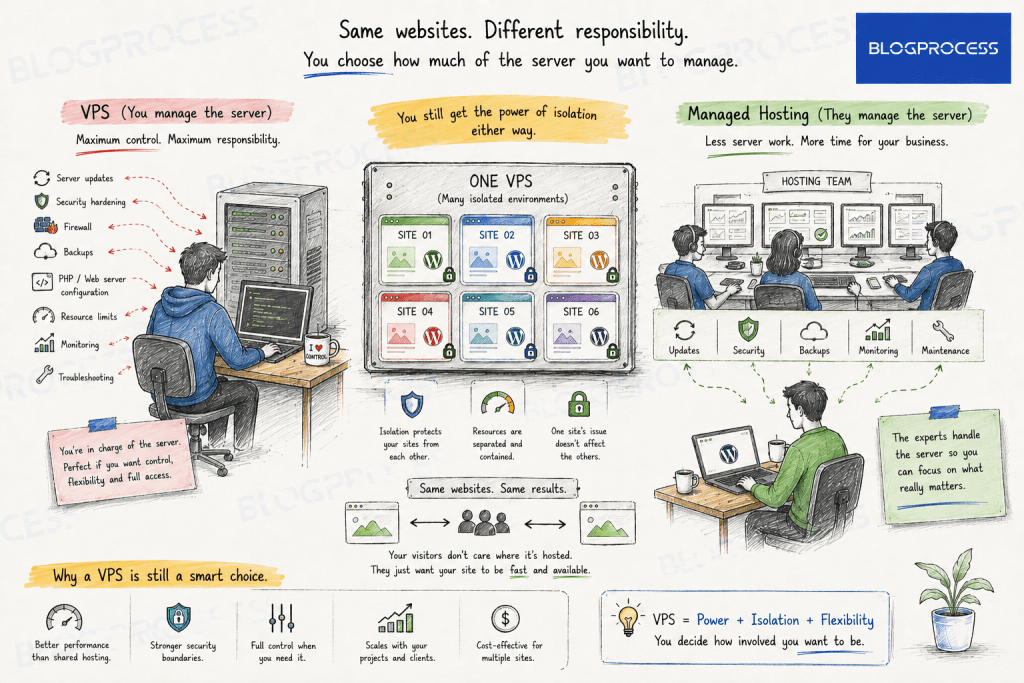
This is the part that turns “cheap hack” into “legitimate infrastructure decision.” The isolation is the whole point. Skip it and you’ve just built a slower, riskier version of shared hosting with none of the safety net.
What Isolation Looks Like in Practice
The Configuration Layer
Once the panel layer is in place, here’s roughly what the per-site configuration should look like on a mid-tier VPS running 10-15 lightweight WordPress sites:
| Layer | Configuration |
|---|---|
| PHP-FPM | Dedicated pool per site, worker count scaled to site traffic |
| Memory | Per-site cap set below total available RAM ÷ site count, with headroom |
| System user | One isolated user per site, no shared file ownership |
| Backups | Automated, off-server, verified restore tested at least monthly |
| Firewall | Application-layer rules per site, not just a server-wide default |
| Monitoring | Alerting on resource spikes per site, not just server-wide uptime |
The Actual Math on a 12-Site Box
On an 8GB, 4-core VPS running 12 client sites, start from what a PHP-FPM worker actually costs, not a round number. A lean brochure site with a handful of plugins runs roughly 60-90MB per worker. A busier site with a page builder and more active plugins runs closer to 90-150MB. A WooCommerce store with 20-plus plugins can push 150-180MB per worker under real traffic, which lines up with what we found when we audited plugin bloat across a batch of client sites: plugin count drives resource cost more than most people account for.
Reserve 1.5-2GB for MySQL, Nginx, and the OS, leaving roughly 6GB for PHP-FPM across all 12 pools. At an average of 90MB per worker, that’s a budget of about 65-70 total workers to split across the box. In practice that lands most brochure sites at 4-6 max_children each and the one or two heavier sites at 12-15, comfortably under budget instead of right up against it. The instinct to give every pool a generous round number, “just set max_children to 20 everywhere,” is exactly what runs a box out of memory the first time several pools hit their ceiling at once.
Why Per-Site Monitoring Is the Part People Skip
That monitoring row matters more than it looks. Server-wide uptime monitoring will tell you the box is up. It won’t tell you that client #9’s site has been serving 500 errors for the last hour while everything else runs fine. Per-site monitoring is what actually catches the problem the isolation is supposed to prevent.
One migration detail worth knowing before you move client sites over in bulk: Let’s Encrypt limits failed authorization attempts to 5 per hostname per hour. If you point several domains at the new server and try to issue certificates before DNS has fully propagated for each one, those failed attempts eat into that limit fast, and hitting it locks you out of retrying that domain for a while. Migrating a handful of sites a day, confirming DNS first, avoids it entirely. Trying to cut over all 15 at once in a single afternoon is exactly how you end up staring at a rate-limit error on client #12 with no quick fix available.
What Actually Broke (And What Changed After)
Isolation doesn’t mean nothing goes wrong. It means what goes wrong stays small.
The Plugin Conflict Nobody Warns You About
The first real problem showed up as a plugin conflict, not a resource spike. Two client sites were both running WP Rocket with the server’s Redis object cache turned on, and neither one had a unique cache key prefix set. For the better part of a day, site B’s homepage was intermittently serving cached fragments meant for site A: wrong hero image, wrong headline, on a live client site. It wasn’t obvious at first because most pages still loaded fine, just occasionally wrong. That’s the kind of bug that only exists because the sites share infrastructure. On separate managed hosting accounts, it can’t happen at all. The fix was a one-line config change per site once the actual cause was clear, but finding it meant learning the hard way that shared caching layers need the same isolation discipline as everything else on the box.
The Downtime That Actually Mattered
The second problem was a real downtime event, and it’s the one worth paying attention to. During a plugin update rollout, two of the heavier sites hit their memory ceilings within minutes of each other. Linux’s out-of-memory killer stepped in to free up RAM, and instead of touching the capped PHP-FPM pools that were actually causing the pressure, it killed the shared MySQL process. That’s not a random failure, MySQL is usually the single biggest process on a box like this, so it’s often the first thing the kernel reaches for even when it isn’t the actual cause of the memory shortage. Every site on the box went down at once, not because of a bad neighbor problem the isolation was supposed to catch, but because the database sits below the isolation layer, shared by everyone. It took about six minutes from the crash to noticing the alert and restarting MySQL manually.
What Changed After
Redis got per-site key prefixes so the cache collision can’t repeat. MySQL got its oom_score_adj set low via a systemd override, so the kernel targets PHP-FPM workers first under memory pressure instead of reaching for the database, which is stateless-safe to kill and MySQL is not. Resource alerting moved from server-wide uptime checks to per-site and per-process monitoring, so a problem shows up as an alert instead of a client email. And the one e-commerce client on the box got moved off to dedicated managed hosting entirely, since six minutes of downtime during a live sale is a different kind of expensive than six minutes on a brochure site.
None of that is an argument against doing this, it’s the argument for doing it properly. Every failure here had a fix that made the setup stronger, and none of them were fixes a managed host would have made on your behalf, because you’d never have had access to the layer where the problem actually lived. That’s the trade. A VPS with real isolation, real monitoring, and an honest read on which sites belong there is a genuinely good way to run this, once you know what you’re looking for and where to look.
The One Thing Even a Well-Configured VPS Doesn’t Solve
Isolation protects you from one site’s problems becoming everyone’s problem. It does nothing for the box itself going down, and the MySQL incident above is exactly that scenario playing out.
If the VPS has a hardware failure, gets DDoSed hard enough, or the data center has an outage, every client site goes down at the same time. Managed hosting spreads that risk across the provider’s infrastructure. A single VPS, no matter how well isolated internally, is still one point of failure at the infrastructure level.
This isn’t a reason not to do this. It’s a reason to be honest about what you’re trading. You’re trading per-site redundancy for cost savings and control. That’s a legitimate trade for a lot of agencies. It’s not a free upgrade.
The Isolation You Can’t Configure Your Way Out Of
Everything above is about isolating your client sites from each other. There’s a separate risk your panel has no control over: isolation from other customers on the same physical host, people you’ve never met, running unrelated projects, on the same underlying hardware your VPS provider sold both of you a slice of.
The metric to know is CPU steal time, shown as %st in top or mpstat. It’s the percentage of time your VM wanted to run but the hypervisor was busy serving someone else’s virtual machine instead. A rough rule of thumb: sustained steal time above 10% for 20 minutes or more means real contention, not a blip. Your panel’s per-site memory caps and PHP-FPM pools do nothing here, because this contention happens below your operating system, at the layer your provider controls, not you. Budget VPS tiers oversell more aggressively than mid-tier and above, so this risk scales down as your monthly spend goes up. It’s worth checking %st occasionally on whatever box you’re running, especially if performance feels inconsistent for no reason your own monitoring can explain.
Who This Setup Isn’t Right For
Not every client site belongs here, and saying so up front is worth more than pretending this is a universal fix.
- Client e-commerce sites where downtime has a direct, measurable dollar cost probably still belong on real managed hosting with its redundancy and support SLA
- Clients who need guaranteed response-time support agreements, since you’re the entire support team on a self-managed VPS
- Any site where you don’t have the time to actually monitor per-site resource usage, because unmonitored isolation is just isolation you haven’t tested yet
If most of your client roster is brochure sites, portfolios, small blogs, or low-transaction-volume business sites, this setup makes a lot of sense. If you’re carrying even one or two high-stakes e-commerce clients, it’s worth keeping those separate on dedicated managed hosting and using the VPS for everything else. If you’re going the other direction, moving a site off a VPS and onto managed hosting, our walkthrough on migrating a site off ScalaHosting covers the same move in reverse.
Cost Comparison, Realistically
Here’s the same math from earlier, but broken down per site instead of as a lump sum, since that’s the number that actually matters when you’re pricing client work.
| Approach | Cost per Site/Month | Isolation Level | Who Handles Support |
|---|---|---|---|
| Per-site managed WordPress hosting | $25–$35 | Full, provider-managed | Hosting provider |
| VPS + management panel (this setup) | $2–$6 | Full, self-managed | You, plus panel tooling |
| Bare VPS, no panel | $1–$3 | None | You, no tooling |
The middle row is the honest sweet spot for agencies past a certain client count. The bottom row is the trap.
If you’re weighing this decision for your own hosting stack more broadly, our guide on choosing a WordPress hosting provider walks through the same cost-versus-control tradeoff from the single-site side. And if Pressable specifically is the per-site host you’re weighing against a VPS, our comparison of the best Pressable alternatives breaks down how it stacks up against WordPress.com, Kinsta, WP Engine, and Cloudways on that same cost question.
Questions People Ask About Hosting Multiple WordPress Sites on One VPS
Why not just use managed WordPress hosting for each client site instead of a VPS?
Managed hosting is usually priced per site, typically $25 to $35 a month at production tiers from established providers, against roughly $2 to $6 a site on a properly isolated VPS setup. The dollar gap shows up almost immediately, but most agencies wait until they’re managing 8 to 10 sites or more before making the switch, since setting up real isolation takes upfront time that only pays off once you’re running enough sites to spread it across. A 2026 survey of WordPress agencies found 42% run exclusively on self-managed VPS or dedicated infrastructure, and that share climbs to 90% among agencies managing more than 100 sites.
Is running multiple client sites on one VPS actually safe?
It’s safe when each site runs in an isolated PHP-FPM pool with its own system user, resource caps, and backups. It’s not safe on a bare VPS with no separation between sites, where one site’s traffic spike or security issue can affect every other site on the box.
What’s the difference between a raw VPS and a VPS with a management panel?
A raw VPS gives you compute with no structure. A management panel like GridPane, RunCloud, SpinupWP, or ServerPilot adds the isolation layer: per-site PHP-FPM pools, system users, firewall rules, and automated backups, turning shared infrastructure into something closer to individually managed hosting.
Which management panel is best for hosting multiple client sites?
Several established panels handle this well, including GridPane, RunCloud, SpinupWP, and ServerPilot, and the right choice depends more on your workflow, budget, and comfort with server management than any single feature. What matters more than the specific panel is confirming it actually enforces per-site isolation rather than just simplifying deployment.
How many WordPress sites can one VPS realistically host?
It depends entirely on site traffic and resource needs, not a fixed number. A mid-tier VPS can often handle 10 to 20 low-to-medium traffic sites comfortably with proper isolation, but one high-traffic or resource-heavy site (like an active WooCommerce store) can use as much capacity as several brochure sites combined.
What happens if the VPS goes down?
Every site hosted on it goes down at the same time, since resource isolation protects sites from each other but not from a full server or infrastructure failure. This is the tradeoff for the cost savings and control, and it’s worth planning around with monitoring and a fast-recovery backup strategy.
Can other customers on the same VPS provider slow down my sites?
Yes, through a mechanism called CPU steal time, visible as %st in tools like top. It happens when the physical host is shared with other unrelated customers and the hypervisor is busy serving their workload instead of yours. No amount of panel-level isolation fixes this, since it happens below your operating system. Higher-tier VPS plans oversell less aggressively and see less of it.
Conclusion
The headline version of this idea, “put all your client sites on one cheap VPS,” is bad advice on its own. The honest version has a second half most people skip: with real isolation, real monitoring, and a clear read on which clients belong there and which don’t, it’s a legitimate way to run infrastructure at a fraction of per-site managed hosting cost. The savings are real. So is the single point of failure. Build for both, and this stops being a shortcut and starts being an actual system.
If you’re setting this up yourself, start with the isolation layer before you migrate a single client site over. The VPS you pick matters less than the panel choice and the isolation config, those are what determine whether this works or blows up in your face.