

Your blog has been crawled by an AI system this week. Probably today. ChatGPT, Claude, Perplexity, and a growing list of coding agents all send bots across the open web looking for content they can actually parse.
Most B2B blogs hand those crawlers a mess of navigation menus, cookie banners, and script tags before they ever reach the paragraph that matters. llms.txt was proposed as the fix. It’s a plain Markdown file placed at your domain root, meant to tell AI systems what your site is, what it covers, and which pages are worth reading. Notice the word meant.
Whether anything is actually reading that file is a separate question from whether AI crawls your site at all, and the evidence on that specific point is far weaker than most guides let on. This one covers both the setup and the honest state of play.
What llms.txt Actually Does for a B2B Blog
How llms.txt Differs From a Standard Search Crawl
Think of llms.txt as a curated briefing document sitting at the root of your domain. Search engines have crawled full HTML for decades and built enormous indexes to make sense of it.
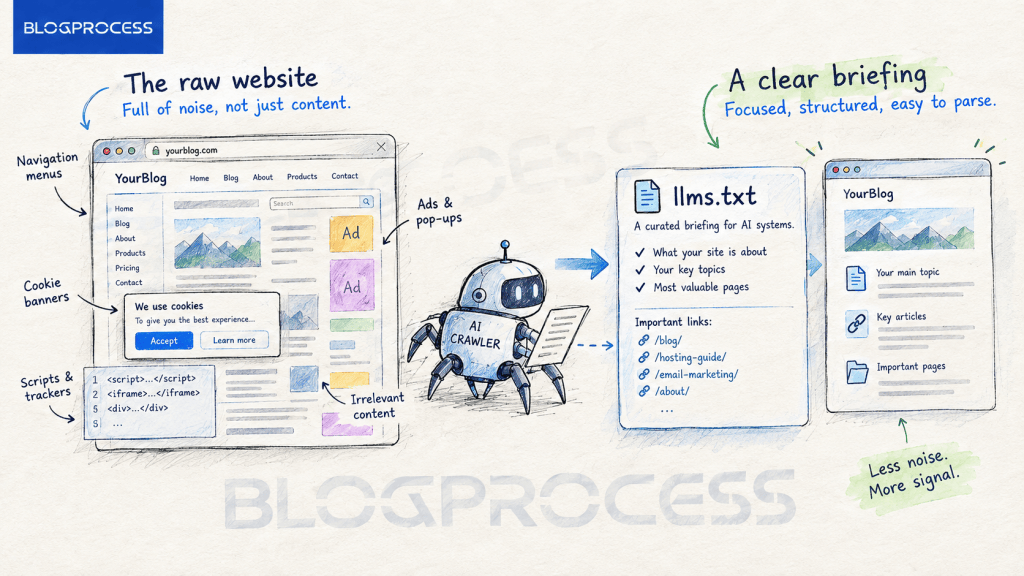
Large language models work differently, at least in theory. They operate inside a limited context window, and every irrelevant div or ad script they have to wade through eats into the budget they have for your actual content.
An llms.txt file is meant to skip all of that, handing the model a short, structured summary plus links to your highest value pages, written in the format models already understand best. Whether a given model bothers to fetch that summary is the open question this guide comes back to.
Why B2B Blogs Still Have a Reason to Care About llms.txt
For a B2B blog, the appeal is obvious. Your buyers increasingly ask AI tools to summarize options before they ever visit a website. A procurement manager comparing vendors, a founder researching hosting providers, a marketer scoping out email tools. All of that research now happens partly inside a chat window instead of a browser tab.
The honest version of the pitch is narrower than most content on this topic admits. llms.txt is not currently a proven way to get cited more often in ChatGPT, Perplexity, or Google’s AI features, and the shift toward AI citations favoring creator-style content makes the picture even more complicated. What it does have going for it is near-zero setup cost and a genuine, confirmed audience among developer and agentic tools. More on both below.
There’s a second reason B2B teams still bother. B2B content tends to be dense, technical, and buried behind navigation designed for humans scanning menus, not machines parsing structure. A ten-item mega menu, a sidebar full of category widgets, a footer stuffed with legal links.
None of that helps an AI model understand what your company actually does, even if the model never reads your llms.txt file specifically. Cleaning up that structure has value on its own.
llms.txt vs robots.txt vs sitemap.xml
These three files get confused constantly, and mixing them up leads to wasted setup time. They solve different problems.
| File | Purpose | Audience |
|---|---|---|
| robots.txt | Blocks or allows crawler access to specific paths | All bots, including search engines |
| sitemap.xml | Lists every indexable URL for discovery | Search engine crawlers |
| llms.txt | Curates and summarizes your best content in AI-readable Markdown | AI models and AI-native crawlers, where adopted |
robots.txt is a bouncer. It says who gets in the door. sitemap.xml is a phone book, exhaustive and unranked. llms.txt is meant to work like an executive summary handed to a guest who only has five minutes, though unlike the other two, there’s no confirmation the guest is actually reading it. None of the three replace each other, and a B2B blog serious about crawlability needs robots.txt and sitemap.xml regardless of what it decides about llms.txt.
What the Evidence Actually Says About llms.txt
Google Has Said Directly That It Doesn’t Use llms.txt
This is the part most llms.txt guides skip, and it matters more than the setup steps. Google’s John Mueller stated on Reddit in April 2025 that none of the major AI services had confirmed using llms.txt, and that server logs showed AI crawlers weren’t even requesting the file on most sites. He compared it directly to the old keywords meta tag, a field site owners could fill with whatever they wanted, that search engines eventually stopped trusting and stopped reading.
Google made it official on May 15, 2026, publishing its first dedicated AI optimization guide under Search Central’s Generative AI fundamentals section. The guide states plainly that sites don’t need to create new machine readable files, AI text files, markup, or Markdown to appear in Google Search or its generative AI features, because Google Search itself doesn’t use them. Google may still crawl an llms.txt file the way it crawls any other page on your site, but the guide is explicit that the file receives no special treatment. That’s about as direct a statement as a search engine ever gives, and it echoes a point worth repeating from our breakdown of GEO versus SEO: the two disciplines solve different problems, and llms.txt doesn’t automatically buy you either one.
The Largest Independent Study Found No Citation Benefit
SE Ranking, an SEO analytics vendor, ran the largest public study on this to date, examining roughly 300,000 domains. They found llms.txt adoption sitting around 10 percent of the domains sampled, and no statistically significant correlation between having the file and how often a site was cited in AI-generated answers. Their own writeup calls this out plainly: llms.txt doesn’t currently move the needle on AI citation frequency.
That doesn’t mean the file is worthless. It means the specific claim driving most of the hype, that publishing llms.txt gets you cited more in AI search, isn’t supported by the largest dataset anyone has published on the question.
| What was measured | Finding |
|---|---|
| Google Search and AI features | Confirmed not to read or use llms.txt as of 2026 |
| AI citation frequency (SE Ranking, ~300K domains) | No significant correlation with llms.txt presence |
| Coding agents and IDE tools | Confirmed to follow llms.txt when pointed at it, not automatic by default |
| Consumer AI chat assistants (ChatGPT, Perplexity) | No public commitment to reading it; adoption inconsistent |
Where llms.txt Does Have a Real, Confirmed Audience
The one use case with solid evidence behind it isn’t blog citation at all. It’s developer tooling. This isn’t automatic background discovery, worth being precise about. Coding agents like Claude Code and Cursor don’t scan every site root for llms.txt on their own. What actually happens is documentation sites publish the file and explicitly tell visitors, human or agent, to fetch it, often with a visible instruction right on the page. When a developer points an agent at that URL, or pastes it into a prompt, the agent follows it efficiently and uses the linked pages instead of guessing. That’s a real, working pattern. It just depends on someone pointing the agent there first.
If your B2B blog sits alongside product documentation, or if developers are part of your buying committee, that’s a real and confirmed reason to ship the file. It’s just a narrower reason than “AI search visibility.”
The llms.txt Structure and Syntax
Required Sections in an llms.txt File
The format is deliberately lean, which is part of the appeal even with the adoption questions unresolved. It follows a Markdown convention with a small set of required and optional sections. You won’t be typing this out by hand. The plugin in the setup section below builds it for you. This is here so you know what you’re looking at when you check the result.
# Your Company Blog> A one to three sentence summary of what your company does and who it serves. Write it like you would pitch the business to a board member.## Docs- [Guide Title](https://yoursite.com/guide-slug/): One sentence describing what the reader gets from this page.- [Second Guide Title](https://yoursite.com/second-slug/): One sentence description.## Optional- [Secondary Resource](https://yoursite.com/resource/): Lower priority page, still worth indexing.
A few rules matter more than the rest. The site name must come first, formatted as a top-level heading, and should be your site or brand name, nothing clever. The one to three sentence summary right under it is your one shot at framing, so make it count.
Formatting Rules That Keep an llms.txt File Valid
Below the summary line, group your links under clear section headers, and write a short description for every link rather than dropping bare URLs. Models that do fetch the file use that description to decide whether the linked page is worth pulling in.
Skip anything blocked by robots.txt or marked noindex. If you’re not sure what that means, it’s the setting your SEO plugin uses to hide a page from Google. Including those pages creates a contradiction between what you’re telling crawlers and what you’re telling AI systems, which is exactly the kind of unverifiable, self-declared content that got the file compared to the old keywords meta tag in the first place.
How to Set Up llms.txt on a WordPress B2B Blog
You don’t need a developer for this, and the setup cost is low enough that it’s worth doing even with the citation evidence being thin. That said, the roughly 10 percent adoption rate cited earlier suggests most B2B blogs haven’t gotten around to it yet, low effort or not. Having reviewed the current field of WordPress llms.txt plugins, the pattern across nearly all of them is consistent: they pull titles and excerpts from your existing published content and respect whatever noindex rules your SEO plugin already enforces.
Step-by-Step llms.txt Setup
- Install a plugin that builds the file for you. Go to Plugins, then Add New in your WordPress dashboard, and search for llms.txt. Pick one with recent updates and decent reviews, install it, and turn it on. You will not write or upload any file by hand.
- Tell the plugin which content to include. Most plugins let you pick by content type, meaning blog posts versus static pages versus products, and by category. A B2B blog usually wants its best guides and pillar articles included, and thin or outdated posts left out.
- Write the one to three sentence summary yourself. The plugin will offer to generate this automatically. Don’t use its version as-is. This short summary is your one shot at describing your business accurately, so write it yourself or edit what the plugin drafts.
- Check that the file actually loads. Type yoursite.com/llms.txt into your browser’s address bar once the plugin is active. You should see a plain text page with your summary and a list of links. If you get an error page instead, the plugin isn’t set up correctly yet.
- Decide how often it updates. Most plugins default to regenerating the file automatically every time you publish or update a post. Leave that setting on unless your site publishes dozens of posts a day, in which case a daily refresh is enough.
- Make sure it doesn’t contradict your other settings. If a page is hidden from Google through your SEO plugin, it shouldn’t appear in your llms.txt file either. Most llms.txt plugins check this automatically, but it’s worth a quick look the first time you set it up.
Most implementations take under thirty minutes once you’ve picked a plugin. Given how little confirmed payoff exists, that low time cost is the whole justification.
Picking a WordPress llms.txt Plugin That Won’t Go Stale
Some tools generate a static file you upload once and forget. Others regenerate dynamically every time you hit publish, pulling fresh titles and excerpts straight from the database with zero manual maintenance.
For a B2B blog publishing multiple posts a week, the dynamic route wins every time. Static files go stale fast, and a stale llms.txt pointing at deleted or updated content actively hurts more than having no file at all, since it defeats the one thing the file is supposed to do: give an accurate picture of what’s actually on your site.
One more thing worth checking before you settle on a plugin: don’t install two of them at once. If two llms.txt plugins are both trying to generate the same file, they’ll conflict with each other. Pick one and stick with it rather than layering several on top of each other hoping for better coverage. It’s the same plugin bloat problem that compounds fast on WordPress sites regardless of which plugins are involved.
What to Include and Leave Out of Your llms.txt File
A list of every page on your blog is not an llms.txt file, it’s a sitemap with extra steps. Curation is the entire value proposition, whether or not a model ends up reading it today.
Pages Worth Including in llms.txt
- Cornerstone guides that represent your core expertise and would give an accurate picture of your business if read alone
- Product or service pages that explain what you actually sell in plain language
- High-authority comparison or roundup content that positions your brand against alternatives
- Recently updated pillar content, since freshness signals still matter across every AI and search system
Pages to Leave Out of llms.txt
- Thin posts under a few hundred words with little standalone value
- Duplicate or near-duplicate content covering the same query
- Anything already marked noindex in your SEO plugin
- Outdated posts you haven’t refreshed in years and don’t plan to
Ask one question for every page you’re deciding on. If a model read only this page and nothing else, would it walk away with an accurate picture of your business? If not, cut it.
Common llms.txt Mistakes B2B Teams Make
These mistakes show up across nearly every early llms.txt rollout, and most are avoidable with a single review pass before publishing.
- Treating llms.txt as a guaranteed citation or ranking boost. The largest public study to date found no measurable relationship between the two.
- Auto-generating the summary blockquote and never editing it. Generic marketing copy performs worse than a specific, honest sentence, on the off chance something does read it.
- Listing pages that contradict robots.txt rules elsewhere on the site.
- Forgetting to update the file after a major content pruning pass, leaving dead links pointing at pages that no longer exist.
- Serving the file from a subdirectory instead of the domain root, where most implementations expect to find it.
- Publishing an llms-full.txt dump of the entire site and calling it done. Volume is not the goal here. Curation is.
- Skipping it entirely for a B2B blog that also hosts developer documentation, where the confirmed use case actually lives.
Fix the first and last items on this list and you’ve avoided the two most common framing mistakes in this space.
Questions People Ask About llms.txt for B2B Blogs
Is llms.txt an official web standard?
No. It remains a community-driven convention proposed by Jeremy Howard and the Answer.AI team in September 2024, not a ratified IETF or W3C standard. Treat it as an optional convention, not a requirement.
Does llms.txt improve my Google search rankings?
No. Google’s John Mueller and other Google representatives have stated directly that Google Search and its AI features don’t read or use llms.txt files, comparing them to the deprecated keywords meta tag.
Do I need both llms.txt and llms-full.txt?
Most B2B blogs only need the standard llms.txt index. The full text export is typically reserved for developer documentation sites where an entire knowledge base needs to be ingested at once.
Will ChatGPT or Perplexity definitely use my llms.txt file?
No, and there’s no confirmed commitment from either platform that they do. The largest independent study on the topic, covering roughly 300,000 domains, found no significant link between having the file and being cited more often.
How often should I update my llms.txt file?
Immediately after publishing cornerstone content, and at minimum whenever you run a content pruning pass. A stale file linking to deleted pages does more harm than having no file at all.
Is llms.txt worth setting up at all for a B2B blog?
If your site includes developer documentation, yes, since coding agents reliably follow the file once a developer points them at it. For pure content marketing with no technical audience, it’s a low-cost, low-certainty bet rather than a proven visibility lever.
Conclusion
llms.txt is not the AI-era SEO breakthrough it gets sold as, and the data backs that up. Google has said outright it doesn’t read the file. The largest independent study found no link between having one and getting cited more.
What does hold up is narrower and more useful than the hype: coding agents reliably use it once someone points them at the URL, and setup costs almost nothing if you’ve already got a plugin doing the work. Ship it if your blog sits near documentation or a technical audience.
Skip the fantasy that it’s a shortcut to AI citations, and put your actual effort into content that ranks and gets referenced on its own merits.