Most software that promises to “unify HR, IT, and Finance” turns out to be three separate tools wearing the same logo. Rippling isn’t. It’s one of the few that actually built it that way from the ground up, and that distinction matters more than the marketing copy suggests.
If you run a small team, manage contractors across a handful of countries, or you’re the person who ends up fixing payroll errors and revoking laptop access when someone leaves, this is the platform worth understanding before you write it off as “another HR tool.”
Here’s what it does, module by module, and where it fits compared to the point solutions you’re probably duct-taping together right now. The pattern repeats constantly. Teams scale past ten people, payroll, IT, HR, and spend start as four separate tools, and by month eighteen someone’s spending half a Friday reconciling all four by hand.
What Is Rippling? A Workforce Platform Explained
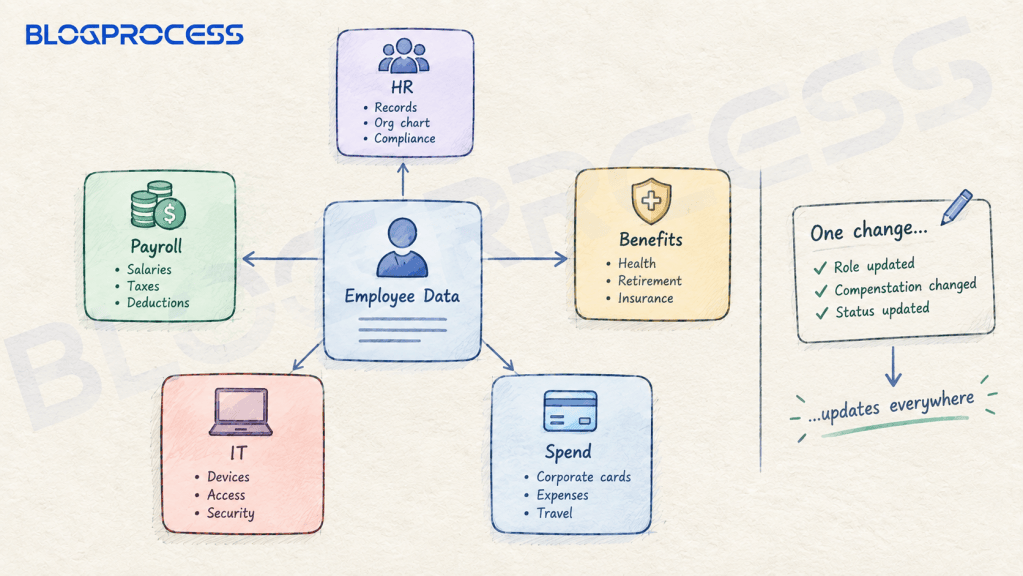
Rippling is built around one core idea. Employee data lives in a single system, and every other function, payroll, device provisioning, app access, benefits, pulls from that same record instead of syncing copies across five different tools.
That sounds like a small architectural detail. It isn’t.
Most HR stacks are a patchwork. You’ve got a payroll tool that doesn’t talk to your identity provider, an IT tool that doesn’t know someone got promoted last week, and a spreadsheet somewhere tracking who still has access to what. When an employee’s role changes, someone has to manually update four or five systems, and half the time one of them gets missed.
Rippling’s pitch is that none of that manual syncing should exist. One update. Payroll, benefits, device policies, and app access all follow automatically from it. Whether that plays out perfectly in practice depends on your setup, but the underlying architecture is genuinely different from a bundle of acquired tools stitched together after the fact.
Rippling Modules Explained: HR, Payroll, IT, and Spend
Rippling isn’t one product. It’s four connected systems that share the same employee data layer. Here’s what each one covers.
Rippling HR Software
This is the base layer. Employee records, org charts, compliance tracking, and the workflows that trigger everything else. Every other module reads from this data, which is the whole point of the “unified” pitch.
Rippling Payroll Software
Runs payroll for employees and contractors regardless of location. No manual math. When comp, benefits, or role changes happen anywhere else in the system, payroll updates without someone manually re-entering numbers. It also handles tax calculation and filing across federal, state, and local agencies.
Rippling IT Management
Identity, access, and device management from one dashboard. One login, not five. Provisioning a new hire’s laptop and app access, and revoking both the moment someone leaves, runs through the same system that triggered their onboarding in the first place.
Rippling Spend Management
Corporate cards, expense management, bill pay, and travel, all tied back to the same employee and approval data instead of a separate finance stack.
| Module | What It Covers | Where It Matters Most |
|---|---|---|
| Rippling HR | Employee records, compliance, org structure | Any company with more than a handful of people |
| Rippling Payroll | Domestic and global pay, tax filing | Teams hiring across multiple states or countries |
| Rippling IT | Device management, SSO, access control | Remote or hybrid teams without a dedicated IT department |
| Rippling Spend | Cards, expenses, bill pay, travel | Teams tired of chasing receipts and reconciling manually |
You don’t have to buy all four. Not at once. Plenty of small teams start with just payroll or just IT and add modules later, which is worth knowing if the full platform feels like overkill right now.
Rippling Onboarding and Offboarding: How the Automation Works
This is the feature that gets the most attention, and it’s not hard to see why. Most onboarding isn’t one step. New hire paperwork, payroll setup, benefits enrollment, laptop shipping, and app provisioning normally happen across five disconnected steps, usually with at least one of them falling through the cracks.
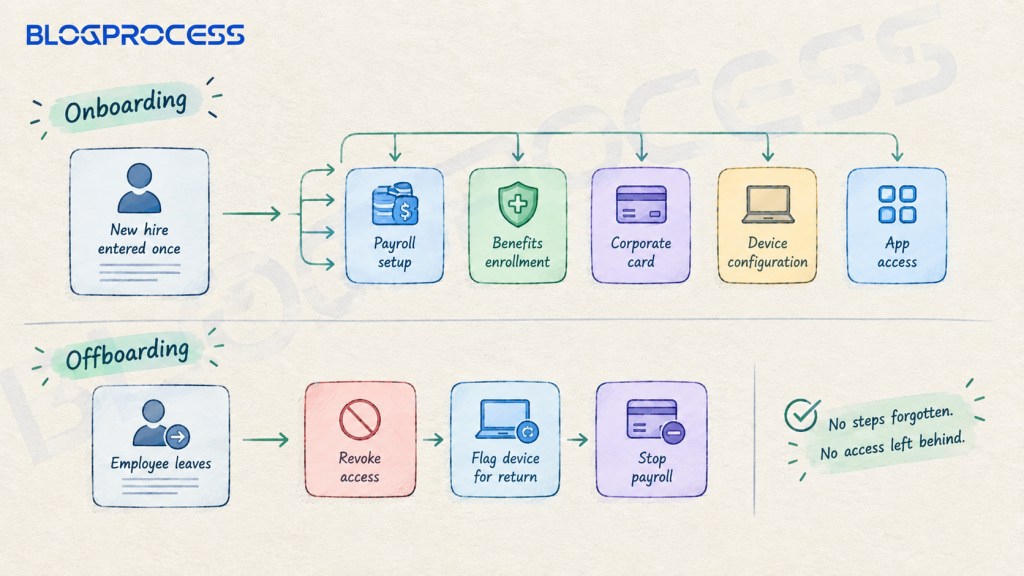
Rippling collapses that into one workflow. One record. A new hire’s information gets entered once, and it triggers payroll setup, benefit enrollment, corporate card issuance, device configuration, and third-party app access automatically.
Offboarding runs the same way in reverse. Nothing gets forgotten. Access gets revoked, devices get flagged for return, and payroll stops, all from the same trigger instead of someone manually working through a checklist and hoping they remembered everything. Departed employees with active Slack or Google Workspace access three weeks after their last day is one of the most common security gaps small teams carry, and it almost always traces back to offboarding living in someone’s memory instead of a system.
Rippling Global Payroll and Employer of Record, Known as EOR, Explained
If you’ve ever tried to hire someone outside your home country without setting up a legal entity there, you know how fast that becomes a mess of local labor law, tax registration, and compliance risk you didn’t sign up for.
Rippling’s Employer of Record function lets you hire internationally without setting up your own entity in that country. No local entity needed. Rippling becomes the legal employer on paper, handles local compliance, and you manage the day-to-day relationship.
For companies that already have international entities, Rippling’s global payroll runs natively rather than bolting on a third-party partner for each country, which is how a lot of “global payroll” products work behind the scenes. Nothing hidden. Payroll calculations pull from timesheets, expenses, and local tax requirements, and the reporting shows exactly what’s happening in each country instead of a black box.
This matters most for teams past the “we’ll just pay them as a contractor” stage but not ready to open a legal entity in every country they hire from. Real risk, not paperwork. Misclassifying a long-term contractor as an employee in disguise is one of the most common compliance mistakes growing teams make, and it’s usually the trigger that pushes them toward an EOR instead of continuing to wing it.
Rippling Contractor Management for International Teams
Not every team needs global payroll. Not yet, anyway. A lot of small businesses, agencies, and solo operators just need to pay freelancers and contractors reliably across multiple countries without a compliance headache.
Rippling’s contractor management handles onboarding, invoicing, international payments, and the local agreements that keep the arrangement legally clean, across 185+ countries. That’s the real value. For a team that’s scaling past hiring one or two freelancers off Upwork and into something closer to a distributed contractor bench, this is the module that applies.
A few things to know if you’re evaluating this:
- Contractor agreements are localized, not generic templates stretched across every country
- Payments and invoicing run through the same dashboard as your employee data, so you’re not juggling two separate systems
- Compliance tracking flags misclassification risk before it becomes a legal problem
- You can start here and add full payroll later without migrating to a different platform
That last point matters more than it sounds. A lot of teams outgrow their contractor-payment tool the moment they hire their first real employee, and then they’re migrating data into a completely different system. That’s expensive. Migrating payroll history and contractor records mid-year is one of the messier operational problems a growing team can run into, and it’s almost entirely avoidable by starting on a platform built to scale into payroll from day one.

Rippling IT: Identity, Access, and Device Management
Here’s the part most HR software doesn’t touch at all. Not even close. Rippling combines an HRIS and an identity provider, which means access decisions are driven by actual employee data instead of a separate IT team manually mapping who gets what.
Single sign-on covers 600+ pre-built integrations plus custom SAML and SCIM support, so provisioning and deprovisioning app access happens automatically based on role, department, or any other employee attribute you set.
Device management runs cross-platform. Real-time visibility into device and security posture, automated patching, and remote lockout or wipe capability when a device needs to be recovered.
Password management through Rippling’s built-in RPass gives every employee access to exactly the passwords their role requires, stored in an encrypted vault instead of a shared doc or, worse, sticky notes.
For a five-person team this might be overkill. Fair enough. For a twenty-person remote team without a dedicated IT hire, it’s the difference between someone manually tracking who has access to what in a spreadsheet and having that mapped automatically to each person’s actual role.
Rippling vs Gusto, Deel, and Standalone HR Tools
The honest question most people want answered: is this better than just using separate best-in-class tools for each function?
| If You’re Comparing | Standalone Approach | What Rippling Changes |
|---|---|---|
| Payroll | Gusto, QuickBooks Payroll | Payroll auto-updates when role or comp changes elsewhere, no manual re-entry |
| Contractor payments | Deel, Remote as standalone tools | Contractor data lives in the same system as employees, easier to convert later |
| IT and device management | Separate MDM plus separate SSO tool | Access and devices tied to HR data instead of manually mapped |
| Expense and spend | Ramp, Brex as separate systems | Spend policies driven by the same employee and role data as everything else |
The tradeoff runs the other way, too. No argument there. Best-in-class standalone tools sometimes have deeper features in their one category than Rippling’s equivalent module. If you need the most advanced expense management tool on the market specifically, a dedicated spend platform might beat Rippling’s version on pure feature depth.
What you’re trading for that is the manual syncing between systems that a standalone stack requires. Most teams don’t notice. For a lot of small and mid-size teams, that tradeoff favors the unified platform. The failure point with a standalone stack is almost never the individual tools themselves, it’s the sync between them breaking silently, which is the kind of problem nobody notices until an audit or an offboarding goes wrong.
Who Should Actually Consider Rippling HR Software
This isn’t a fit for everyone, and pretending otherwise wastes your time.
Good fit if:
- You’re hiring across multiple states or countries and dealing with the compliance headache manually
- You’ve got enough headcount that manually tracking device and app access is starting to break down, even without a dedicated IT hire
- You’re managing a growing contractor bench and want it to scale into full payroll later without migrating
- You’re tired of updating four different systems every time an employee’s role changes
- Your team is past the “we’ll figure it out with spreadsheets” stage
- You want offboarding to revoke access automatically instead of relying on someone’s memory
- You’re reconciling corporate cards and expenses by hand every month and want spend policies tied to the same employee data as everything else
Probably not worth it if:
- You have one or two employees and no international hiring plans
- You already have deep, working integrations between best-in-class point solutions and no appetite to migrate
- Your team is small enough that manual HR admin genuinely takes less than an hour a week
- You’re not hiring contractors or employees outside your home country anytime soon
Most teams evaluating this fall somewhere in the middle, which is exactly why the module-by-module approach matters. Start small. You don’t have to commit to the whole platform on day one.
Rippling Pricing: What to Expect
Rippling does publish a number. The core HR platform starts around $8 per employee per month, with a separate base platform fee in the $35 to $40 a month range for other products. That number is a floor, not a real estimate.
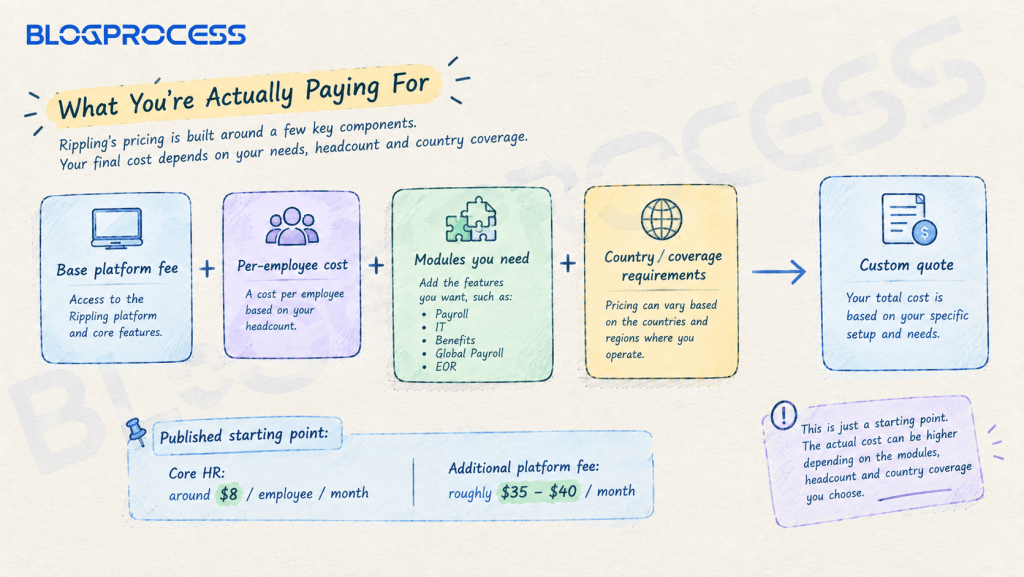
Payroll, IT, benefits, global payroll, and EOR each carry their own per-employee charge on top of the base. None of it’s published. Getting an accurate total requires a custom quote built around your headcount, which modules you activate, and whether you need country-specific EOR or global payroll coverage layered in.
That’s standard for platforms bundling payroll, IT, and finance into one system instead of selling a single fixed product. Not a full one. A published starting number works fine as a floor, but it stops being useful the moment pricing depends on module combinations, headcount, and country coverage that vary by customer.
If you’re comparing this against a fixed-price tool like Gusto, budget time for a quote conversation before assuming a monthly number. Plan for it. That’s not a knock against Rippling specifically, it’s the tradeoff that comes with modular, multi-function platforms in general.
Getting Started with Rippling
If a specific module solves a clear problem you have right now, payroll errors, offboarding gaps, or a growing contractor bench, requesting a quote for that module alone is the fastest way to see real pricing for your team size. One module, one quote. You don’t need to evaluate the entire platform to get a specific answer for the piece that’s costing you time today.
Questions People Ask About Rippling
Does Rippling replace my existing payroll provider entirely?
Yes, if you migrate to Rippling Payroll, it becomes your system of record for pay runs, tax filing, and compliance. Not before then. Some teams run a transition period alongside their existing provider before fully switching over.
Can I use Rippling for just IT or just payroll without the full platform?
Yes. Rippling’s modules can be adopted individually. Plenty of teams start with one module and add others later as the need comes up.
How does Rippling handle international contractor payments?
Contractor payments and localized agreements run through Rippling’s contractor management module, covering 185+ countries, with compliance tracking to flag misclassification risk before it becomes a legal issue.
Is Rippling’s Employer of Record the same as opening my own entity abroad?
No. With Rippling’s EOR, Rippling is the legal employer in that country, which lets you hire without setting up your own entity. If you already have an entity there, Rippling’s native global payroll applies instead.
What happens to device and app access when someone is offboarded in Rippling?
Access revocation and device recovery are triggered automatically from the offboarding workflow, rather than requiring someone to manually work through each system separately.
Is Rippling worth it for a five-person team?
It depends on whether you’re hiring internationally or need real IT management. Size alone isn’t the test. A five-person domestic team with simple payroll needs might not need the full platform yet, but a five-person team managing contractors across multiple countries often benefits from it earlier than expected.
Conclusion
The single-system architecture is the actual differentiator here, not the feature list. Here’s the edge. Any individual module, payroll, IT, contractor management, has standalone competitors that do that one thing well. What none of them do is share the same employee data layer the way Rippling’s modules do, which is what eliminates the manual syncing that eats hours every time someone joins, leaves, or changes roles.
If your team is still updating four systems by hand every time something changes, that’s the problem worth solving, regardless of which platform ends up fixing it. Fix that first. Start with the module that hurts most right now, payroll, contractor payments, IT, or spend, and expand from there instead of trying to migrate everything at once.
If paying and managing contractors across borders is the piece costing you the most time right now, check out Rippling’s global contractor platform and get a quote for your team size.

Rippling is one piece of a bigger compliance picture. See our complete guide to HR compliance for small businesses for how this platform choice fits with worker classification, wage and hour rules, and AI hiring compliance.
Affiliate Disclosure: This post contains affiliate links. If you click through and make a purchase, BlogProcess may earn a small commission, at no extra cost to you. We only recommend tools we trust and believe bring genuine value to small businesses and entrepreneurs.