
Your next customer might never see your homepage.
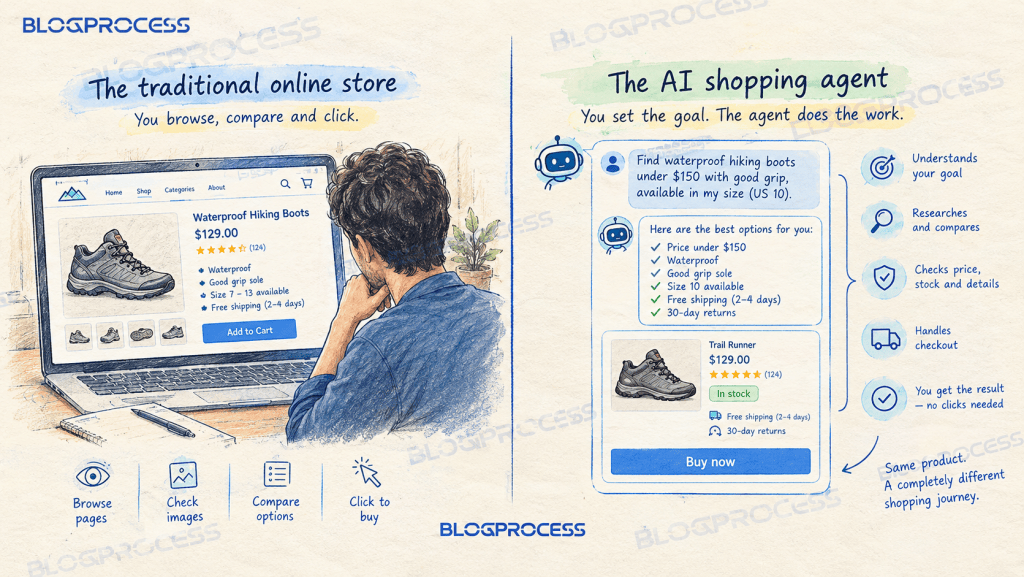
They will ask ChatGPT for waterproof hiking boots under 150 dollars, and an AI shopping agent will do the browsing, comparing, and buying for them. No scrolling. No clicking through your carefully designed category pages. Just a conversation, a cart, and a checkout that happens somewhere you cannot see.
This is agentic commerce, and it is already moving serious revenue. AI traffic to US retail sites grew 393 percent year over year in early 2026, according to Adobe Analytics. Shopify reported AI-driven traffic to its stores up roughly 8x in the same window, with orders from AI-powered search up nearly 13x. The conversion story is even better than the traffic story. By March 2026, AI referrals converted 42 percent better than other traffic sources, a record high, and revenue per visit ran 37 percent higher. A year earlier, that same traffic converted worse than average. Now it wins.
Most WooCommerce store owners are not ready for this. Not even close. Here is what changes, and what your product data needs to look like before an agent will trust it enough to buy from you.
What Agentic Commerce Means for Your WooCommerce Store
Agentic commerce is shopping where an AI agent researches, compares, and completes a purchase on a customer’s behalf. The shopper sets the goal. The agent does the work.
OpenAI’s Instant Checkout launched inside ChatGPT in September 2025, then got pulled back within six months once the conversion math failed to work. Six months, then gone. Microsoft and Google moved fast to fill the checkout gap instead, while Shopify pushed merchant catalogs directly into ChatGPT, Copilot, and Gemini. We broke down that whole protocol landscape, OpenAI’s retreat, Copilot Checkout, and Google’s Universal Commerce Protocol, in our guide to UCP for small businesses. The short version: discovery happens inside AI, and the sale still usually closes on your own site.
None of those protocols plug into WooCommerce natively yet. That will likely change. Fixing your product data now is where the opportunity is, while most WooCommerce store owners are still treating this as next year’s problem.
The Old Rules Do Not Apply Here
A human shopper forgives a lot. A missing spec. A slightly ugly product page. Stock photos instead of real ones. An agent forgives none of it.
Where a person browses pages, images, and visual design, an agent reads structured product data and feeds. Different inputs entirely. Where a sale used to happen on your storefront, it increasingly happens inside a chat conversation, through a protocol you never see. The thing that wins is no longer brand polish or ad spend. It is clean data, accurate inventory, and trust signals a machine can verify.
Not a stylistic shift. A different buyer, evaluating you by different rules.
Where WooCommerce Falls Short on Agent Readiness
Most of what an agent checks before recommending a store, current pricing, live inventory, complete variants, shipping terms, return policy, review signals, is platform-agnostic. We already turned it into a checklist in the UCP guide linked above. None of it is WooCommerce-specific.
WooCommerce itself falls short in four places that generic advice will not fix for you:
- Product schema. WooCommerce ships partial schema out of the box, and duplicate markup from your theme or SEO plugin often makes it worse
- Shipping data in structured markup. Your shipping classes do not map to schema shipping details automatically
- Merchant Center feed generation. There is no native path from your product catalog to a compliant feed
- Cross-system consistency. Feed titles, on-site titles, and structured data drift out of sync fast once a catalog grows past a handful of products
Fix those four and you have closed the WooCommerce-specific half of the readiness gap. Everything else on the checklist applies to any platform.
The Schema Markup Your WooCommerce Product Pages Are Missing
That schema gap sits at the top of the list for a reason. Start there. It is the single biggest blocker to agentic visibility, and the easiest one to fix.
If your schema is already broken by duplicate markup from your theme or SEO plugin, our guide to fixing WooCommerce product schema walks through diagnosing that first. That piece covers rich results. This one is about a different bar entirely: what an AI agent needs to see before it will recommend you at all.
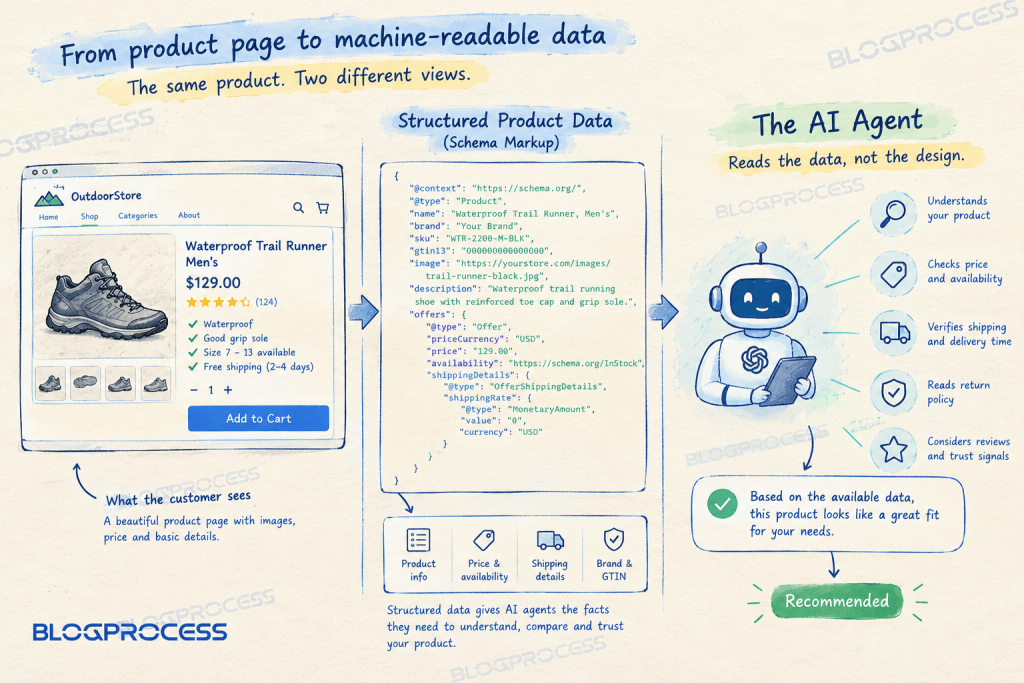
Here is a minimal, agent-readable Product schema block for a single item. Nothing fancy. If you would rather not hand-code this, AIOSEO’s schema generator gives most WordPress stores a point-and-click path to the same result, covered in our AIOSEO features breakdown. Either way, this is what you are aiming to produce:
{ "@context": "https://schema.org/", "@type": "Product", "name": "Waterproof Trail Runner, Men's", "brand": "Your Brand", "sku": "WTR-2200-M-BLK", "gtin13": "0000000000000", "image": "https://yourstore.com/images/trail-runner-black.jpg", "description": "Waterproof trail running shoe with reinforced toe cap and grip sole.", "offers": { "@type": "Offer", "priceCurrency": "USD", "price": "129.00", "availability": "https://schema.org/InStock", "shippingDetails": { "@type": "OfferShippingDetails", "shippingRate": { "@type": "MonetaryAmount", "value": "0", "currency": "USD" } } }}
That last shipping block matters more than most stores realize. Skip it, lose the sale. Agents weigh delivery cost and timeframe heavily when comparing near-identical products across merchants.
Core Attributes Your Product Schema Cannot Skip
| Attribute | Why an Agent Needs It | WooCommerce Field |
|---|---|---|
| GTIN when available, SKU otherwise | GTIN identifies the product the same way across every merchant; SKU only works within your own store | Global Unique ID field, or SKU |
| Brand | Required alongside GTIN for most Merchant Center categories, and helps an agent tell apart near-identical products from different manufacturers | Product Brands taxonomy |
| Price and currency | Enables direct price comparison across merchants | Regular/Sale price |
| Availability | Filters out items an agent should not recommend | Stock status |
| Shipping cost and timeframe | Weighted heavily in agent comparisons | Shipping class |
| Material and use case | Answers “will this actually work for me” queries | Attributes |
| Return policy | Reduces friction the agent has to resolve before buying | Store policy page |
Fill every row in that table before you move on.
Building a Google Merchant Center Feed From WooCommerce
Your Merchant Center feed is not just a Google Shopping formality anymore. Treat it as infrastructure. This feed is quickly becoming the backbone data source multiple AI shopping surfaces pull from, not only Google’s own AI Mode.
A workable core feed needs a tight set of fields:
- id, usually your WooCommerce SKU or product ID
- title, matching your on-site product title exactly
- description, written for a person, not stuffed with keywords
- link, the canonical product URL
- image_link, a real product photo, not a placeholder
- price, matching the price a shopper pays at checkout
- availability, kept current, ideally synced in near real time
- gtin, the same identifier from your schema markup, since this is what actually lets an agent match your listing to the same product elsewhere
- brand, required alongside GTIN for most categories, and one of the fastest ways a feed gets rejected when it is missing
You need a dedicated product feed plugin that maps your catalog to Google’s specification and keeps the feed URL synced automatically. Google’s own free extension, recently renamed Google for WooCommerce after years as Google Listings & Ads, is the obvious first stop for most WooCommerce stores. Start free. AdTribes’ Product Feed Pro is a common paid upgrade once you need more control over category mapping and multi-channel feeds.
Manually exporting and re-uploading a static file is a fast way to end up recommending sold-out inventory to an AI agent, which is worse for your reputation than not being listed at all. For the plumbing that keeps a feed plugin’s data fresh without manual exports, our guide to WooCommerce webhooks covers wiring inventory changes through automatically.
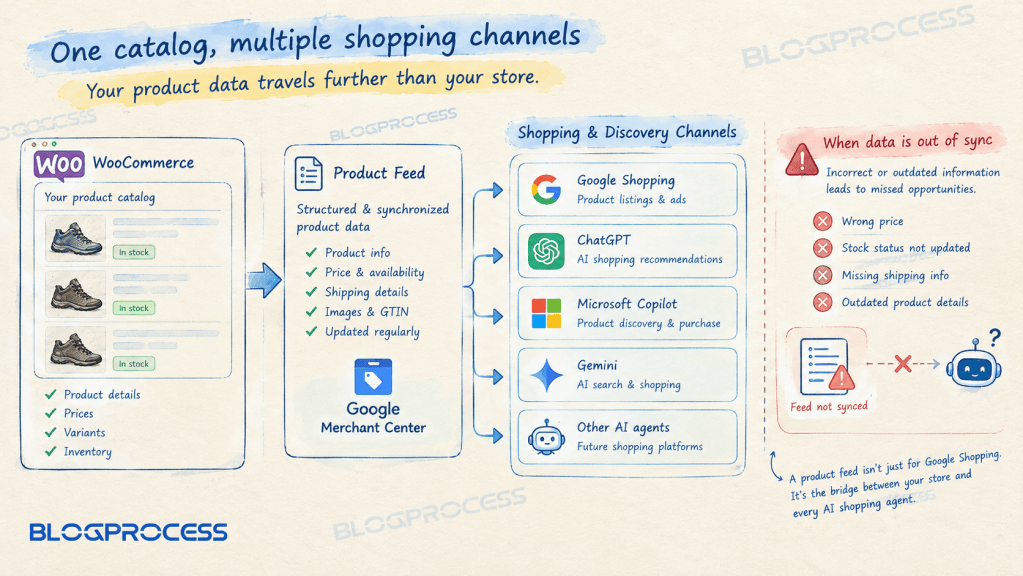
Keeping Product Data Consistent Across Every AI Surface
An agent that finds conflicting information about the same product will not resolve the conflict in your favor. It just drops you. Or flags the listing as low trust.
Run this consistency check across four places before you consider a product page done:
- Product feed title matches the on-site H1 exactly, word for word
- Structured data price matches the price shown at checkout, including active discounts
- Category and breadcrumb naming matches what your feed submits as
google_product_category - Image alt text describes the actual product shown, not a generic stock description
Small mismatches compound fast across a catalog of any scale, so this is worth a recurring audit rather than a one-time fix.

The Revenue Case for Getting Agentic Commerce Right
The upside here is not abstract. The numbers back it up. Gartner expects roughly 20 percent of all digital commerce transactions to run through AI platforms by 2030. Bain puts a similar figure on it, up to a quarter of US ecommerce, close to 500 billion dollars, in the same window. During the 2025 holiday season, Salesforce found that roughly one in five Cyber Week orders worldwide already involved an agent somewhere in the purchase path.
The stores that show up in that flow get highly qualified, purchase-ready visitors who convert well above average. The ones that do not show up lose the sale. Quietly. To a competitor whose data happened to be cleaner, price included.

This is not about chasing a trend. It is about not quietly disappearing from a growing share of your own market. Simple as that.
Questions People Ask About WooCommerce Product Data for AI Agents
Does WooCommerce support agentic checkout out of the box?
Not yet. Shopify has pushed merchant catalogs directly into ChatGPT, Copilot, and Gemini through its Agentic Storefronts rollout, and also backs Google’s Universal Commerce Protocol, but WooCommerce has no native integration with either. Third-party plugins are expected to fill that gap as adoption grows through 2026, though none are universal yet. Readiness today means optimizing your product schema and Merchant Center feed so agents can find and evaluate your catalog, not installing a plug-and-play checkout button.
What is the fastest first step to prepare my store?
Fix your Product schema markup first. Complete schema is the single attribute agents check before deciding whether to evaluate you at all, and most WooCommerce stores are missing required fields like GTIN, accurate availability, or structured shipping details right out of the box. Start with the core attributes table above, verify each field against your actual product pages, then move on to your Merchant Center feed once schema is solid.
Do I need a separate plugin for Google Merchant Center?
Yes, in almost every case. WooCommerce does not generate a Merchant Center-compliant feed natively, and manually building one quickly falls out of sync with live inventory. A dedicated product feed plugin maps your catalog fields to Google’s specification and keeps the feed URL updated automatically, which matters more now that AI shopping surfaces increasingly pull from the same feed Google Shopping always used.
Will agentic commerce replace normal ecommerce traffic?
Not entirely, and not soon. Adobe reported AI-referred traffic to US retail sites growing 393 percent year over year in early 2026, but that growth is coming off a small base, and classic search and direct traffic still make up the bulk of most stores’ revenue today. Gartner expects roughly 20 percent of digital commerce transactions to run through AI platforms by 2030. Treat this as a fast-growing new channel to prepare for, not a wholesale replacement of everything else.
How often should I audit my product data for consistency?
Monthly at minimum for an active catalog, and immediately after any price change, restock, or promotion. Check that your product feed title, on-site title, structured data price, and category naming all still agree with each other. Stale availability data is one of the fastest ways to lose an agent’s trust, since an agent that recommends an out-of-stock item once tends to deprioritize that merchant on future queries.
Does this only matter for large stores?
No, and smaller stores may actually have an edge here. A large retailer often juggles millions of SKUs across legacy systems that are hard to keep clean, while a small WooCommerce catalog with a few hundred products is far easier to audit and keep fully consistent. The barrier agents care about is not store size. What matters is whether your data is complete, accurate, and current.
Conclusion
Agentic commerce is not a distant forecast anymore. High-converting traffic is already routing away from stores that have not fixed their product data, and toward the ones that have. Google’s Rich Results Test will not tell you if you are agent-ready, but it will catch basic schema errors fast, and that is where most WooCommerce stores actually stand before anything else matters. Run one product page through it right now. Start with your Product schema. Then your Merchant Center feed. Then a recurring consistency audit. In that order, not all three at once.
The store that shows up cleanly to an AI agent this quarter is the store that keeps its market share while everyone else scrambles to catch up next year.