Most website visitors leave without telling you they were ever there. Your offer isn’t the problem. Because whatever tool sits between them and you is too slow, too closed, or too much work.
That’s the whole problem in one sentence.
You’re paying for traffic through ads, SEO, or word of mouth, and then handing that traffic a form, a chat box, or nothing at all to decide what happens next. That handoff decides everything. Get that tool wrong and you’re funding someone else’s business by accident, because the visitor who couldn’t reach you found a competitor who could.
This piece breaks down what a contact form, live chat, and an AI chatbot do to your conversion numbers, where the real data comes from, and what to run on your own site based on your traffic and your team size.
Contact Form vs Live Chat vs AI Chatbot: The Basics
Quick definitions before the numbers, so nothing gets confused later.
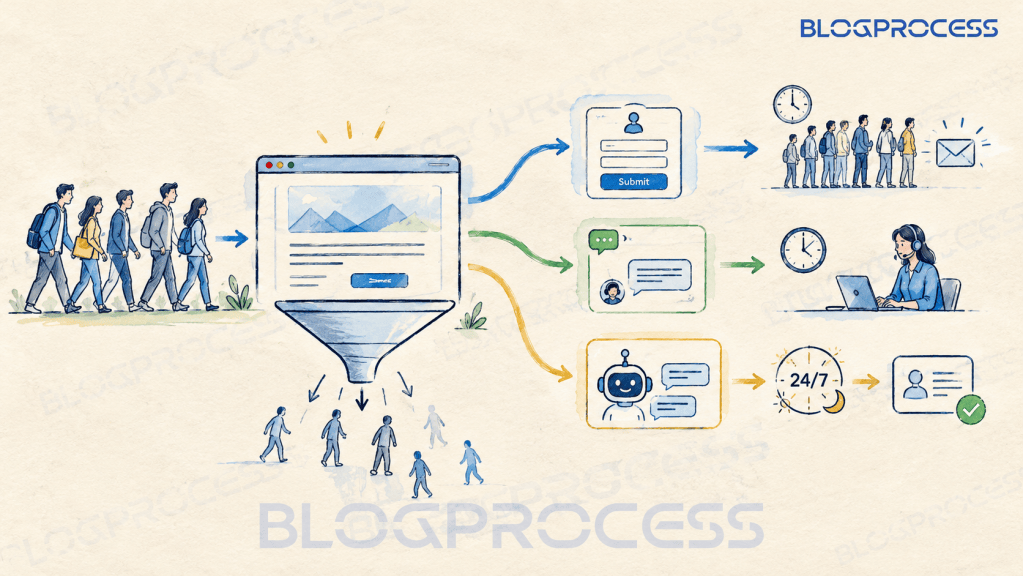
Contact form. A static field set on your site. Name, email, message. The visitor submits it and waits for you to respond on your own schedule.
Live chat. A chat widget connected to a real person on your team. Simple as that. It only works while someone’s watching it.
AI chatbot. A chat window that answers on its own, day or night. No human required. It can qualify a lead, book a call, and grab contact details mid-conversation.
They look the same. They behave completely differently once a visitor clicks.
Chatbot Conversion Rate vs Contact Form Conversion Rate: The Real Numbers
Here’s where most articles on this topic get sloppy. They quote a percentage with no source attached. No link, no proof. So let’s be specific about where these numbers come from.
What the Contact Form Conversion Data Actually Shows
Form conversion varies more by industry than most articles admit. That’s the honest answer. Ruler Analytics’ benchmark data puts real estate lead forms at an average of 1.7%, while their B2B ecommerce report shows 3.2% for that sector, with top performers reaching into the double digits. Most small business sites land somewhere in that range, closer to the low end.
What the AI Chatbot Conversion Data Actually Shows
AI chatbots land in a very different range. Glassix’s own client study, run across e-commerce, retail, SaaS, and small business clients, found a 23% lift in conversion rate on sites using a chatbot compared to sites without one. The gap is real. Here’s what that lift actually means for your own site: if you currently convert visitors at 2%, a 23% lift puts you closer to 2.5%, not a dramatic jump on its own, but real leads over a year of steady traffic. It shows up in cost too. Tidio’s published figures put average chatbot ROI at roughly 1,275% when measured purely on support cost savings, which tells you the gap isn’t just about lead volume. It’s about what those leads cost to capture.
Where Live Chat Conversion Rates Fall
Live chat sits in the middle, with one catch attached. No clean number exists. Live chat conversion claims online are all over the place, anywhere from single digits to 40%, usually from vendor blogs with no visible methodology. Rather than repeat one of those, the table below sticks to what’s verifiable.
| Tool | Conversion Signal | Availability | Response Speed |
|---|---|---|---|
| Contact Form | 1.7% to 3.2% absolute rate, varies by industry | Always visible | Hours to days |
| Live Chat | Meaningful lift over baseline, staffed hours only | Only when staffed | Under 1 minute when staffed |
| AI Chatbot | +23% lift over baseline, not an absolute rate | 24/7 | Instant |
Notice the catch built into that live chat row. That catch matters. The lift only shows up when someone’s watching the widget. Turn it off, or leave it unanswered for twenty minutes, and it performs worse than a form, because the visitor expected a response and got silence instead.
Lead Follow Up Automation: What Happens After You Capture the Lead
This is the part almost nobody covers, and it’s the one that actually determines whether any of this matters.
A captured email that sits in an inbox for six hours isn’t a lead. It’s a name on a list that’s cooling off by the minute. Speed wins. Response speed changes outcomes more than the tool itself does. Dr. James Oldroyd’s widely cited Lead Response Management Study, run with InsideSales.com across tens of thousands of leads, found businesses that responded within five minutes were 21 times more likely to qualify that lead than businesses that waited even thirty.

Questions to Ask About Your Own Follow Up Sequence
So before you pick a tool, ask what happens the second someone submits it.
- Does a welcome sequence fire automatically, or does it wait for a human to notice the notification?
- Is the lead tagged by what they asked about, so the follow up isn’t generic?
- Does the chatbot’s captured email sync straight into your email platform, or does someone have to export a CSV once a week?
- Is there a fallback message if nobody responds within a set window, so the visitor isn’t left wondering?
If you’re running WordPress and haven’t set this up yet, our breakdown of email automation worth setting up covers exactly this blind spot. Which tool captures the lead matters. The data above proves it. But what happens the moment after counts just as much, and it’s the part almost nobody sets up properly.

Best WordPress Chatbot Plugins Compared
If you’re on WordPress, adding a chatbot is a plugin decision, not a development project. No code required. But not every option behaves the same once it’s installed.
SaaS Chatbot Plugins vs Self-Hosted Options
| Plugin | Hosting Type | Typical Cost | Email Platform Sync |
|---|---|---|---|
| Tidio | SaaS, embedded script | Free tier, paid from ~$29/mo | Native integrations, Zapier fallback |
| Chatbase | SaaS, embedded script | Free tier, then tiered plans from ~$40/mo, credit-based | Webhook or Zapier |
| Intercom | SaaS, embedded script | Published tiers, from $29/seat/mo billed annually | Native, broad ecosystem |
| Self-hosted chat plugin | Runs on your server | One-time or low monthly | Manual or plugin-dependent |
The SaaS tools load a lightweight script and don’t touch your server resources much. Less overhead, less risk. Self-hosted options give you more control over data, but they add plugin overhead, and a bloated plugin stack is its own conversion killer. We’ve written before about what plugin bloat actually costs a site, and a poorly configured chat plugin is a common offender.
Embedding a Chatbot Widget on WordPress
Installing the official plugin from any of these providers takes zero code, just activate it and log in with your account. But it helps to know what that plugin is doing under the hood, since it’s dropping a script tag into your site’s header. A basic version looks something like this:
<script> (function(){ var s = document.createElement('script'); s.src = "https://widget.yourchatbotprovider.com/embed.js"; s.async = true; document.head.appendChild(s); })();</script>
That’s what’s quietly running the moment you hit activate. No manual work needed. What decides results is how the bot is trained on your specific services, prices, and FAQs, not the embed code itself. A generic bot that doesn’t know your business gives generic answers, and generic answers don’t build trust.
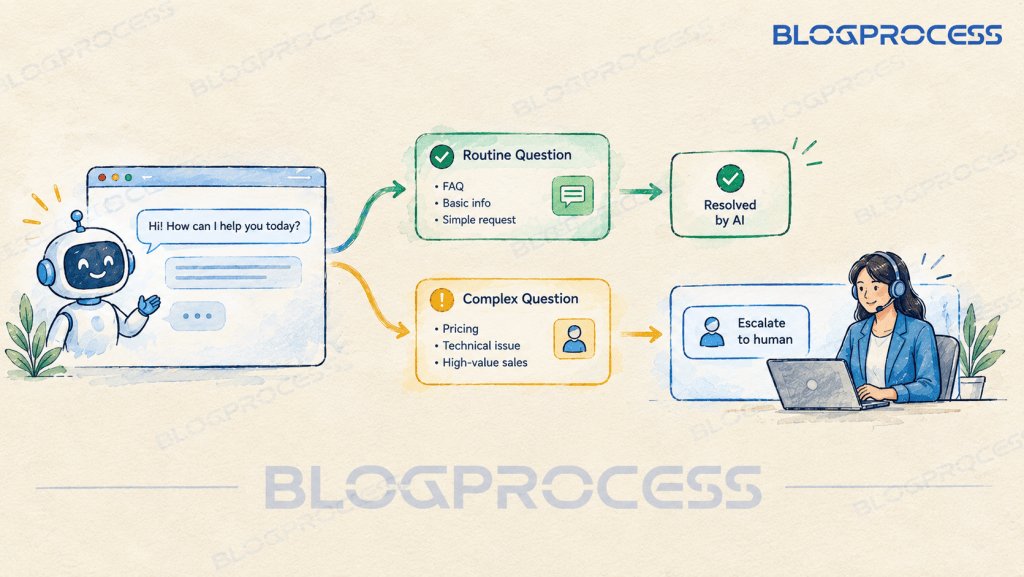
Worse, an undertrained bot doesn’t just sound generic. It can confidently give a wrong answer, wrong pricing, wrong policy, wrong availability. That’s worse than nothing. Review your chat transcripts weekly for the first month, and set up an escalation path to a human for anything the bot isn’t confident about.
Chatbot Page Speed and Hosting Considerations
One more thing before you install anything. Don’t skip this. Page speed matters here more than people expect. A chatbot script that loads slowly can undo the exact conversion lift you installed it for, since visitors bounce before the widget even renders. Check your hosting is fast enough to absorb the extra script first. Our guide on what to look for when picking a host is a reasonable place to start if you’re not sure your current host can handle it.

When Live Chat Still Beats an AI Chatbot
None of this means live chat is obsolete. Far from it. It has a real advantage in one specific situation.
Complex, high-value conversations still favor a human. Custom quotes. Technical questions with a lot of variables. Anything where a back-and-forth changes the outcome of the sale. A trained person closes those better than a bot right now, full stop.
The smart setup for most small businesses isn’t picking one tool and abandoning the others. It’s layering them. A chatbot handles routine questions and after-hours capture. It hands off to a human the second a conversation gets complicated or high-value. That combination catches the volume a form misses, without losing the human touch on the deals that need it.
Best Lead Capture Tool for Small Business: A Decision Framework
A simple framework for picking your primary tool, based on traffic and staffing, not guesswork. Layer in human escalation on top of whichever one you land on, the way the last section described. Just your starting point.
- Low traffic, simple offer. A contact form as your backup is fine. A free chatbot tier costs nothing, but training it well still costs time, and that’s not worth spending until the traffic justifies it.
- Steady traffic, dedicated staff during business hours. Live chat will lift your numbers, as long as you can keep it staffed and responsive.
- Growing traffic, thin team, lots of after-hours visitors. This is where a chatbot earns its keep. It catches the visitors your form is currently losing.
- High-value, complex sales. Keep a human in the loop for these conversations even if a chatbot handles the first touch.
Most small businesses reading this fall into the third bucket. Traffic is already showing up. The form is sitting there catching almost none of it. A chatbot is the fastest fix available without spending more on ads to bring in visitors you’re already losing.
Questions People Ask About Chatbot vs Live Chat vs Contact Form
Does a contact form still make sense to keep on my site? Yes, as a backup option, not your primary lead capture tool. Some visitors genuinely prefer filling out a form on their own time. Keep it, just don’t rely on it alone.
How much does a chatbot actually cost to run? Basic tools start free and scale with usage or feature tier. A properly configured bot trained on your specific business typically costs more upfront but pays that back quickly through captured leads a form would have missed.
Can a solo operator realistically run live chat? It’s genuinely hard. If you’re the only person answering questions, delivering the work, and handling billing, staying consistently available for chat is a real strain. That’s exactly why chatbots are popular with small teams.
Will adding a chatbot slow down my WordPress site? It can, if the plugin is heavy or your hosting is already stretched thin. Check your page speed before and after installing, and make sure your host can absorb one more script without a noticeable hit.
Does the chatbot need to connect to my email platform? It should. A captured lead that doesn’t trigger a follow up sequence is barely better than a form nobody checks. Native integrations or a Zapier connection both work, but the connection needs to exist.
Can an AI chatbot give customers the wrong information? Yes, if it’s undertrained on your business, and that’s a real risk worth taking seriously before launch. A wrong price quote or a wrong return policy from a bot does more damage to trust than a slow contact form ever would. Train it on your actual current pricing and policies rather than generic data, review its transcripts weekly for the first month, and route anything it’s unsure about to a human.
Conclusion
A contact form loses leads quietly. No noise, just gone. Live chat captures them actively but only while someone’s watching it. An AI chatbot catches the ones that would’ve walked away at midnight, no staffing required.
Pick based on your actual traffic and your actual team size, not on whichever tool looks the most modern. Start with your numbers. If you’re already getting visitors and your form is sitting there doing almost nothing with them, that’s your fix. Get the chatbot trained on your real business, connect it to your email platform so the lead doesn’t go cold, and check your hosting can handle the extra script before you flip it live.