A reader emailed me convinced her blog already had “email automation running.” What she actually had was Jetpack’s default toggle that emails subscribers whenever she publishes a post. That’s not automation. That’s a notification with extra steps, and a lot of WordPress blogs are running the exact same setup while believing they’ve solved email marketing.
So over the last week of July, I set up the tools that get recommended for this on a staging WordPress install running the same theme and plugin stack as my main blog: MailPoet, FluentCRM, and Uncanny Automator, each configured to do the same three things, a welcome message for new subscribers, a tag applied when someone clicks a specific link, and a notification when a form gets submitted. Here’s what was worth the setup time and what I’d skip.
The Automation You Think You Have (But Don’t)
Jetpack’s Newsletter feature, the one built into WordPress.com and most Jetpack-connected sites, defaults to “on” the moment you activate it. Every new post gets emailed to your subscriber list automatically unless you turn that default off. No configuration, no automation builder, nothing to test.

No welcome message when someone subscribes. No tagging based on what they click. No way to send anything except “I published something.” It’s a broadcast pipe, not an automation system, and it’s easy to mistake the two because it feels automated. Something happens without you touching it. That’s not the same as a system that responds differently depending on who’s on the other end.
What Actually Counts as Automation
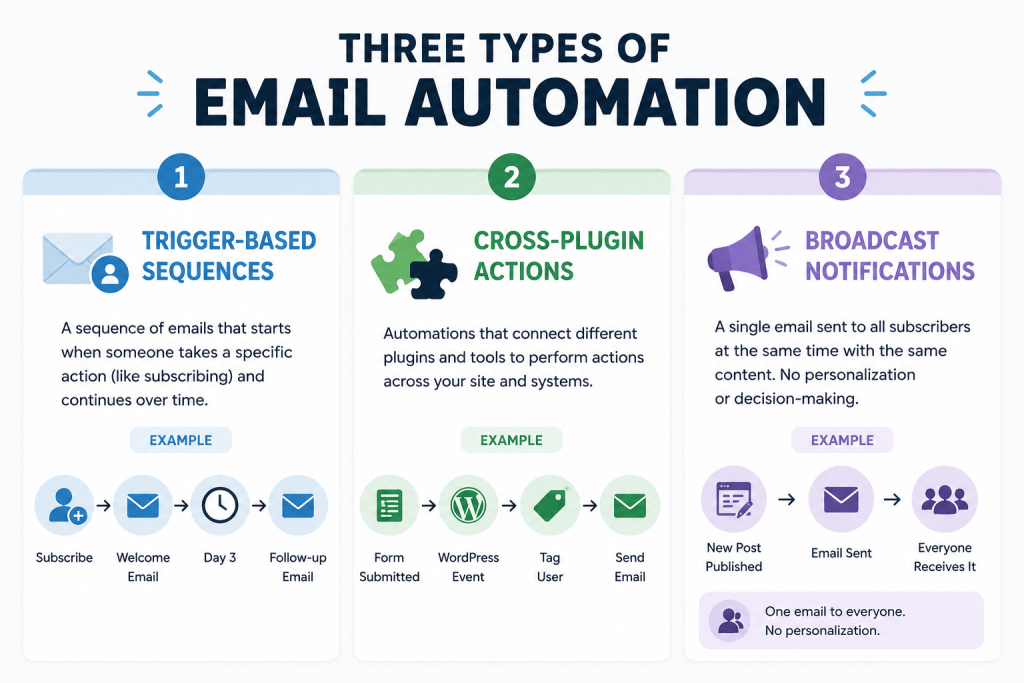
Trigger-Based Sequences
A real welcome sequence, or any multi-step series that fires based on when someone subscribed rather than when you published, needs an actual automation builder. That means a system where you can define a starting condition, someone joins a list, someone fills out a form, and then a sequence of timed steps runs independently of anything else happening on your site. This is the baseline most bloggers think they have and don’t, and it’s the single biggest gap between a notification setup and an actual email program.
Cross-Plugin Actions
Automations that span tools, tagging someone in your CRM when they finish a course, notifying you when a form gets submitted, adding a contact to a list when they leave a comment for the third time. This is a different category from sequences, because the trigger and the action live in two separate plugins that don’t naturally talk to each other. This is the one most WordPress-specific automation plugins are actually built for, and it’s also the one people reach for when what they actually needed was a simple sequence inside a single tool. Which tool captures that lead in the first place, a contact form, live chat, or an AI chatbot, changes how much there even is to automate here, and it’s worth getting right before you build anything on top of it. We broke down how those three compare on actual conversion data.
Broadcast-Only Notifications
New-post-to-email, which is what Jetpack gives you by default. Useful, free, and worth keeping on regardless of what else you set up, but it isn’t automation in any sense that involves a decision being made. Every subscriber gets the same email at the same trigger point, with no branching based on who they are or what they’ve done.
Three Tools I Actually Set Up and Tested
Before the individual breakdowns, here’s how the three actually compare on setup time and what they’re built to do:
| Tool | What It Actually Is | Setup Time | Sends Its Own Email | Best For |
|---|---|---|---|---|
| MailPoet | WordPress-native ESP with basic automation | ~20 minutes | Yes | A simple welcome sequence, fast |
| FluentCRM | Self-hosted CRM and ESP | ~60 minutes | No, relies on WP mail/SMTP | Larger lists, cross-site tagging |
| Uncanny Automator | Trigger-and-action layer, not an ESP | ~10 minutes | No, connects to your ESP | Cross-plugin logic only |
MailPoet
MailPoet’s automation builder sits inside the same plugin as its email sending, so setting up a welcome sequence took about twenty minutes, most of it spent picking template blocks rather than fighting the trigger logic. The free tier’s automation is limited to the basics, a single trigger with a few action steps, but for a welcome message and one follow-up, that’s genuinely enough. Where it fell short was the click-based tagging test.

MailPoet can tag based on a link click, but only within its own email templates, not from arbitrary links elsewhere on my site, which meant restructuring how I’d planned to track engagement. I also ran into the subscriber-count quirk I mentioned in the free tools comparison, my own WordPress user accounts counted against the 500-subscriber limit before I’d added a single real contact, which is worth checking before you assume how much room you actually have.
FluentCRM
FluentCRM took longer to set up, closer to an hour, because it’s not just an automation tool, it’s a full CRM sitting on top of WordPress, and the extra options in its workflow builder took time to work through. The trigger list alone, tags applied, form submitted, link clicked, custom field changed, is deep enough that I spent a chunk of that hour just reading through what was available before building anything. Once it was running, though, the click-tracking and tagging test worked exactly as I wanted, including from links outside of FluentCRM’s own emails, something MailPoet couldn’t do. Worth knowing going in: FluentCRM doesn’t send email itself, it hands that job to WordPress’s own mail function, so if you haven’t already sorted out authenticated SMTP, you’re setting yourself up for the same deliverability problem I wrote about after my own contact form emails started disappearing. The $129 flat annual fee for a single site, no per-contact pricing, is the real draw if your list is large enough that SaaS pricing has started to hurt.
Uncanny Automator
Automator isn’t an email tool at all, which took me longer to understand than it should have. It’s a trigger-and-action layer that connects WordPress events, form submissions, course completions, comments, purchases, to actions in other plugins and services, including your actual ESP. The free version handled my form-submission notification test in about ten minutes, and it’s genuinely the fastest way to wire “when X happens on my site, do Y in my email tool” without touching either tool’s native automation builder.
Automator’s official WordPress.org listing puts the free tier’s trigger and action library at over 350 across popular plugins, which was more coverage than I expected before checking. But it doesn’t store subscribers or send campaigns on its own. You still need MailPoet, FluentCRM, or an external ESP underneath it for the sending itself, and treating Automator as a replacement for one, rather than a bridge into one, is the mistake I see recommended most often.
What’s Actually Worth Setting Up
If You Just Want New-Post Notifications
Leave Jetpack’s default on and stop there. Building anything more elaborate for a need this simple is wasted setup time.
If You Want a Real Welcome Sequence
MailPoet is the faster path if you’re WordPress-only and your list is under its free cap. If you’ve already got a paid MailPoet or a paid external ESP like Kit, you likely already have this covered without adding another tool. I covered where the free tiers actually stand right now if you haven’t picked one yet.
If You Need Cross-Plugin Triggers
This is Uncanny Automator’s actual job. Course completions, membership changes, form submissions feeding into your CRM. Don’t reach for this unless you have a genuine cross-plugin trigger to build, since it adds nothing on its own.
If You’re Already Paying for an External ESP
Skip FluentCRM and MailPoet’s automation layers entirely and use Automator’s free tier to bridge WordPress events into whatever you’re already paying for. No reason to run two automation systems in parallel.
What I Skipped, and Why
I didn’t set up Automator’s Pro tier or its AI assistant add-on, since neither test case needed the expanded integration list, and paying for headroom I’m not using isn’t worth it yet. I also didn’t migrate my existing list into FluentCRM despite liking the tagging test results, because the SMTP dependency means it’s really only a clear win if you’re also willing to sort out authenticated sending, and that’s a bigger project than the automation piece by itself.
I skipped webhooks entirely too, both FluentCRM and Automator support them for connecting to services outside their native integration lists, but every use case I could think of for my own site was already covered by a built-in integration, so adding webhook complexity would have been solving a problem I don’t actually have. Setting up all three tools felt like more control.
Actually running the site with just one active would have been the honest choice for most of the week I spent testing. Running three overlapping automation plugins at once is exactly the kind of thing that shows up later in a plugin bloat audit, each one still polling for triggers it never fires.
Questions People Ask About Email Marketing Automation for WordPress
Does Jetpack’s new-post email count as automation?
Not in any meaningful sense. It’s a single broadcast notification with no branching logic, no welcome sequence, and no ability to send anything beyond the post-published email.
Do I need a separate automation plugin if I already use an external email marketing tool?
Only if you need WordPress-specific triggers, like course completions or form submissions, connected into that tool. Uncanny Automator’s free tier covers this without duplicating your existing ESP.
Is FluentCRM worth it for a small blog?
Only if you’re also prepared to handle its SMTP dependency properly. The flat pricing is a real advantage as a list grows, but it adds a technical layer that a hosted tool like MailPoet or Kit handles for you.
Can MailPoet’s automation handle a full welcome sequence?
Yes, for a basic sequence of a few steps. Its free tier automation is limited to simple trigger-and-action chains, which covers most blogs, but complex branching logic will require a paid tier or a different tool.
Should I run more than one automation tool at once?
Generally no. Each of these tools assumes it’s the one handling triggers for your site, and running two in parallel usually means duplicate emails or conflicting tags rather than added capability. Pick the one that matches your actual need and skip the rest.
Conclusion
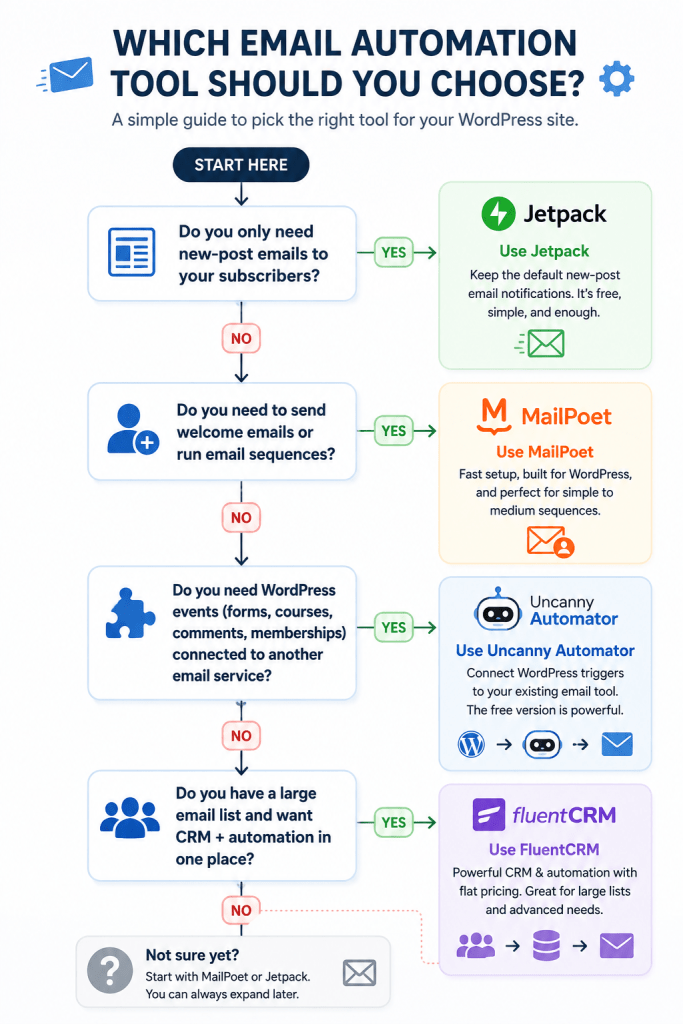
Check what you actually have running before adding anything. If it’s just Jetpack’s default toggle, that’s fine for a lot of blogs, but don’t mistake it for a system that can run a welcome sequence. And before you trigger anything off an “opened” event, worth knowing that open rate itself is no longer a metric you can trust, which changes what a safe automation trigger even looks like.
If you already picked an email tool from what’s actually free right now, its native automation is probably enough for a first sequence, so start there before adding a second plugin on top of it.
Only reach for Uncanny Automator once you have a specific cross-plugin trigger you can’t build any other way, not because it sounds like a useful thing to have installed.
And if you’re setting up FluentCRM, sort out your sending authentication first, or you’ll hit the same deliverability wall I did, three weeks of “sent successfully” messages that nobody ever actually received. If that volume ever grows into cold outreach territory rather than just your existing subscriber list, how many sending domains cold email actually needs is worth figuring out before you scale that far.