I told a reader last month to just sign up for Mailchimp’s free plan and get started. Bad advice. I hadn’t checked the current numbers, and by the time she signed up, Mailchimp had quietly slashed its free tier to the point where it barely functions for anyone with an actual list. That’s the problem with most “best free email marketing tools” posts floating around right now. They’re running on numbers from a year ago, and 2026 has been a brutal year for free plans. Two of the platforms bloggers get pointed toward most often cut their free tiers within months of each other, and most of the content ranking for this topic hasn’t caught up yet.
So instead of trusting my own memory of what these tools used to offer, I spun up a fresh free account on all five over the course of a week and ran the same three things through each one: imported a test CSV of a few hundred contacts, built one welcome automation, and sent one broadcast. That’s a small test, not a lab study, but it’s enough to catch the gap between what a pricing page promises and what you actually hit when you’re clicking around at 11pm trying to get a newsletter out.
Here’s what’s actually free right now, what changed, and which tool I’d point a broke blogger toward depending on what they’re trying to do.
The Default Recommendation Just Got Worse
Mailchimp has been the go-to answer to “what email tool should I use” for over a decade, and that reputation is now doing more harm than good.
Mailchimp’s February Cut
As of February 17, 2026, the free plan caps out at 250 contacts and 500 sends a month, with a daily ceiling of just 250 emails. Automation was already stripped from the free tier back in June 2025. So the tool everyone still recommends by reflex can’t run a welcome sequence, can’t handle more than a couple hundred subscribers, and slaps its own branding on every email you send.
MailerLite’s July Cut
I’m not picking on Mailchimp specifically. MailerLite, long the “generous free plan” alternative bloggers switched to, cut its own free tier from 500 subscribers and 12,000 monthly emails down to 250 subscribers and 2,500 emails, effective July 1, 2026. A second round of feature caps (three automations, three forms, one landing page) is scheduled to land August 13, 2026. Two of the most commonly recommended free tools got meaningfully worse in the same year, within months of each other.
That’s the actual news here, and it’s why I’m rewriting this list now instead of trusting what I wrote about email tools a year ago.
What Actually Matters on a Free Plan
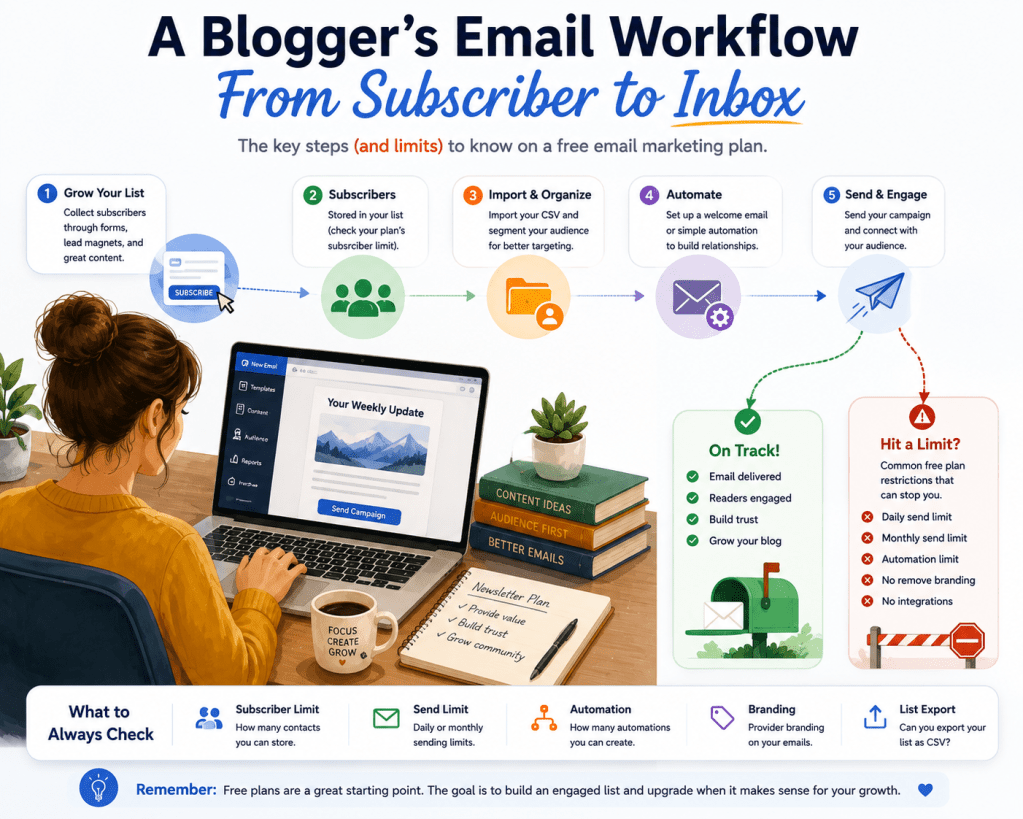
Every provider highlights the number that makes them look best. Contact limit, send limit, or feature list, whichever flatters them most. You need to check all of it, not just the headline figure.
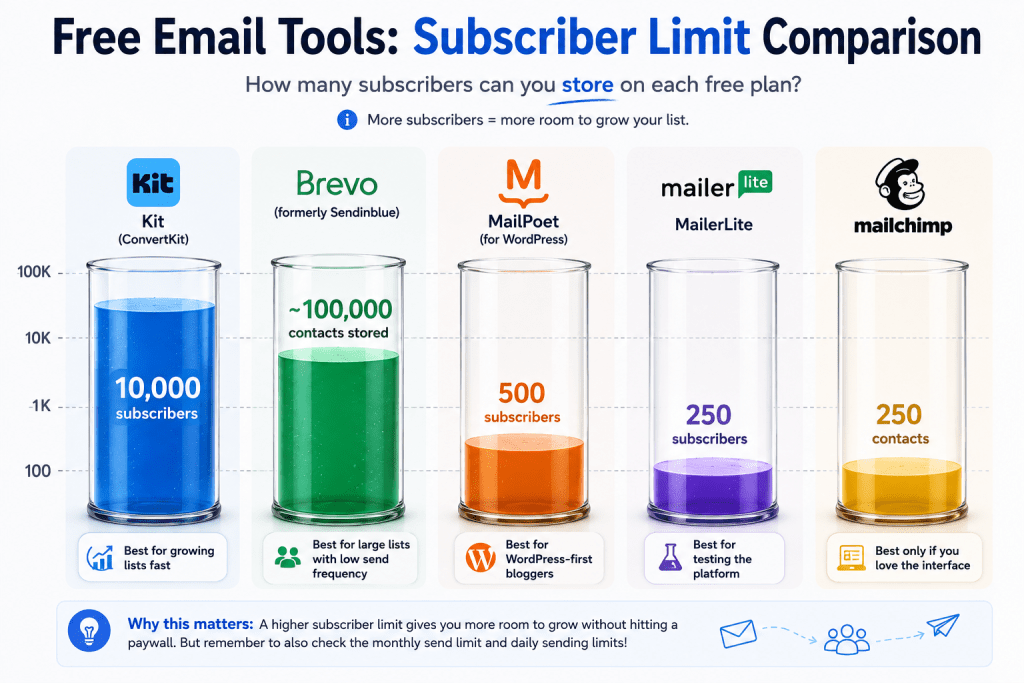
Subscriber Cap
How many contacts can you actually hold, and does it count unsubscribed or bounced addresses against you. Some platforms are generous here, others quietly count people who unsubscribed a year ago.
Send Limit
Some tools cap by month, some by day. A daily cap of 300 sounds fine until you realize it resets at midnight and doesn’t roll over, so a Tuesday-morning campaign that goes out to a bigger list than usual can get you throttled mid-send.
Automation Access
A welcome sequence for new subscribers is table stakes for running an actual email program. Several free plans now lock this behind a paid tier entirely, which means every new subscriber gets silence until you manually notice and email them yourself. If you’re not sure what’s actually worth automating once you do have access to it, our breakdown of email marketing automation for WordPress blogs covers that separately from the tool choice itself.
Branding
Every free plan I looked at puts the provider’s logo or “sent with” footer on your emails. None of them let you remove it without paying, so factor that into how professional you need your list to look on day one.
List Export
Check whether you can export your subscriber list as a plain CSV at any time, free tier included. A couple of providers make this harder than it should be specifically to discourage switching later, and you don’t want to find that out the day you’re trying to leave.
Get these five numbers before you read a single feature comparison chart. They tell you more than the marketing page does.
Five Free Tools Worth Actually Using in 2026
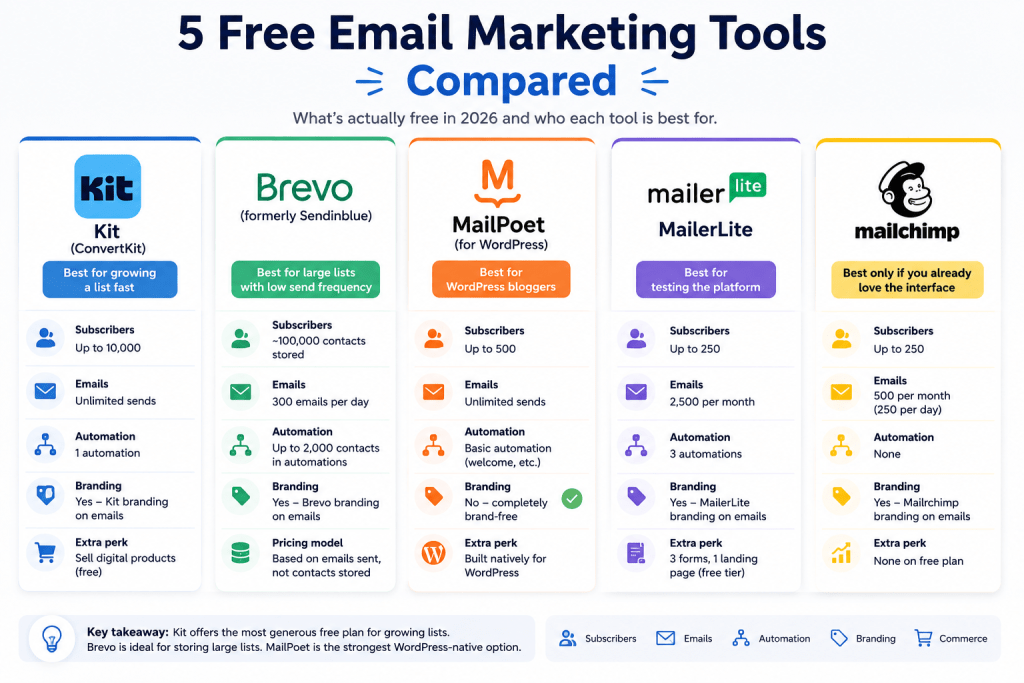
Here’s where each of the major players actually stands right now, verified against their own documentation rather than a listicle that hasn’t been updated since 2024.
Kit (ConvertKit)
Kit’s free “Newsletter” plan is the outlier here, and it surprised me. Up to 10,000 subscribers, unlimited broadcasts, no monthly or daily send cap, and it even lets you sell a digital product on the free tier. Setting up a test product and connecting Stripe took about fifteen minutes, longer than I expected, but the broadcast itself sent instantly with no confirmation delay or review queue. The tradeoff is a single automation rule and no third-party integrations, which I ran into the moment I tried to connect it to a form tool I actually use, no direct option, just a Zapier workaround. If your list is under 10,000 and you mainly send broadcasts rather than complex drip sequences, it’s still the most usable free plan on this list by a wide margin.
Brevo
Brevo works differently from the rest. It charges by emails sent, not contacts stored, so you can park a genuinely large list on the free plan as long as you’re not blasting it daily. I actually hit the 300-email daily cap partway through testing, sending to a list of a couple thousand test contacts one afternoon, and the campaign just sat queued with no warning email. I only noticed because I happened to check the dashboard again before dinner. If you’re sending one weekly newsletter to a few thousand people, the math works out fine, but don’t assume you’ll get a heads-up before you hit the wall.
MailPoet
MailPoet earns its spot because it lives inside WordPress itself, which matters more than it sounds like on paper. No separate login, no API key to configure, and subscriber counts sync straight from your site. That last part caught me off guard during testing, the subscriber count on my test site included every WordPress user account, two admin logins I’d forgotten were even set up, eating into the 500 limit before I’d added a single real subscriber. Worth checking your user list before you assume how much headroom you actually have. The 500-subscriber ceiling is tighter than Kit’s, but for a blog that’s still building its list, it removes an entire layer of tooling you’d otherwise have to manage.
Mailchimp
Mailchimp still has real strengths on paid tiers, deep integrations, a mature template library, years of documentation. None of that helps you on the free plan anymore. When I logged into a fresh free account to check this myself, the automation option wasn’t just capped, it wasn’t in the menu at all. No grayed-out button, no upgrade prompt where the feature used to live, just gone. At 250 contacts and 500 sends a month with automation removed entirely, it’s really a demo account rather than a plan you’d run a blog on. I’d only recommend it now to someone who wants to poke around the interface before committing elsewhere.
MailerLite
MailerLite is the one that stings a bit, because it used to be my default recommendation for anyone who outgrew Mailchimp without wanting to pay yet. I hadn’t logged into my own MailerLite test account in a few months, and the first thing I saw on the way back in was a banner counting down to the August 13 feature cutoff. Small detail, but it changes how the product feels to use. Waiting to lose functionality reads differently than never having had it. The July 2026 cut to 250 subscribers and 2,500 sends, with that second round of feature caps landing in August, closes the gap that used to make MailerLite worth switching to. It still includes automation on the free tier, which Mailchimp doesn’t, but the subscriber ceiling now matches Mailchimp’s almost exactly. That’s not the generous alternative it used to be.
Which One I’d Pick for Which Situation
Starting From Zero
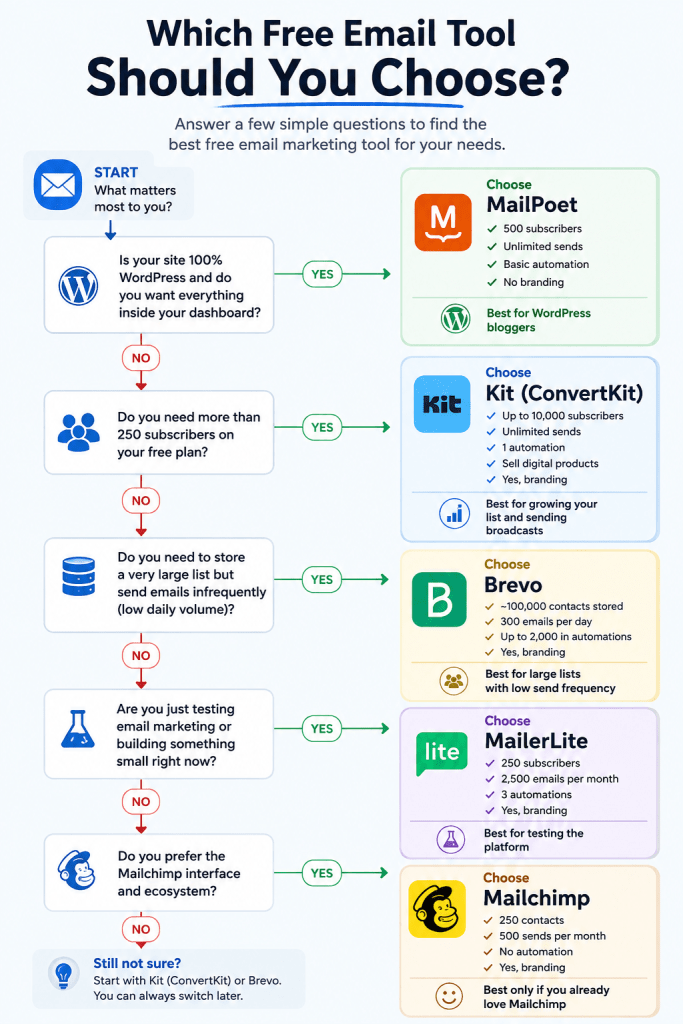
If you’re starting from zero and mainly want to send a weekly or monthly roundup, I’d point you at Kit. The 10,000-subscriber runway means you won’t hit a paywall for a long time, and unlimited sends means you’re not doing math before every send.
Running WordPress Only
If you’re running a WordPress-only setup and don’t want another dashboard to manage, MailPoet is the more sensible pick even with the lower cap. I’ve written before about what actually matters when you’re choosing a WordPress host in the first place, and the same logic applies here: fewer moving parts usually beats more features you won’t use.
A Large List, Sent Infrequently
If your list is large but you send infrequently, maybe a monthly digest, Brevo’s send-based pricing works in your favor in a way contact-based pricing never will.
Planning to Sell Something Soon
If you’re planning to sell something soon, a course, a template pack, a small digital product, Kit’s built-in commerce feature on the free tier means you can test that without adding a second tool to your stack. That’s a real advantage over MailPoet and Brevo, neither of which offers anything comparable without a paid plan.
Already Close to the Old Limits
And if you already have an existing list sitting in Mailchimp or MailerLite and you’re right at the edge of the new limits, don’t panic and migrate the same day. Export your list first, confirm it lands cleanly in whichever tool you’re moving to, and only then cut over your actual sending. I’ve watched people rush a migration and lose weeks of subscriber tags in the process.
I wouldn’t start fresh on Mailchimp or MailerLite right now. Not because they’re bad products, but because their free tiers no longer give you enough room to find out if the product is right for you before you hit a wall.
What You Give Up by Staying Free
None of this is free in the sense of “no cost at all.” You’re paying with limitations instead of dollars, and it’s worth being honest about what those are.
Every option on this list puts the provider’s branding on your emails, which is a small thing until a reader mentions it. Automation is either capped or entirely absent, so anything beyond a single welcome email or a basic sequence usually means a manual workaround or a paid upgrade. And migrating a list between providers later, once you outgrow the free tier, is never as clean as the “one-click import” pages promise. Tags, segments, and automation history rarely transfer cleanly, even when the contact list itself moves over fine. Pick the tool you’d be least annoyed to grow out of, not just the one with the biggest number on the pricing page today.Every option on this list puts the provider’s branding on your emails, which is a small thing until a reader mentions it. Automation is either capped or entirely absent, so anything beyond a single welcome email or a basic sequence usually means a manual workaround or a paid upgrade. And migrating a list between providers later, once you outgrow the free tier, is never as clean as the “one-click import” pages promise. Tags, segments, and automation history rarely transfer cleanly, even when the contact list itself moves over fine. Pick the tool you’d be least annoyed to grow out of, not just the one with the biggest number on the pricing page today.
Questions People Ask About Free Email Marketing Tools
Is Mailchimp still worth using for free in 2026?
Only for a very small list under 250 contacts with no automation needs. The February 2026 changes made the free plan too limited for most bloggers actively growing a list.
Which free email marketing tool has the highest subscriber limit?
Kit’s free Newsletter plan supports up to 10,000 subscribers, the highest ceiling of any major provider’s free tier right now.
Can I use a free email marketing tool if I don’t use WordPress?
Yes. Kit, Brevo, MailerLite, and Mailchimp all work independently of your website platform. MailPoet is the exception since it’s built specifically as a WordPress plugin.
Do free email marketing plans hurt deliverability?
Not directly, since deliverability depends more on your sending domain’s authentication and reputation than on which pricing tier you’re on. That said, shared branding footers and lower sending reputations tied to free-tier IP pools can play a small role.
When should I move off a free email marketing plan?
When you’re within about 10 percent of the subscriber or send limit, not the day you hit it. Upgrading under pressure, mid-campaign, usually costs you more in lost time than just planning the move a few weeks ahead.
Conclusion
Check your current list size against the numbers in the table above before you assume your current tool still fits. If you’re under 250 subscribers, almost anything here works. Past that, Mailchimp and MailerLite are the two I’d steer away from starting fresh on, for the reasons above. And whichever tool you land on, none of it matters if your DNS records aren’t configured correctly, since a misconfigured sending domain sinks deliverability regardless of which platform sent the message.
Once you’ve picked a tool, the tool itself is only half the equation. I’ve covered what actually drives results in email marketing separately, and if deliverability is a concern once you start sending in volume, I broke down why my own emails were landing in spam and what actually fixed it. Worth a read before you scale past whatever free plan you land on.