

WordPress does not send automated emails on its own. It can trigger an event: a new subscriber, a form submission, a fresh post going live. That’s it. What happens after that trigger is a separate question, and most bloggers never actually answer it. They install a plugin, turn on a toggle, and hope.
Here is the model worth understanding before you touch a single plugin setting: Trigger → Condition → Action → Email. A visitor submits a form. A subscriber gets added. WordPress waits a day. A welcome email goes out. Once that chain makes sense, choosing tools gets a lot easier.
If you have not read our broader breakdown of the topic, start with Email Marketing Automation for WordPress Blogs. The practical question below is simpler: how do you actually get WordPress to send an email without you clicking send?
What Counts as Automated Emails in WordPress?
An automated email is one that goes out because of a rule, not because someone opened their inbox and hit compose. The rule can be dead simple. Someone signs up, they get a welcome message. Or it can branch into a real sequence. Someone signs up, waits two days, gets tagged based on what they clicked, then gets a different email depending on that tag.
Both count as automation. Only one of them is actually useful past a certain list size.
Automated Email Notification vs. Trigger vs. Sequence in WordPress
This distinction matters more than most WordPress tutorials let on:
- A notification fires once and does nothing else. New comment, someone gets pinged. That’s it.
- A triggered email responds to a specific event with a single message. Form submitted, confirmation sent.
- A multi-step automation chains several actions together, often with waits and conditions in between.
Plenty of plugins market “automated emails” when what they’re really shipping is a notification system. Worth checking before you build a whole strategy around a feature that stops at step one.
What You Can Automate With WordPress Email Automation
| Trigger | Automated action |
|---|---|
| New subscriber | Send welcome email |
| Form submission | Send follow-up |
| New user registration | Send onboarding email |
| New blog post | Notify subscribers |
| Purchase | Send follow-up |
| Abandoned cart | Send reminder |
| Inactive subscriber | Send re-engagement email |
Every row above needs its own event listener and its own delivery mechanism. WordPress doesn’t bundle all of that natively, which is exactly why the next section matters.
The Three Pieces You Need to Automate Emails in WordPress
Automated email in WordPress isn’t one system. It’s three, stacked on top of each other, and conflating them is where most setups go sideways.
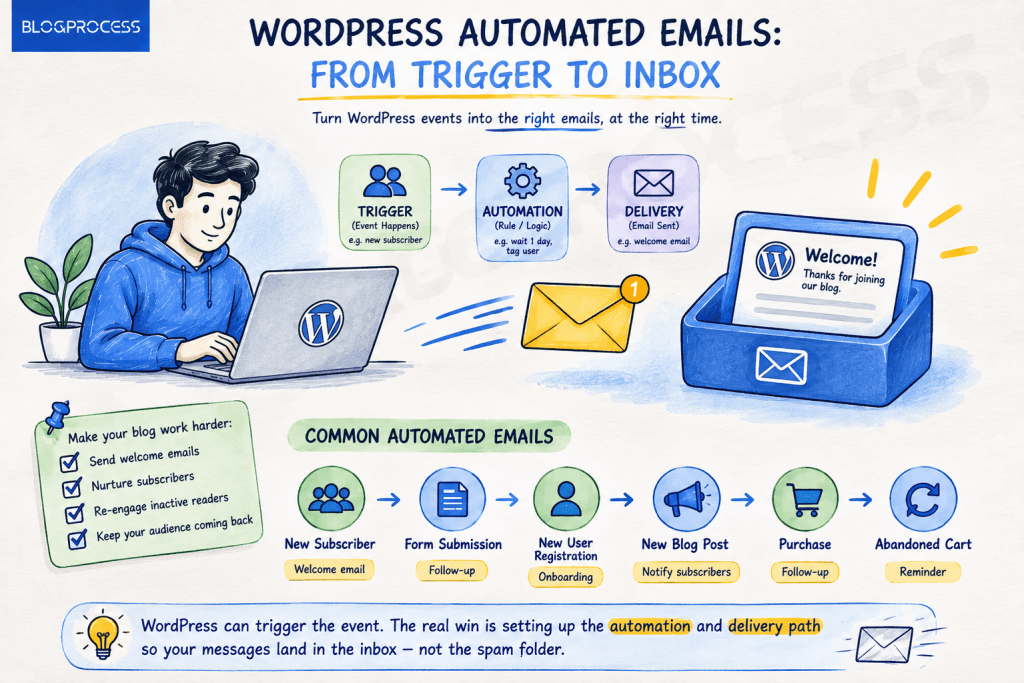
WordPress website → detects that something happened. Automation tool → decides what to do about it. Email delivery system → gets the message into an inbox instead of a spam folder.
WordPress can absolutely fire the event. It’s the “then send this exact email through a reliable delivery path” part that trips people up, and here’s the technical reason why. WordPress core has never shipped its own mail transfer agent. According to the WordPress developer documentation, wp_mail() is a wrapper around PHP’s native mail() function, and it defaults to plain text with no built-in authentication layer. That’s not a bug. WordPress was never built to handle deliverability, only to hand a message off and hope the server does something reasonable with it.

That gap is exactly why so many automated sequences quietly fail. Delivery breaks first, automation second. Get your delivery layer sorted before you add waits, tags, or conditions. Check out our breakdown of every DNS record your email actually needs, and if messages have ever landed in spam for no obvious reason, here’s the usual real cause.
Four Ways to Automate Emails in WordPress
Method 1: WordPress Email Marketing Plugin (MailPoet)
Tools like MailPoet handle newsletters, subscriber lists, and basic automated sequences from inside WordPress itself. Simple, by design. Good fit if your needs are: collect subscribers, send a welcome message, occasionally notify people about new posts. Not built for heavy segmentation or complex branching logic.
Method 2: WordPress CRM With Email Automation (FluentCRM)
FluentCRM and similar tools step things up considerably. Tagging, segmentation, behavioral triggers, multi-branch sequences. Worth the extra setup time once your list is large enough that “send everyone the same email” stops making sense.
Method 3: WordPress Automation Plugin (Uncanny Automator)
Uncanny Automator and comparable plugins connect WordPress events to actions across different plugins and services. Useful when the goal isn’t strictly email but rather chaining together WordPress-native actions: new registration triggers a Slack message, a tag gets added, and an email goes out, all from one recipe.
Method 4: External Email Automation Platform
Some bloggers skip WordPress-native tools entirely and run automation through Brevo, MailerLite, or a similar platform, connecting it to WordPress only for the trigger. Worth considering if you already run marketing outside WordPress.
If you’re still deciding between paid platforms, our list of free email marketing tools worth trying before you pay for anything is a reasonable starting point. A dedicated plugin comparison is coming as a follow-up piece. Category before brand. Getting the category right matters more than picking a winner on day one.
Real WordPress Email Automation Workflows
Automated Welcome Email Sequence With Behavioral Branching
A flat three-email sequence that sends on a fixed schedule regardless of what the subscriber does is the version most tutorials show. It’s also the version that leaves engagement data on the table. A branching version looks like this:
- Hour 0: Welcome email sends immediately on signup. Subject line built around one specific outcome, not “Welcome to the newsletter.” Something like “Here’s the first thing to fix on your site.”
- Day 2, condition check: Branch based on whether the subscriber clicked the link in that first email, not whether they opened it. Open tracking runs on a hidden pixel, and it’s gotten less reliable over the past few years since Apple’s Mail Privacy Protection pre-loads that pixel for every message regardless of whether a human ever looks at it. Clicks are still real signal. Clickers get a deeper resource tied to what they clicked. Non-clickers get a different value email instead of a repeat send.
- Day 5: A soft call to action, gated behind whether the subscriber has clicked anything across the first two emails. Clickers get a direct offer. Non-clickers get one more piece of value content instead, since pitching someone who’s shown zero engagement usually just triggers an unsubscribe.
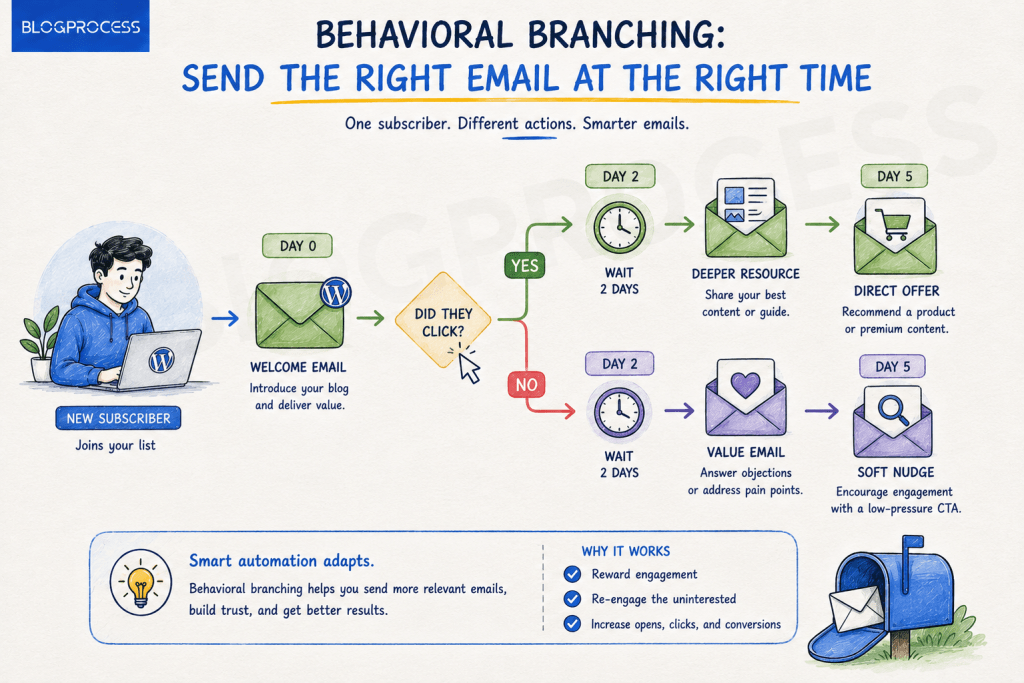
In FluentCRM this branching lives inside a Funnel, using a Conditional block that checks Link Clicked status. Worth knowing before you build around it: that specific condition sits behind FluentCRM Pro. Free doesn’t cut it here. The benchmark set on the free version skips link-click tracking entirely.
In MailPoet, conditional branching of any kind requires the paid Automations add-on, since the free Starter plan only supports linear sequences. That distinction matters more than most comparison posts mention, and it’s worth checking before you build a sequence that assumes a feature your plan doesn’t include.
WooCommerce Automated Cart Recovery Emails
Cart abandonment automation is one of the higher-value use cases precisely because the timing window is narrow and well documented across ecommerce data.
| Send | Timing | Content |
|---|---|---|
| Email 1 | 1 hour after abandonment | Reminder only, no discount |
| Email 2 | 24 hours after abandonment | Reminder plus a small incentive, often a modest percentage off or free shipping |
| Email 3 | 72 hours after abandonment | Final reminder, urgency framing, last chance for the incentive |
The first email deliberately skips the discount. No coupon, not yet. Offering a discount immediately trains repeat customers to abandon carts on purpose and wait for the coupon. One detail that trips people up: WooCommerce core has no native concept of an abandoned cart, so nothing fires automatically until something is watching for it. That means either a dedicated cart recovery plugin, like Abandoned Cart Lite for WooCommerce, or a CRM with its own tracking built in. FluentCRM added a native Abandoned Cart module a while back that handles both the detection and the timed sequence in one place, no separate plugin required. Skip this one if your average cart value is low enough that the incentive cost outweighs the recovered revenue.
Automated Follow-Up Emails After a Form Submission
Treating every form submission the same way wastes the one piece of data the form actually captured: intent. A service inquiry form with a budget field is a better example than a generic contact form.
- Someone selects a low budget tier. They get an automated email pointing to self-serve resources or a lower-tier offer. No human follow-up needed.
- Someone selects a high budget tier. The automation tags them as a priority lead, sends a Slack or email alert to the actual team, and starts a different, shorter nurture sequence that assumes they’re closer to a decision.
That single field turns one form into two automations instead of one generic “thanks for reaching out” email. Small change, real payoff. FluentCRM handles field-based routing through its own conditional triggers. Uncanny Automator can do the same, but the condition/filter feature that makes it possible sits behind Automator Pro, the free version runs recipes in a straight line with no branching. Which of those three, a contact form, live chat, or an AI chatbot, actually captures that lead in the first place matters just as much as what happens after it. We compared how those three convert here.
Automatic Blog Post Notification Emails, and Why They’re Not the Same Thing
New article published ↓Check subscriber list ↓Send article email
Worth flagging again: this is closer to a notification than a marketing sequence, and treating it like one leads to flat, forgettable send patterns. A stronger version batches new posts into a weekly digest instead of firing one email per post. Weekly wins here. Sending a single-post email every time you publish is one of the fastest ways to spike unsubscribe rates on a low-frequency blog. Save the immediate single-post send for genuinely high-value content, not every update.
Simple vs. Advanced WordPress Email Automation
Simple automation follows one rule: someone does X, WordPress sends Y. Form submission triggers a confirmation email. Done.
Advanced automation looks more like this: someone does X, WordPress waits, checks a condition, tags the user based on behavior, sends an email, waits again, checks what they did with that email, sends a different one depending on the answer.
That second version almost always requires a CRM or a dedicated automation platform. WordPress alone, out of the box, isn’t built to hold that much branching logic. Not a flaw. Just a scope limit, one worth planning around before you commit to a tool that can’t grow with your list.
Which Automation Method Should You Use in WordPress?
| What you want to do | Best approach |
|---|---|
| Send blog post notifications | Email newsletter plugin |
| Welcome new subscribers | Email automation tool |
| Create multi-email sequences | CRM or email automation platform |
| Automate WordPress actions | Automation plugin |
| Automate WooCommerce customer emails | WooCommerce automation tool |
| Improve email delivery | SMTP plus proper authentication |
If your current setup only handles single-trigger emails and you’re still on single opt-in, it’s worth understanding how that choice affects your automation before you scale it up. This comparison covers what your platform actually defaults to and why it matters more than most people assume.
The gap between “email sent” and “email delivered” is bigger than most automation guides admit. WP Mail SMTP, whose plugin runs on more than three million WordPress installs, reports an average deliverability rate of roughly 64% for sites still relying on WordPress’s default PHP mail function, compared to about 96% for sites using authenticated SMTP. That’s not a rounding error. That’s the difference between a five-email welcome sequence that actually lands and one where two out of five messages vanish into a spam folder nobody checks.
Methodology note: Plugin categorization and feature comparisons above reflect each tool’s publicly documented feature set as of August 2026, cross-checked against current listings on WordPress.org and each vendor’s own documentation. Feature sets change fast in this category, so check current plugin documentation before committing to a paid tier.
[Screenshot placeholder: example automation recipe inside a WordPress automation plugin dashboard]
Questions People Ask About Automated Emails in WordPress
Can WordPress send automated emails?
Not on its own, no. WordPress can detect that something happened, a form was submitted, a user registered, but turning that event into a scheduled, conditional, or sequenced email requires a plugin, CRM, or external automation tool layered on top.
How do I automate emails in WordPress?
Pick a tool that matches your complexity needs. Start there. A newsletter plugin like MailPoet covers basic welcome emails and notifications. A CRM like FluentCRM handles branching sequences. An automation plugin like Uncanny Automator connects WordPress events to actions across other tools. Configure the trigger, set the action, and test the delivery before going live.
Does WordPress have built-in email automation?
No. Core WordPress can send transactional emails like password resets and new user notifications, but it has no built-in system for marketing sequences, drip campaigns, or behavioral triggers. That functionality always comes from a plugin.
Can I send automated welcome emails from WordPress?
Yes, and it’s one of the most common use cases. Most email marketing plugins and CRMs include a welcome email trigger as a default automation, usually configurable within minutes of installing the tool.
What is the best email automation plugin for WordPress?
It depends on what you’re automating. Newsletter-focused bloggers tend to prefer MailPoet. Businesses that need tagging and segmentation usually move to FluentCRM. Sites that want to connect automation across multiple plugins often use Uncanny Automator. A full comparison is coming as a dedicated follow-up article.
Do I need SMTP for automated emails in WordPress?
Yes, in almost every case. WordPress’s default mail function sends without authentication, and deliverability data from WP Mail SMTP puts unauthenticated sends at roughly 64% inbox placement, versus roughly 96% for authenticated SMTP. Proper SMTP configuration with SPF, DKIM, and DMARC records in place is what actually gets automated emails delivered instead of quietly disappearing.
Conclusion
WordPress isn’t an email automation platform. It’s an event detector that hands the real work off to whatever tool you connect to it. Once that framework clicks, picking between MailPoet, FluentCRM, Uncanny Automator, or an external platform stops being confusing and starts being a straightforward question of how complex your sequences need to get.
Start small. Get a single welcome email firing reliably before you build out a five-step drip sequence. Confirm your delivery setup is solid first, because the most sophisticated automation in the world is worthless if it lands in spam. From there, expand one workflow at a time: welcome sequence, then form follow-ups, then re-engagement for subscribers who’ve gone quiet.