


I found 47 broken internal links on my own site the first time I actually checked. Not external links to some tool that shut down years ago. Links from one of my own posts to another one of my own posts, pointing at a URL that no longer existed.
Most of them came from slug changes I’d made without thinking twice. Rename a post for better SEO, forget every other post linking to the old URL, and six months later there’s a quiet trail of dead links nobody notices until traffic on an old cornerstone post mysteriously dips.
Why Broken Internal Links Quietly Hurt More Than You’d Think
A broken external link is annoying. A broken internal link is worse, because it’s damage you did to yourself, and it compounds. Every internal link is a small vote of confidence from one page to another. When that link goes dead, the page on the receiving end loses that vote, and the reader who clicked it hits a 404 instead of the deeper content you wanted them to see.
Search engines notice too. A site with a growing number of broken internal links reads as poorly maintained, which isn’t a great signal to send at the exact moment GEO and AI search are paying closer attention to whether a site is actively kept up.
The insidious part is that broken internal links don’t announce themselves. A broken external link sometimes gets reported by an annoyed reader. Nobody emails you to say your own post links to your own dead page. It just sits there, quietly costing you clicks, until you go looking for it.
How to Actually Find Every Broken Link
Guessing which posts have dead links doesn’t scale past about ten posts. You need an actual scan.
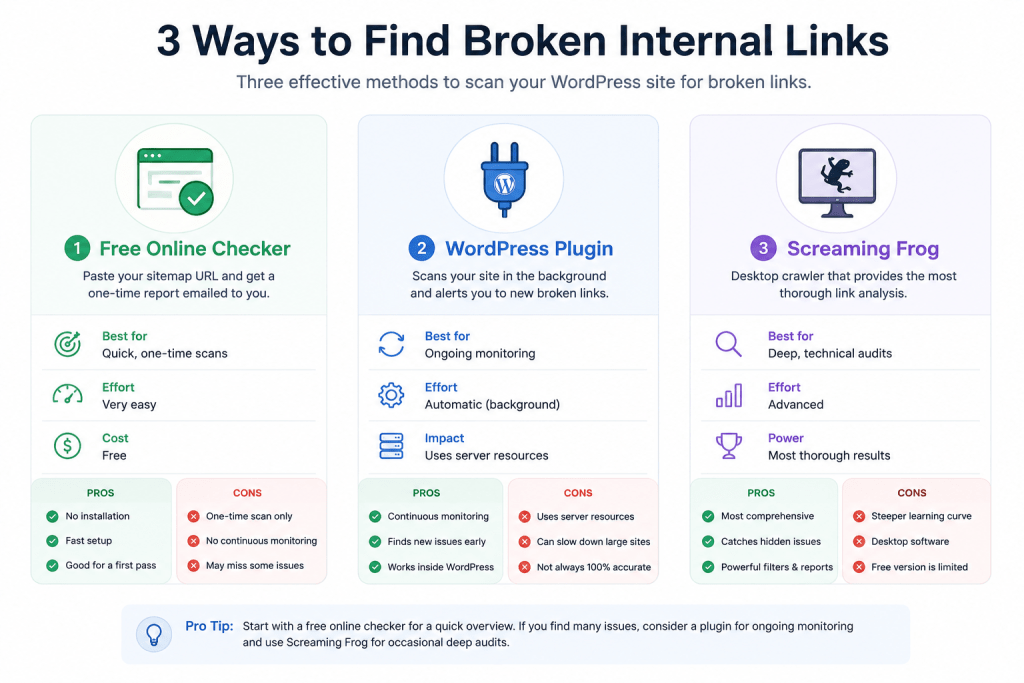
Three ways to run one, roughly in order of effort:
→ A free online checker (like Dead Link Checker or Broken Link Check): paste your sitemap URL, get a report emailed to you. Good for a single pass, not built for repeat visits.
→ A WordPress plugin (Broken Link Checker is the common one): scans continuously in the background and flags new breaks as they happen, at the cost of some extra server load running all the time.
→ A manual crawl with a tool like Screaming Frog: the most thorough option, and the one that catches redirect chains and soft-404s the other two often miss.
For a site with a few hundred posts, I’d start with the free online checker for a first pass, then decide whether continuous monitoring is worth the background cost based on how much comes back.
A Worked Example: What My Own Scan Turned Up
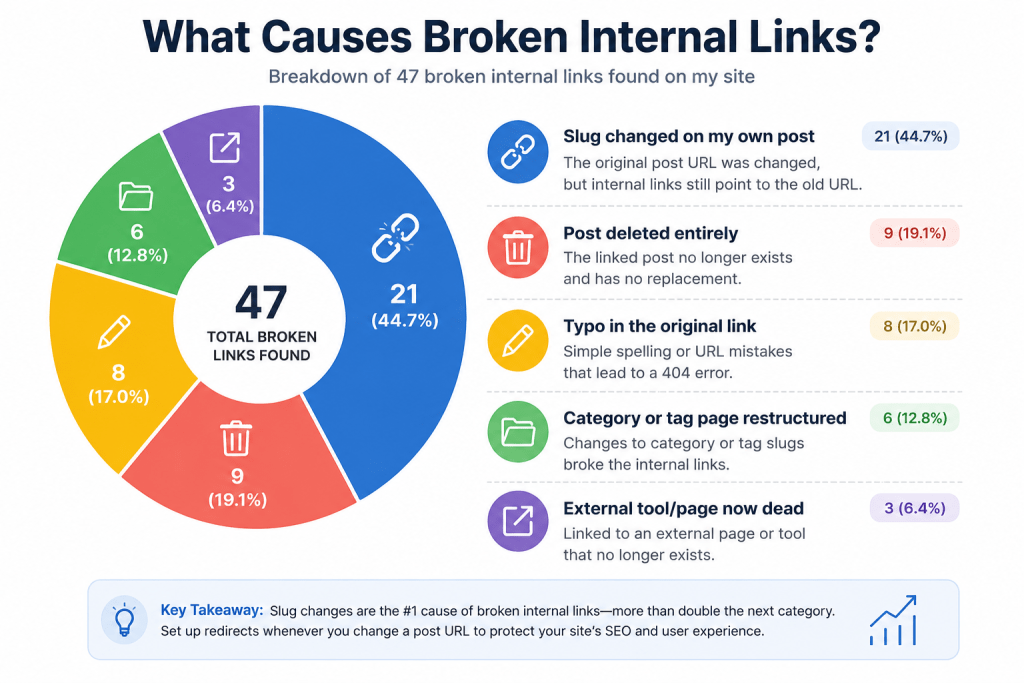
Here’s what my first real scan actually found, broken down by cause:
| Cause | Count | Typical Fix |
|---|---|---|
| Slug changed on my own post | 21 | Update the link or redirect the old slug |
| Post deleted entirely | 9 | Link to a replacement post or remove the link |
| Typo in the original link | 8 | Fix the URL directly |
| Category or tag page restructured | 6 | Update to the new archive URL |
| External tool/page now dead | 3 | Replace with a current source or remove |
Slug changes were the biggest single cause by a wide margin, more than double the next category. That’s worth knowing before you start fixing things one by one: the highest-leverage move usually isn’t hunting for typos, it’s making sure every slug change gets a redirect at the moment you make it, not months later when a scan finally catches the fallout.
Not Every Broken Link Deserves the Same Urgency
A scan report treats every broken link the same way: one line in a list. In practice, a dead link buried in a five-year-old post nobody reads matters a lot less than one sitting inside your highest-traffic post, or one that used to point at a page you’re actively trying to rank.
Before fixing anything, cross-reference the broken links against your analytics. A broken link inside a post getting real monthly traffic jumps to the top of the list regardless of how old it is. A broken link in a post that gets three visits a year can wait, or in some cases isn’t worth fixing at all if the surrounding content is due for a rewrite anyway.
I sorted my own 47 this way before touching any of them. Six sat inside my three highest-traffic posts. Those six got fixed the same afternoon. The rest got worked through over the following two weeks, in traffic order, rather than in whatever order the scanner happened to list them.
The Redirect vs. Rewrite Question
Fixing a broken link isn’t always about the redirect. Sometimes the better fix is going back to the sentence that contained the link and asking whether the link even belongs there anymore.
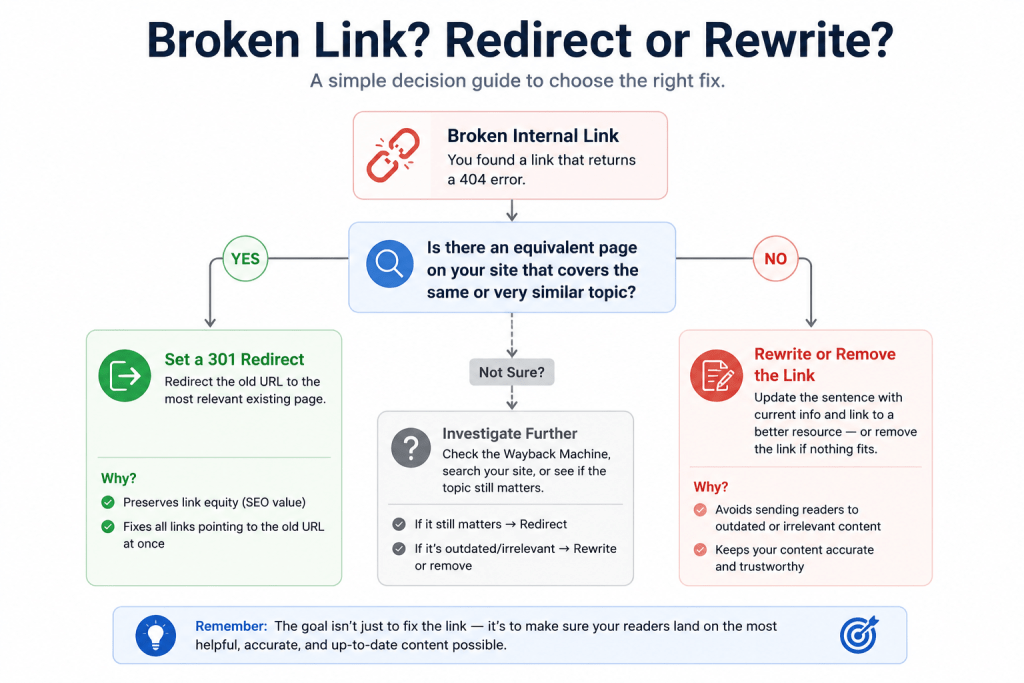
A post written two years ago might reference a tool, a statistic, or a strategy that’s since changed enough that linking to the old destination, even with a working redirect in place, points a reader toward something now slightly wrong or outdated. In that case, the actual fix isn’t a 301. It’s rewriting the sentence itself to reference something current, then linking to whatever page genuinely supports that updated claim.
This came up twice in my own cleanup. One broken link pointed at a post about a plugin I no longer recommend at all. Redirecting it to that same post would have “fixed” the broken link while quietly pointing readers toward outdated advice. Removing the link and updating the sentence was the actual right call, not a redirect.
Fixing Each Type of Broken Link
Not every broken link gets fixed the same way, and treating them all identically wastes time.
Slug changes are the easiest real fix: a 301 redirect from the old URL to the new one. This fixes every single link pointing to that old slug at once, including ones you don’t know about yet, like links from other sites or bookmarks. Editing each individual post that links there is the slower, worse option for this category specifically.
Deleted posts need a judgment call. If a genuinely better replacement exists on the site, redirect to that. If nothing covers the same ground anymore, it’s usually better to just remove the link from wherever it appears rather than redirecting to something unrelated just to avoid a 404.
Typos are the simplest category and the one people obsess over most, probably because they feel like an embarrassing mistake. They’re also usually the smallest slice of the total problem, eight out of 47 in my case, so don’t let them eat more of your time than their share of the damage.
Restructured archive pages (categories, tags, custom taxonomies) get missed constantly because they don’t feel like “real” pages the way posts do. A redirect at the taxonomy level fixes every internal link pointing to the old archive URL in one move, same logic as the slug fix above. On a WooCommerce store, this kind of drift often shows up first in breadcrumb schema disagreeing with the actual category path, worth checking as an early warning sign before it turns into a full broken-link scan.
Setting Up Redirects the Right Way
A redirect plugin or your host‘s built-in redirect manager handles the mechanics; the part worth doing carefully is making sure every redirect points to a genuine equivalent, not just the closest thing you can find. A redirect to a loosely related post trains readers to distrust your links generally, which defeats the purpose of fixing this in the first place.
Keep the list of redirects itself somewhere visible, a simple spreadsheet works, so six months from now you’re not rediscovering the same slug change twice. I lost an afternoon once tracking down a redirect I’d already set up and forgotten about, because nothing recorded that it existed anywhere outside the plugin’s own settings page.
If plugin overhead is already a concern on your site, The Real Cost of “Just One More Plugin”: A WordPress Bloat Audit is worth reading before adding a dedicated redirect plugin, since some hosts and SEO plugins already include redirect management without needing another separate tool running on every page load.
Building This Into a Regular Check
A one-time cleanup gets you back to zero. New broken links start accumulating again the moment you rename your next post or delete an old one.
The cheapest habit that actually prevents this: whenever you change a slug or delete a post, set the redirect in that same sitting, before moving on to anything else. That single habit would have caught 30 of my 47 broken links before they ever became a problem, since the slug and deletion categories together made up the majority of the total.
Beyond that habit, a scan every quarter catches the smaller, harder-to-predict cases, typos, external links going dead, restructured archives, without needing a plugin running continuously in the background. 7 Mistakes That Will Kill Your Blog and Even Your Business covers a few other maintenance gaps worth checking in the same pass, since a lot of the small structural issues that compound over time tend to cluster together, and if the checks keep sliding because you’re already stretched thin, The Blogger Burnout Checklist is worth a look too. If your site’s foundational structure was set up in a hurry when you first started, The Essentials of Blogging – Part1 is worth revisiting too, since a clean permalink structure from the start prevents a good chunk of this entire problem.
Questions People Ask About Broken Internal Links
How many broken links is “normal” for an established blog? There’s no universal number, but as a rough sense of scale, mine turned up 47 across a few hundred posts before ever running a check. If you’ve never scanned and have any real archive, expect double digits rather than a handful.
Do broken internal links actually hurt SEO, or is that overstated? They don’t tank rankings the way a manual penalty would, but they do waste crawl budget and dilute the internal link equity a healthy site structure depends on. The bigger practical cost is usually the reader experience: a dead link mid-article is a small but real reason to bounce.
Should I use a plugin that scans continuously, or is a periodic manual check enough? A quarterly manual check is usually enough once you’ve built the “redirect at the moment of change” habit, since that habit prevents most new breaks from accumulating in the first place. Continuous scanning plugins add value mainly for larger sites publishing daily, where waiting three months means a much bigger backlog by the time you check.
What’s the fastest way to fix a large number of broken links at once? Sort by cause first, the way the table above does, rather than fixing links one at a time in the order a scanner lists them. Slug-change and archive-restructure redirects each fix dozens of individual broken links in one move, which clears the bulk of the problem before you ever touch the smaller typo and dead-external-link categories.
Can fixing broken links accidentally create redirect loops? Yes, if an old slug gets redirected to a URL that’s later renamed again without updating the first redirect. Keeping a visible list of every redirect, not just relying on the plugin’s internal settings, is what prevents this from stacking up unnoticed.
Conclusion
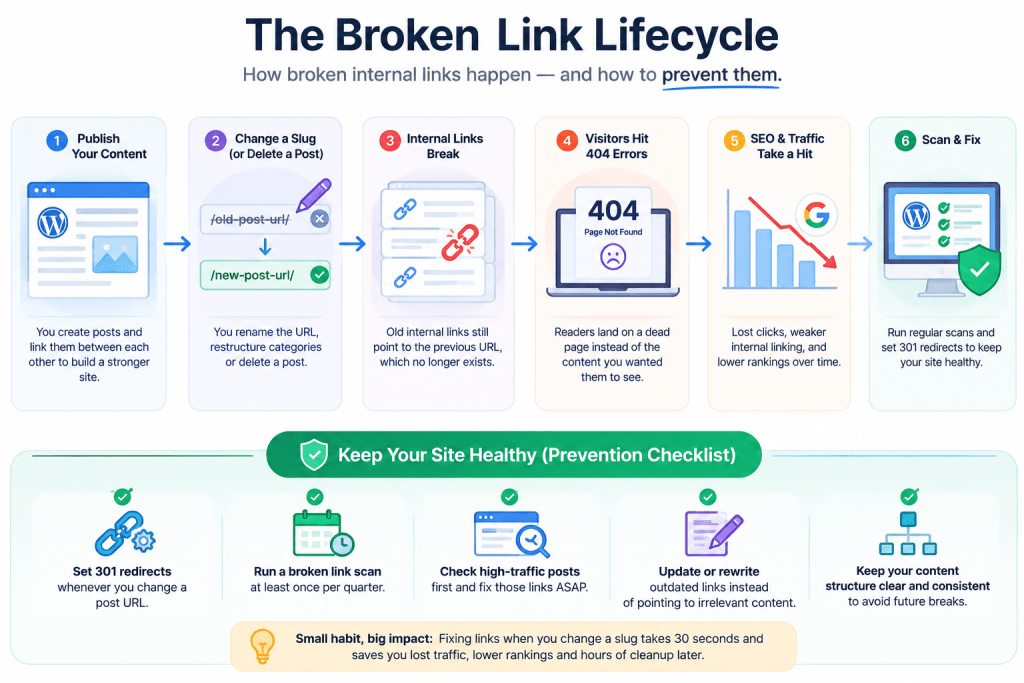
Forty-seven broken links sounds like a lot until you realize 30 of them traced back to one preventable habit: not setting a redirect the moment a slug changed. The scan matters, but the habit is what keeps the number from creeping back up right after you fix it.
Run a free link checker against your sitemap this week. Sort whatever comes back by cause, not by URL. Fix the slug changes first, since that’s almost always where most of the damage is hiding.