

Fix the ‘Scheduled Maintenance’ Error on WordPress

One of the most annoying error in WordPress is the ‘Scheduled Maintenance’ message a Webmaster gets after an automatic upgrade has completed.

This problem is mainly caused by a failed automatic upgrade or an interrupted update process.  So each time a visitor tries to visit your home page, he/she will get the following message:

Briefly unavailable for scheduled maintenance. Check back in a minute.

In fact, each time WordPress is automatically updating its core files, themes or plugins, the blog will be  marked as ‘under maintenance’.
To fix this problem :  remove .maintenance (hidden) file, located  in your blog root directory and the site will come back.
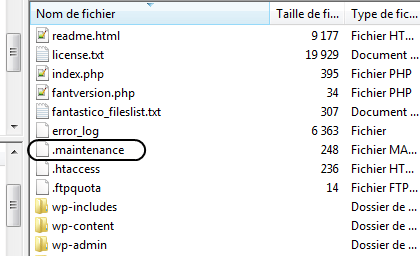
maintenance


You may want to run the WordPress automatic upgrade again after resolving this problem.


You May Also Like

Easy Tips for Changing the Author of a Published Post in WordPress

Suppose you wrote a post and published it then realized that you are not the author listed, how will you plan to change the “author”? There are other reasons why writers need to change the author of the blog posts such as: when you need to replace the author name under your name, as well […]

Affect an image to categories in WordPress without plugin

This tutorial allows you to add a text field to fill the URL of an image for each of your categories. Add this in your functions.php file: [sourcecode language=”php”]add_action(‘init’, ‘my_category_module’);[/sourcecode] [sourcecode language=”php”]function my_category_module() { add_action ( ‘edit_category_form_fields’, ‘add_image_cat’); add_action ( ‘edited_category’, ‘save_image’); }[/sourcecode] The function to add the extra field : [sourcecode language=”php”]function add_image_cat($tag){ $category_images = get_option( ‘category_images’ ); $category_image = ”; if ( is_array( $category_images ) && array_key_exists( $tag->term_id, $category_images […]

WordPress Hack: remove “WordPress Generator”

The publishing platform WordPress adds a small line for itself to advertise and clarify that the site that you find is a site using WordPress. Except that in addition to reporting that it’s WordPress, it goes to show the current version.It is not embarrassing, except that each version has its security problems… Past one of […]

Save more WordPress’ database disk space with a simple trick

If you use WordPress as blogging platform, and you have installed a recent version, you must have see that it has become more greedy in space. This is particularly due to the registration of “revisions”. What is “revisions”? These are versions of posts that are recorded as you write. This is a very useful feature […]