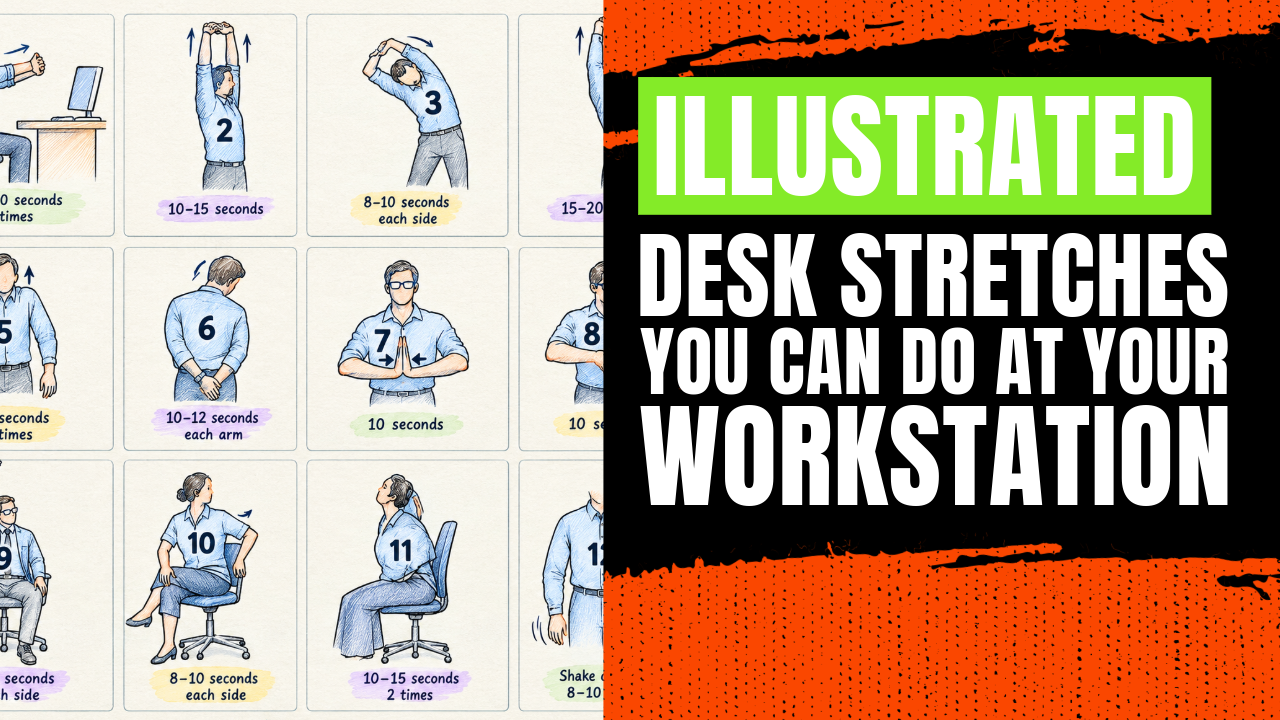


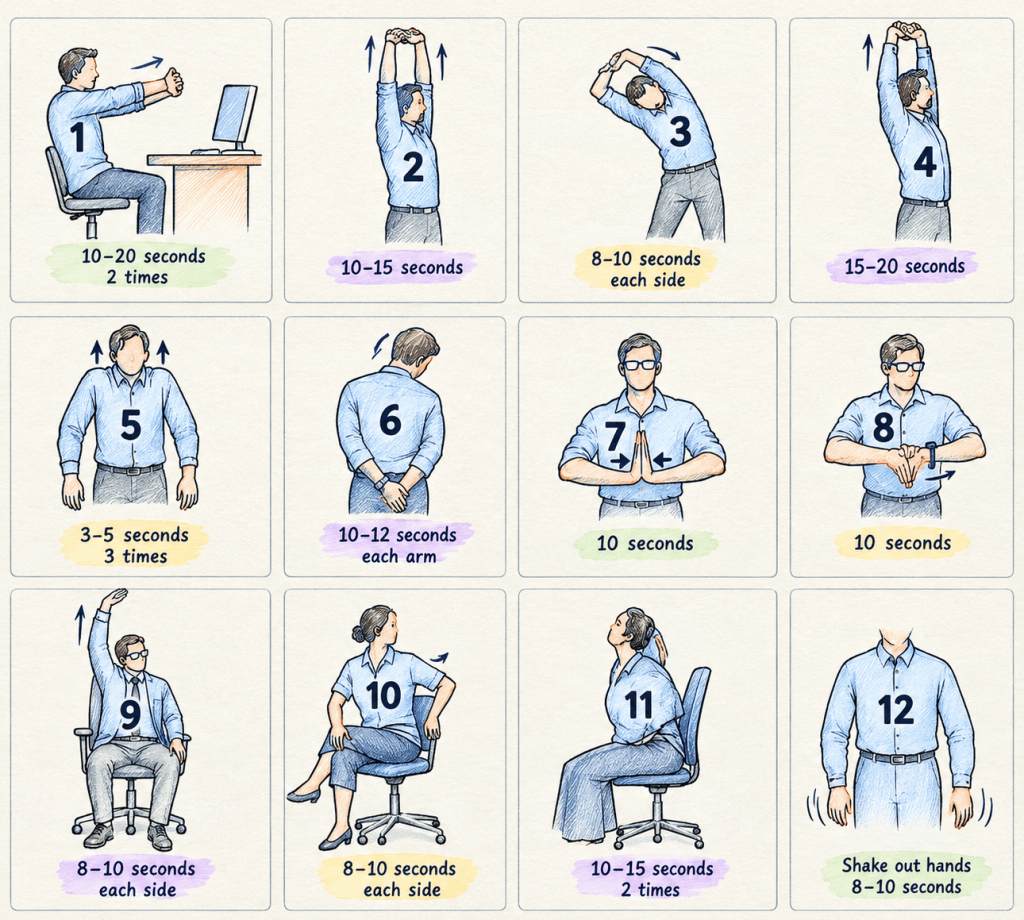
Your body was never built to hold one posture for four hours straight. Writing sessions demand it anyway. The head drifts forward and the shoulders round while the wrists bend over the keyboard. The chart behind this guide lays out 12 desk stretches that need no mat or equipment, and every hold lasts 20 seconds or less.
Why Desk Stretches Matter When You Sit and Type All Day
No matter how well a desk is set up, the chair is rarely the whole problem. The Canadian Centre for Occupational Health and Safety points out that computer work often involves very few changes in body position, and that this lack of movement can lead to muscle pain and strain. Sitting still is the risk.
The same source recommends a break of 5 to 10 minutes for every hour spent at a workstation, ideally standing and walking, with stretches folded in. Other workplace health programs lean toward shorter and more frequent pauses. Colorado State University’s ergonomics program recommends an active micro break every 20 minutes, and the Oregon insurer SAIF says about every 30. Pick one you will keep.
Bloggers face an extra trap, since the work has no natural stopping point. One more edit, one more plugin update, and two hours are gone. Breaks quietly disappear. Stretching has to be scheduled like any other task.
Desk Stretch Safety Rules: How to Stretch at Your Workstation Without Getting Hurt
Bad form hurts. These ground rules draw on the guidance CCOHS gives for stretching at a workstation.
- Hold each stretch for a reasonable time, around 10 to 20 seconds.
- Breathe normally and relax your muscles.
- Never bounce, and never push or pull hard on a joint.
- Do not lock your joints.
- You should feel a stretch, not pain, and if sharp pain or severe discomfort shows up, stop right there.
- If you have an injury, a diagnosed condition, or ongoing numbness or tingling in the hands, ask a doctor or physiotherapist before you start.
The holds on the chart run from 3 to 20 seconds. They are quick. That suits the short, frequent micro breaks that Colorado State University and SAIF recommend.
The 12 Desk Stretch Poses at a Glance
The chart is a set of line drawings with numbers, arrows, shaded zones and hold times, but no written instructions. The shaded zones mark where each stretch is meant to land. Where the step-by-step sections add detail, they describe the most common version of each move. Take them as a guide.
| # | Stretch | Target area | Hold |
|---|---|---|---|
| 1 | Forward arm press | Shoulders, upper back, forearms | 10 to 20 seconds, 2 times |
| 2 | Overhead reach | Sides of the torso, shoulders, arms | 10 to 15 seconds |
| 3 | Standing side bend | Side of the trunk and shoulder | 8 to 10 seconds each side |
| 4 | Tall stretch, palms up | Arms, shoulders, upper back | 15 to 20 seconds |
| 5 | Shoulder shrug | Neck and upper shoulders | 3 to 5 seconds, 3 times |
| 6 | Neck tilt, hands behind back | Side of the neck and shoulder | 10 to 12 seconds each arm |
| 7 | Prayer wrist stretch | Inside of the forearms and wrists | 10 seconds |
| 8 | Reverse wrist stretch | Back of the wrists and forearms | 10 seconds |
| 9 | Seated side stretch | Side of the trunk | 8 to 10 seconds each side |
| 10 | Seated twist | Mid and lower back, hips | 8 to 10 seconds each side |
| 11 | Seated back arch | Lower back, front of the chest | 10 to 15 seconds, 2 times |
| 12 | Hand shake-out | Hands and fingers | 8 to 10 seconds |
Shoulder and Upper Back Stretches at Your Desk
Four of the twelve moves work the shoulders and upper back.
Pose 1: Forward Arm Press Stretch for Tight Shoulders

Sit tall at the desk. Interlace your fingers, turn the palms away from you, and straighten both arms in front of you at about shoulder height. Push the palms forward until you feel a pull across the shoulder blades and through the forearms. Hold for 10 to 20 seconds, then repeat once. It is the only move on the chart drawn at a desk with a monitor, so it is the natural one to do mid-draft.
Pose 2: Overhead Reach Stretch for the Sides of the Torso
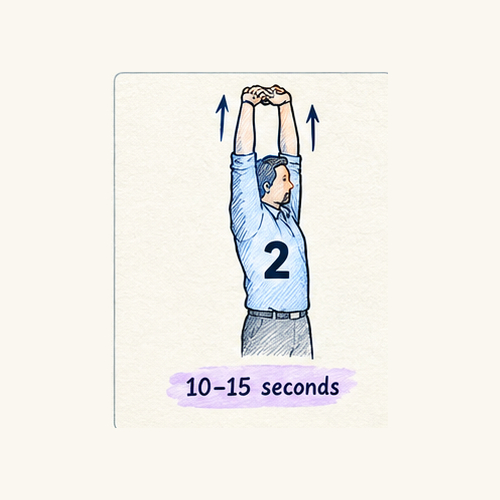
Stand or sit upright, join your hands, and lift both arms overhead with the elbows straight. Reach toward the ceiling while keeping the shoulders away from the ears. Stay up for 10 to 15 seconds. The shaded areas sit along the sides of the torso, so expect the stretch along your ribs rather than in your neck. Keep breathing normally.
Pose 4: Tall Stretch With Palms Up for Arms and Upper Back

Raise both arms overhead, turn the palms toward the ceiling, and grow tall through the spine. This carries one of the longest holds on the chart at 15 to 20 seconds, and the shading follows the upper back and the arms. Seated or standing both work. Lengthen up instead of leaning back.
Pose 5: Shoulder Shrug Stretch to Release Neck Tension
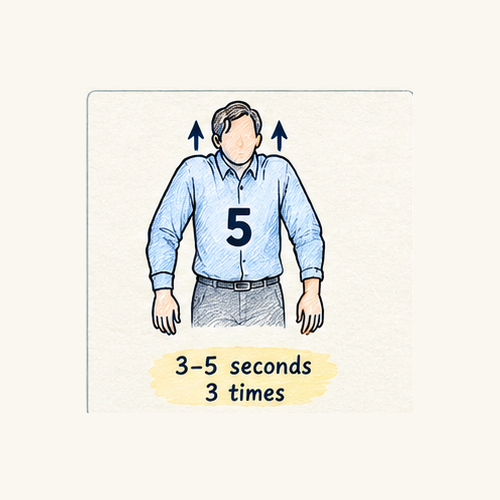
Lift both shoulders toward your ears, hold for 3 to 5 seconds, then let them drop. Do it three times. The CCOHS fact sheet frames the shrug as a way to relieve early tightness or tension in the shoulder and neck area. It is subtle enough for a video meeting.
Neck Stretch and Side Bend Stretches You Can Do Seated or Standing
Side bends and neck tilts cover the parts of your body the arm stretches miss.
Pose 6: Neck Tilt Stretch With Hands Behind the Back for Neck and Shoulder Tension

The drawing shows the hands joined behind the back while the head tips toward one shoulder. Hold the wrist of one arm with the other hand, keep that shoulder low, and tilt your ear slowly toward the opposite side. Stay for 10 to 12 seconds, then switch arms. The chart lists the time per arm, so you finish with two rounds. A small tilt is enough.
Pose 3: Standing Side Bend Stretch for the Trunk and Shoulder

Stand with your feet about hip width apart, raise one arm overhead, and lean sideways away from that arm. Keep the hips still and the chest facing forward. Give it 8 to 10 seconds, then switch sides. CCOHS pairs this lean with the overhead reach in a single back and side stretch. Don’t twist.
Pose 9: Seated Side Stretch Without Leaving Your Chair
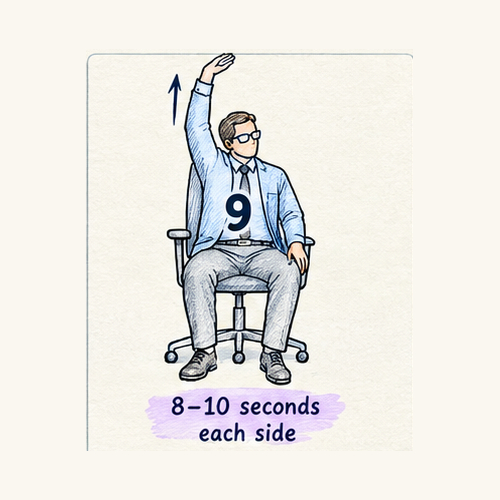
Same idea, seated. Sit upright, lift one arm overhead, and bend the upper body sideways, away from the raised arm, while the other hand rests on the chair seat or hangs at your side. Stay for 8 to 10 seconds on each side. It is the easy choice during a call or while a page loads.
Wrist and Hand Stretches for Typing and Mouse Work
Typing and mouse work repeat the same small wrist movements for hours, so three of the twelve moves target the hands and wrists. Do them in order.
Pose 7: Prayer Wrist Stretch for the Inside of the Forearms
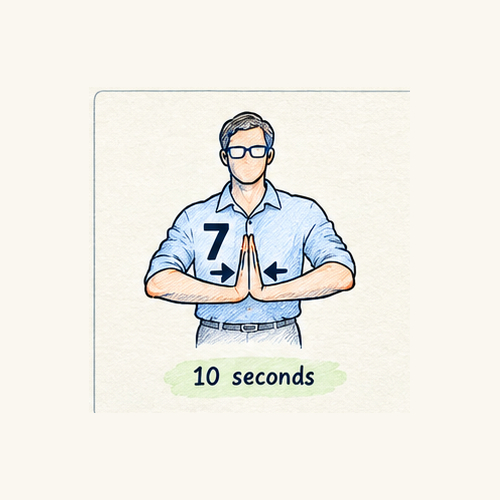
Press the palms together in front of the chest with the fingers pointing up and the elbows out to the sides. Keeping the palms touching, lower the hands slowly toward the waist until you feel a stretch along the inside of the forearms. Hold for 10 seconds. A close variation in the CCOHS fact sheet keeps the elbows on the table and lowers the wrists for 5 to 7 seconds, repeated three times. Keep it gentle.
Pose 8: Reverse Wrist Stretch for the Back of the Wrists
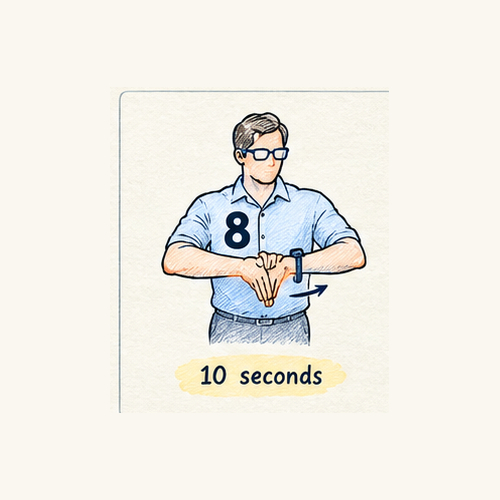
Here the backs of the hands face each other with the fingers pointing down. I read this as the mirror image of the prayer stretch, aimed at the back of the wrists and forearms. Give it 10 seconds and keep the pressure light. Stop if it pinches.
Pose 12: Hand Shake-Out Stretch to Finish a Wrist Sequence

Let both arms hang and shake the hands out loosely for 8 to 10 seconds, as if drying them without a towel. Keep the arms loose. Finish every wrist sequence with this one.
Seated Back Stretches: Twist and Arch for a Stiff Lower Back
Long spells of sitting can leave the lower back stiff, and these two moves target it.
Pose 10: Seated Twist Stretch for Mid and Lower Back

Sit upright with one leg crossed over the other. Turn the upper body to one side, using one hand on the chair back and the other on the outer thigh or knee as a guide, and keep both hips pointing forward. Stay for 8 to 10 seconds, then change the crossed leg and turn the other way. Rotate from the ribs, not by yanking with the arms. The CCOHS hip stretch is a close cousin, with the arm or elbow on the outside of the crossed leg. The twist should feel smooth.
Pose 11: Seated Back Arch Stretch for the Lower Back and Chest
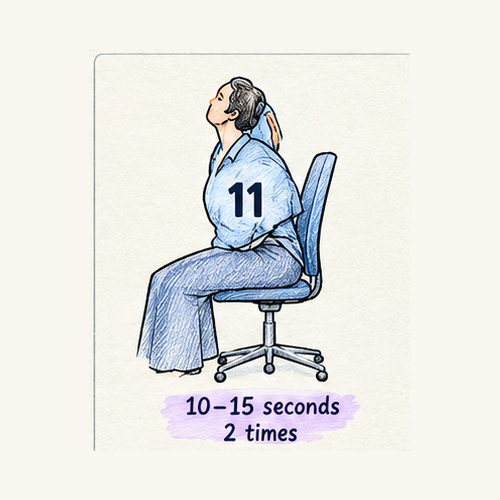
Place your hands on your lower back, lift the chest, and lean back gently into the backrest, letting the head follow only as far as feels comfortable. Hold for 10 to 15 seconds and repeat once. It moves the spine the opposite way from a slouch. CCOHS lists a standing version, knees slightly bent and a slight lean back. Go slowly. Skip the head tilt if you feel dizzy.
Desk Stretch Routine for Bloggers: A Simple Schedule That Sticks
The longest holds on the chart add up to roughly four minutes. With transitions, the full set takes about five minutes, which lands inside the 5 to 10 minutes per hour that CCOHS suggests. That is not much time. You do not need to run all twelve every time, though. A rotating mini version is easier to keep up.
EVERY 30 MINUTES, 1 to 2 minutesPick one move from each group: Shoulders 1, 2, 4 or 5 Neck and sides 6, 3 or 9 Wrists 7, 8 or 12EVERY 60 MINUTES, about 5 minutesRun all 12 in order, then stand up and walk to a windowEND OF A LONG WRITING SESSIONPoses 10 and 11 to reset the lower back
Add an eye break. Colorado State University’s ergonomics program points to the 20-20-20 rule: every 20 minutes, look at something 20 feet away for 20 seconds.
If one area bothers you more than the rest, start with the matching row.
| What you feel | Stretches to try |
|---|---|
| Tight shoulders after a typing sprint | 1, 2, 4, 5 |
| Stiff neck | 6, 5 |
| Tired wrists and forearms | 7, 8, 12 |
| Stiff lower back from sitting | 9, 10, 11, 3 |
Pain that lasts or spreads deserves a professional.
How These Desk Stretches Were Checked Against Workplace Health Sources
Everything here starts from one chart of 12 numbered line drawings with hold times. Timings are unchanged. The written steps were drafted for this guide and then cross-checked against three published workplace sources: the CCOHS fact sheet, the Colorado State University ergonomics page and a SAIF micro-break newsletter.
Source age matters. The CCOHS fact sheet was last revised in 2014 and confirmed current in 2025, and the SAIF newsletter dates from 2016. Neither is recent. All three sources agree that regular breaks matter, and CCOHS and Colorado State University both say not to bounce or stretch into pain. Colorado State University also gives a longer hold of 15 to 30 seconds.
| Pose | Closest match in published guidance |
|---|---|
| 1 Forward arm press | CCOHS back and side stretch, arms brought in front of the body |
| 2 Overhead reach | CCOHS back and side stretch, fingers interlaced and arms overhead |
| 3 Standing side bend | CCOHS back and side stretch, leaning left and right |
| 4 Tall stretch, palms up | CCOHS overhead variation, loosely matched |
| 5 Shoulder shrug | CCOHS shoulder shrug and Colorado State University shoulder shrugs |
| 6 Neck tilt, hands behind back | Ear to shoulder in both sources, hands behind the back not covered |
| 7 Prayer wrist stretch | CCOHS palms together wrist stretch |
| 8 Reverse wrist stretch | No direct match, Colorado State University lists a different wrist extensor stretch |
| 9 Seated side stretch | CCOHS back and side stretch |
| 10 Seated twist | CCOHS hip stretch, partial match |
| 11 Seated back arch | CCOHS standing stretch, partial match |
| 12 Hand shake-out | No direct match |
Where a row says no direct match or partial match, the wording is my interpretation of the drawing. Move cautiously there.
Desk Stretch Warning Signs: When to Stop and See a Professional
Stretching is not a contest. Colorado State University lists signs of work-related musculoskeletal problems and urges early reporting before discomfort turns chronic. Several of them can show up at a desk.
- Persistent pain or aches.
- Tingling.
- Numbness, or body parts that keep falling asleep.
- Swelling.
- Weakness or loss of strength.
- Decreased range of motion.
If any of these show up, or a stretch causes sharp pain, stop and speak to a doctor or physiotherapist. Do not push through it. This guide is general information and not medical advice.
Questions People Ask About Desk Stretches
How often should I do desk stretches during a workday?
CCOHS suggests a 5 to 10 minute break for every hour at a workstation, while Colorado State University and SAIF recommend a short active break every 20 to 30 minutes. A practical split is one or two stretches every half hour and the full set once an hour. Adjust from there.
Can desk stretches fix neck and back pain from sitting?
Desk stretches can ease stiffness and break up a long static posture. They do not treat injuries. If pain persists, spreads, or comes with numbness or tingling, see a doctor or physiotherapist.
How long should I hold each office stretch?
CCOHS suggests holding a stretch for a reasonable time, for example 10 to 20 seconds, while breathing normally. The chart in this guide uses holds between 3 and 20 seconds depending on the move. Colorado State University’s guidance runs longer, at 15 to 30 seconds. Never bounce.
Are seated desk stretches as good as standing ones?
The chart mixes both. Each has a place. Seated versions let you stretch without leaving your chair, and standing versions allow more room to move. Changing position is itself part of the advice from CCOHS, so using some of each makes sense.
Which desk stretches help sore wrists from typing?
Poses 7, 8 and 12 target the hands, wrists and forearms. CCOHS lists similar moves. Wrist pain with numbness or tingling needs a clinician, not more stretching.
Is it safe to do desk stretches if I already have an injury?
Ask your doctor or physiotherapist before starting. Stop if anything hurts. Several of these moves load the neck, shoulders, wrists or lower back, which may be exactly where an injury sits.
Conclusion
Twelve stretches is too many to start with. Pick three. Pose 5 for the neck, pose 1 for the shoulders, pose 12 for the hands. Tie them to something you already do, such as saving a draft or publishing a post, and repeat that trigger every time. The CCOHS guidance on stretching at the workstation covers more moves if you want a longer list. Add the other nine only after the first three become automatic.