

HubSpot CRM transforms business operations far beyond sales tracking. It can manage everything from event management to feedback collection and more – turning one platform into your complete business management system.
When I started freelancing, HubSpot CRM felt like a fancy address book. I thought it was just for tracking who might buy from me. But was I wrong!
After managing dozens of client projects, I discovered something amazing. HubSpot’s platform can run your entire business, not just your sales.
It manages everything from hiring new team members to planning company parties.
Let me show you 10 creative ways HubSpot software transformed how I work. These tricks can help your business too, no matter how big or small.
Key Statistics About HubSpot CRM’s Impact
Before diving into the tactics, here are three facts that show HubSpot CRM’s real power:
- HubSpot has 268,000+ customers in 135+ countries (source: HubSport IR)
- HubSpot estimates that its software saves each user an average of 250 hours every year by automating marketing tasks (Source: WallStreetZen)
- Businesses using HubSpot Marketing Hub report an average 505% ROI over three years (Source: HubLead)
These numbers prove HubSpot’s platform delivers real results for businesses that think beyond traditional sales.
1. Transform HR Operations with HubSpot CRM Workflow Automation
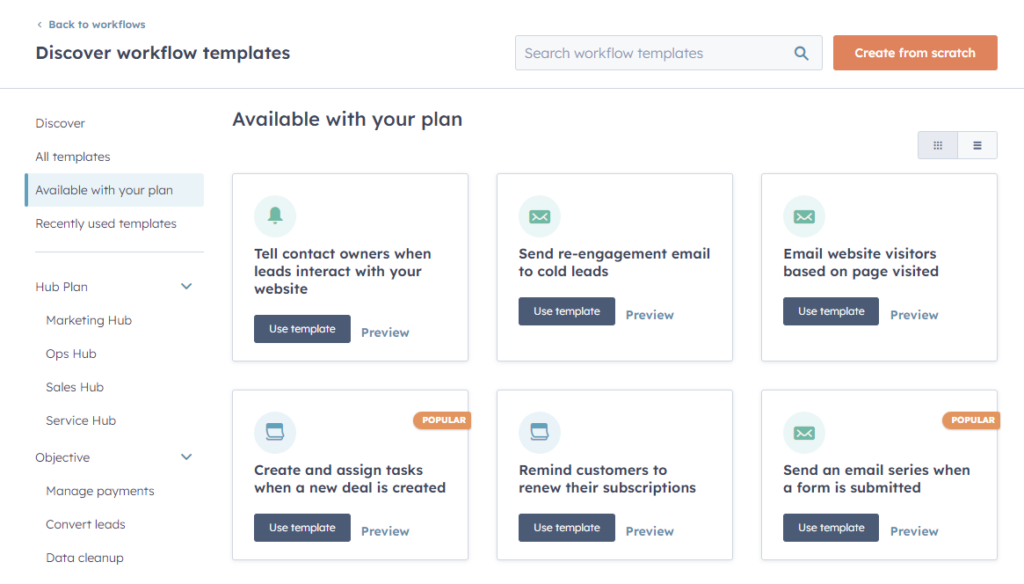
HubSpot CRM eliminates repetitive HR work with automation. Remember when someone from accounting sent the same onboarding email 47 times? Those days are over.
Setting Up Your HR Help Desk
HubSpot’s workflow automation turns messy HR requests into organized systems:
| HR Task | Before HubSpot | After HubSpot CRM |
|---|---|---|
| Time off requests | Email chains | Automated pipeline |
| New hire paperwork | Lost documents | Tracked stages |
| Equipment requests | Phone calls | Digital forms |
| Policy questions | Manual responses | Smart workflows |
Tracking Employee Milestones
HubSpot software remembers important dates automatically. Set up reminders for:
- Work anniversaries
- Performance review dates
- Training completion deadlines
- Benefits enrollment periods
My team loves getting automated birthday messages through HubSpot’s email tools. It feels personal but saves hours.
2. Track Partner Campaigns with HubSpot CRM’s Attribution Features
HubSpot CRM makes partner performance tracking effortless. Finding good partners is hard, but measuring results doesn’t have to be.
Creating Partner Scorecards
HubSpot CRM shows exactly which partners bring real value:
| Partner Name | Leads Generated | Conversion Rate | Revenue Impact |
|---|---|---|---|
| Partner A | 45 | 12% | $15,400 |
| Partner B | 23 | 18% | $22,100 |
| Partner C | 67 | 8% | $8,900 |
Automated Partner Communication
HubSpot’s platform sends updates automatically when:
- Partners reach milestone goals
- New leads come from their efforts
- Monthly reports need sharing
- Payment processes begin
This keeps everyone happy without constant manual work.
3. Build Customer Health Scoring with HubSpot CRM Properties
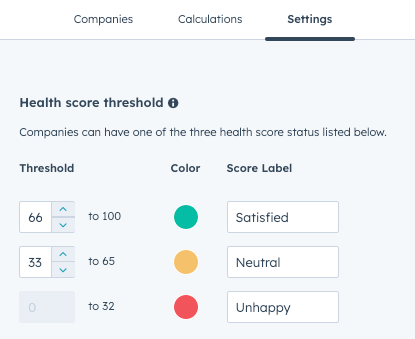
HubSpot CRM prevents churn with proactive customer health scoring.
Happy customers stay longer and spend more, and HubSpot helps you catch problems before they escalate.
Creating Your Health Score Formula
HubSpot software tracks customer happiness through custom properties:
| Positive Actions | Points Added | Negative Actions | Points Deducted |
|---|---|---|---|
| Attends webinar | +10 | Misses scheduled call | -15 |
| Opens support ticket | +5 | Requests refund | -25 |
| Refers new customer | +20 | Late payment | -10 |
| Uses new feature | +15 | Cancellation threat | -30 |
Setting Up Alert Systems
HubSpot’s workflow engine sends warnings when customer scores drop below safe levels.
This saved my biggest client last month when I caught their frustration early.
4. Streamline Event Management Through HubSpot CRM Integration
HubSpot CRM simplifies event management from registration to follow-up. Planning events used to give me nightmares, but not anymore.
Registration to Follow-Up Pipeline
HubSpot CRM handles your entire event process:
| Event Stage | HubSpot Action | Result |
|---|---|---|
| Registration | Automated confirmation | Happy attendees |
| Reminder | Scheduled email sequence | Higher show rates |
| Check-in | Mobile app integration | Smooth entry |
| Follow-up | Personalized thank you | More engagement |
Managing Multiple Event Types
Different events need different approaches. HubSpot’s platform creates separate pipelines for:
- Webinars and online events
- Trade shows and conferences
- Internal team meetings
- Client appreciation events
Each pipeline has custom properties that match what you actually need to track.
5. Onboard New Team Members Using HubSpot CRM Pipeline Management
HubSpot CRM creates smooth onboarding pipelines that retain talent.
Great employees quit when onboarding feels chaotic, but HubSpot fixed this.
The 30-Day Onboarding Pipeline
HubSpot CRM breaks onboarding into clear stages:
| Week | Focus Area | HubSpot Tools Used |
|---|---|---|
| Week 1 | Paperwork & Setup | Digital forms, task assignments |
| Week 2 | Training & Systems | Content library, progress tracking |
| Week 3 | Shadow & Practice | Meeting scheduler, feedback forms |
| Week 4 | Independent Work | Performance dashboards, check-ins |
Measuring Onboarding Success
HubSpot’s reporting tools show which new hires succeed faster:
- Time to first successful project
- Training module completion rates
- Manager satisfaction scores
- 90-day retention rates
This data helps improve your process for future hires.
6. Collect Product Feedback with HubSpot CRM’s Form Integration
HubSpot CRM transforms customer feedback into actionable insights.
Feedback is gold, and HubSpot helped me mine it properly.
Smart Feedback Collection
HubSpot’s form builder creates surveys that actually get completed:
| Feedback Type | HubSpot Feature | Benefits |
|---|---|---|
| Bug reports | Automated tickets | Faster fixes |
| Feature requests | Voting system | Better priorities |
| General satisfaction | NPS surveys | Trend tracking |
| Cancellation reasons | Exit interviews | Retention insights |
Acting on Feedback Quickly
HubSpot software routes urgent feedback to the right people instantly. No more important complaints sitting in email forever.
7. Manage Content Production with HubSpot CRM Project Tracking
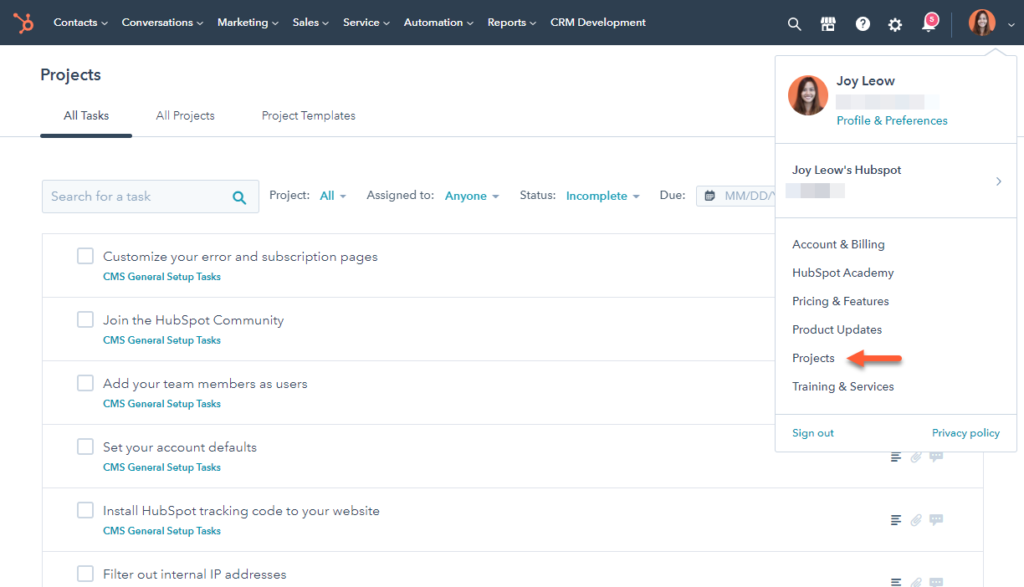
HubSpot CRM organizes content creation like a sales pipeline. Content creation feels overwhelming until you treat it like a structured process.
The Content Pipeline System
HubSpot CRM treats each piece of content as a project:
| Content Stage | Tasks Included | Team Members |
|---|---|---|
| Planning | Research, outline, approval | Writer, manager |
| Creation | Writing, design, review | Writer, designer |
| Approval | Editing, legal check, sign-off | Editor, legal team |
| Publishing | Schedule, promote, track | Marketing team |
Tracking Content Performance
HubSpot’s analytics show which content actually works:
- Page views and engagement rates
- Lead generation from each piece
- Social media sharing numbers
- Conversion to customers
This data helps you create more of what people actually want.
8. Coordinate Vendor Management Through HubSpot CRM Contact Organization
HubSpot CRM organizes vendor management into clear, trackable pipelines.
No more messy spreadsheets or sticky notes.
Vendor Performance Tracking
HubSpot CRM organizes all vendor relationships:
| Vendor Category | Key Metrics | HubSpot Tools |
|---|---|---|
| Software providers | Uptime, support quality | Custom properties |
| Freelancers | Delivery time, quality | Project pipelines |
| Suppliers | Cost, reliability | Deal tracking |
| Service providers | Response time, results | Ticket system |
Contract Renewal Management
HubSpot’s workflow automation prevents expensive surprises:
- 90-day renewal reminders
- Budget impact calculations
- Performance review summaries
- Alternative vendor research
Never get caught with an expired contract again.
9. Automate Approval Processes with HubSpot CRM’s Process Builder
HubSpot CRM accelerates approvals with automated workflows. Waiting for approvals kills momentum, but HubSpot solves that problem.
Multi-Level Approval Workflows
HubSpot CRM handles complex approval chains automatically:
| Request Type | Approval Levels | Average Time |
|---|---|---|
| Marketing spend | Manager → Director | 2 days |
| New hire | HR → Department head → CEO | 5 days |
| Contract changes | Legal → Sales → Finance | 3 days |
| Equipment purchase | Manager → IT → Finance | 1 day |
Tracking Approval Bottlenecks
HubSpot’s reporting shows where approvals get stuck most often. Use this data to fix slow processes.
10. Run Referral Programs Using HubSpot CRM’s Campaign Tools
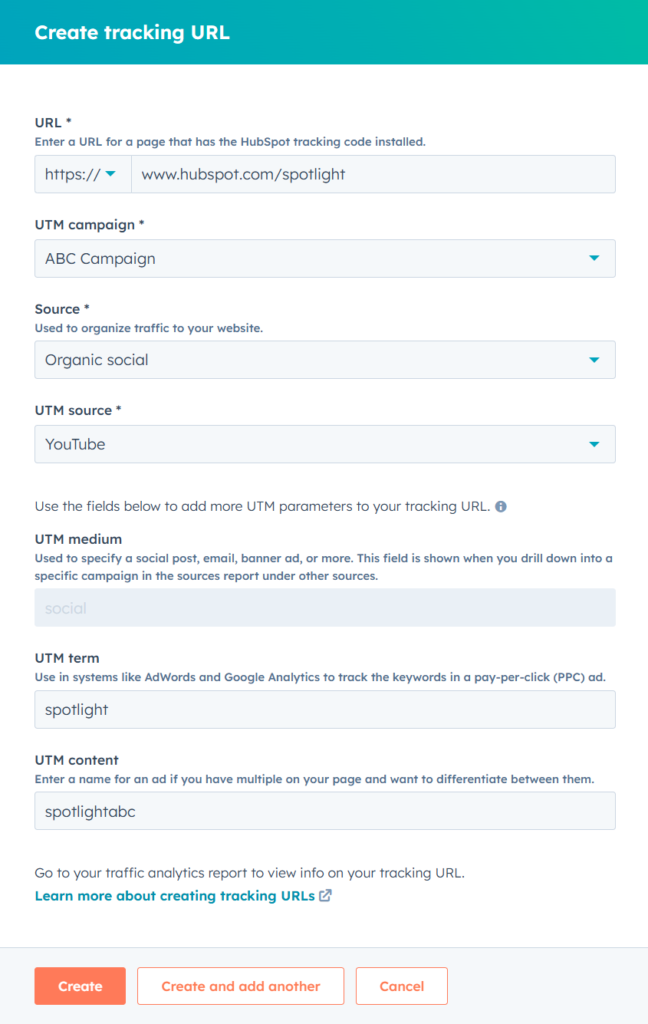
HubSpot CRM powers structured referral programs that fuel growth.
Happy customers make the best salespeople, and HubSpot helps organize their efforts.
Referral Tracking Made Simple
HubSpot CRM manages your entire referral program:
| Referral Stage | HubSpot Action | Result |
|---|---|---|
| Sign-up | Unique tracking links | Clear attribution |
| Referral made | Automated notifications | Fast follow-up |
| Conversion | Reward calculation | Happy referrers |
| Payment | Integration with finance | Smooth process |
Measuring Referral Success
HubSpot software shows which referrers bring the best customers:
- Referral-to-customer conversion rates
- Average deal size from referrals
- Customer lifetime value comparison
- Program ROI calculations
HubSpot CRM vs Competitors: Why Integration Matters
This eliminates data silos and reduces the need for multiple software subscriptions.
| Feature | HubSpot CRM | Salesforce | Pipedrive | Zoho CRM |
|---|---|---|---|---|
| Built-in marketing automation | ✅ Yes | ❌ Requires add-on | ❌ No | ❌ Separate product |
| Native content management | ✅ Yes | ❌ No | ❌ No | ❌ No |
| Free tier availability | ✅ Yes | ❌ No | ✅ Limited | ✅ Limited |
| All-in-one platform | ✅ Yes | ❌ Requires multiple products | ❌ Sales-focused only | ❌ Separate tools |
| Workflow automation | ✅ Advanced | ✅ Advanced | ❌ Basic | ✅ Good |
| Built-in reporting | ✅ Comprehensive | ✅ Advanced | ✅ Basic | ✅ Good |
| Customer service tools | ✅ Integrated | ❌ Separate product | ❌ No | ❌ Separate product |
Common HubSpot CRM Implementation Mistakes to Avoid
Don’t import contacts without proper organization
HubSpot’s contact management works best when properties, pipelines, and segmentation criteria are defined before you upload data.
Rushing into imports without structure leads to messy databases and wasted automation.
Define your contact properties before importing
Clear properties ensure that every lead, customer, or partner is categorized correctly. This helps avoid confusion later when you try to filter or segment your contacts.
Set up pipelines for different processes early
Whether it’s sales, onboarding, or HR workflows, pipelines keep operations structured. Building them before importing data ensures contacts flow smoothly into the right stages.
Create contact lists that match your business needs
Segmentation is only powerful if it’s intentional. Lists built on job roles, industries, or engagement levels allow you to target the right groups effectively.
Configure automation rules before going live
HubSpot’s strength is in automation—but only if workflows are in place before you start.
Setting up rules for lead assignment, task reminders, and email nurturing prevents data from slipping through the cracks.
Frequently Asked Questions About HubSpot CRM Usage
Q. What is HubSpot best for?
HubSpot is best for unifying sales, marketing, and service operations. Its automation tools work across departments, making it ideal for businesses that want integrated workflows without juggling multiple platforms.
Q. How does HubSpot CRM compare to standalone CRM solutions?
HubSpot’s advantage over standalone CRMs is native integration. It combines marketing automation, content management, and customer service in one system, eliminating extra subscriptions and ensuring consistent data across your organization.
Q. When should you use HubSpot for operations beyond sales?
Use HubSpot beyond sales when you need cross-department automation. Its workflows, integrated reporting, and seamless data flow make it suitable for HR, events, marketing, and project management—not just sales tracking.
Q. Is HubSpot CRM really free forever?
Yes, HubSpot CRM is free forever with no time limits. The free version includes contact management, deal tracking, email integration, and basic reporting.
You only pay for advanced features like marketing automation, AI tools, and custom reporting.
Q. How long does it take to set up HubSpot CRM?
Most businesses can set up HubSpot CRM in under a week. The setup wizard simplifies importing contacts, building pipelines, and connecting your email, while advanced workflows or custom properties may take a few extra days.
Q. Can HubSpot CRM work for small teams?
HubSpot CRM works well for small teams and scales as you grow. The free tier handles basic needs, while larger companies benefit from sales automation, advanced marketing tools, and integrated customer service features.
Q. What happens to my data if I stop using HubSpot CRM?
You can always export your HubSpot data if you stop using it. Contacts, deals, and custom properties can be downloaded in CSV format, ensuring you’re never locked into the platform.
Q. Does HubSpot integrate with other business tools?
Yes, HubSpot integrates with 1,800+ popular tools. Gmail, Outlook, Slack, Zoom, WordPress, Shopify, and QuickBooks are just a few examples, all accessible through the HubSpot App Marketplace.
Q. How secure is HubSpot for business data?
HubSpot is highly secure, with SOC 2 Type II certification. Your data is protected with encryption, regular backups, access controls, and 24/7 monitoring from HubSpot’s dedicated security team.
Conclusion
HubSpot CRM transforms your business by automating busywork and keeping everything organized. What once felt like juggling names, emails, and scattered spreadsheets can now run smoothly with a single platform.
Take action today to simplify operations. Sign up for HubSpot’s free CRM account and implement the strategies outlined above.
Small wins, automated reminders, and structured pipelines will add up quickly, giving you more time to focus on growth rather than repetitive tasks.
Affiliate Disclosure: This post contains affiliate links. If you click through and make a purchase, BlogProcess may earn a small commission—at no extra cost to you. We only recommend tools we trust and believe bring genuine value to small businesses and entrepreneurs.