Turn Off Avast 2016 Footer Signature in your E-mails

If you are using any Avast Antivirus, including the free version, Avast automatically inserts an e-mail footer signature into all your outgoing messages.
The signature will looks like:

‘This email has been sent from a virus-free computer protected by Avast‘ if you are using Avast 2016

If you don’t want this message, just follow this steps to disable/remove it from your e-mails:
1- Go to your Avast interface by double-clicking on the orange icon in the Windows system tray. Or you can find Avast in the Windows Start menu » All Programs » Avast.
2- Go to ‘Settings‘ by clicking on the cogwheel icon in the top-right corner of Avast user interface.
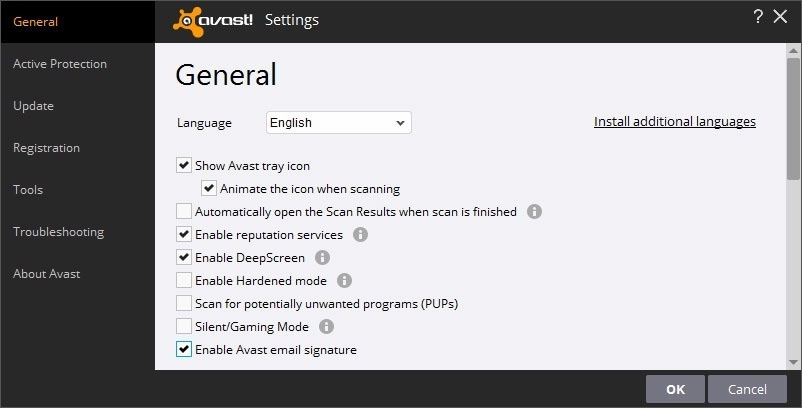
3- In the ‘General‘ section find option ‘Enable Avast email signature‘ and simply un-check it.
That’s all – Avast will not include an e-mail footer signature in your outgoing e-mails anymore.


You May Also Like

Top Ways You Can Support Mental Health In The Office

Mental health is seldom talked about. This is as a result of the stigma associated with it. Studies, however, have shown that nearly everyone develops a temporary psychological disorder in their lifetime. This makes the outbreak of mental diseases an epidemic that should be given more focus and attention. Researches into mental health have provided […]

The Easiest Way to Add In-App Chat: CometChat’s Integration Mini-Guide

Every modern app needs real-time communication features. But building chat functionality from scratch? That’s a massive time sink pulling your team away from what matters. But with CometChat you can have professional messaging running in minutes. 1. Why In-App Chat Matters for Your Application User engagement drives everything in today’s market, and real-time messaging isn’t […]

The Top 10 Online Security Threats and How to Protect Yourself from Them

Since the early days of the internet, fraudsters, pranksters and criminals have been coming up with more and more ways to try and access our data for credit fraud, blackmail, or just to cause chaos. Some organized criminals even use sophisticated software to use your computer to do their dirty work, creating ‘bot-nets’ of home […]

4 Reasons to Become a Trained Software Expert

Most software tools will have a set of basic features that are self-explanatory and easy for the average user to become familiar with. However, certain professional tools have steep learning curves that require guided training or extensive studying of the support manual. Fittingly, the most advanced software are those that are used to facilitate business-related […]