
Save more time while blogging

When we stay days and days to blog , we spends a lot of time to copy bits of text and URLs.

blogging

We move from a tab to an other for taking notes constantly. This makes us waste precious time. It would be easier to copy all successively and then paste the information one by one in the desired locations.

CopyPasteTool is a free software for Windows that allows you to copy multiple items in succession to the clipboard, then paste them as usual using the shortcut CTRL-C / CTRL-V.
The difference is that if you use several times the CTRL-V, previously copied items are pasted one after one.

For example, if I copy:
CTRL-C will copy the element A
CTRL-C will copy the element B
CTRL-C will copy the element C

and then I past:
CTRL-V will paste A

If I don’t  release the CTRL key, and I click  again on the V key, the next element in the stack is pasted: B and so on, until the stack contains no elements.
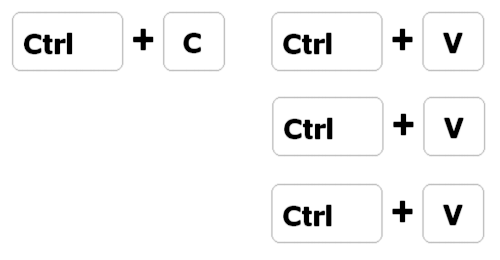
copypaste

This seems simplistic, but it saves huge time and the productivity is greatly improved.

During installation, a small icon will sit in the notification area. The software runs in the background and consumes very little memory.

You May Also Like

Relevant tips in picking your blog’s name

    When it comes to picking a blog name, there are certain rules that you will have to consider: Create a name that indicates your blog focus- Most online users check the link first before going directly to a blog especially when they are using a search engine. Hence, you will need a relevant […]

Ways to Optimize your blog for Mobile Searching

Would you believe this? The number of people accessing the web through their mobile phones has doubled from last year and at present; 22 million people search the net for various reasons everyday. WOW! That is an awesome number and it promises to grow exponentially with each passing day with most of the mobiles today […]

Gaining Exposure for Your Blog

If you are writing for creative satisfaction only, then probably you need no strategy or planning as taking your blog post to as many readers or potential customers as possible is not your aim. But if you are writing to make money, you naturally want to your articles be seen by a larger number of […]

Making your blogging experience faster – Email tip!

Read: Making your blogging experience faster – Browser edition!, Making your blogging experience faster – Gmail edition! and Making your blogging experience faster – Blogger edition! As we discussed in the last post of this series Emails are a huge productivity killer and one of the most time waster, this way I decided to talk about a new tip on […]