
Don’t lose your visitors when your database is unavailable

When your WordPress blog has trouble connecting with the database, it returns a nice “Error Establishing a database connection”.
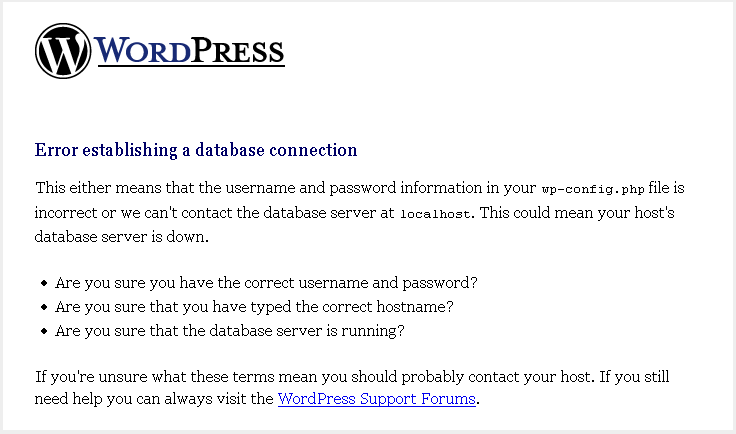
wordpress-database-error

Instead of losing visitors, db-error.php might be the useful solution.
You should create and place it in the wp-content folder. After that paste this short code in it.

[sourcecode language=”php”] // db-error.php

$host=$_SERVER[‘HTTP_HOST’];
$uri=urlencode($_SERVER[‘REQUEST_URI’]);
header("Location: http://google.com/search?q=cache:$host$uri");
exit();

?>
[/sourcecode]

the visitor is automatically redirected to the Google cache of the requested page. This avoids losing a visitor.
You May Also Like

5 WordPress Plugins To better monetize your blog

When we talk about Monetizing a Blog, many people think about Google Adsense as the only solution, but this is not true. So here is a list of 5 plugins that will help you change this idea. Adserver Adserver is an ad server for wordpress. You can set up your campaigns with banners of different […]

Pressable: The WordPress Hosting Built for Next-Generation Demands

WordPress isn’t your grandfather’s blogging platform anymore. Pressable understands this fundamental shift. While most hosting companies are still optimizing for traditional page rendering, Pressable by Automattic, the team behind WordPress itself, to handle what comes next. Multi-channel content. Headless architectures. API-first patterns. Infrastructure that evolves with the platform, not behind it. The disconnect between what […]

WordPress.com got a new face and open-sourced

Automattic, the creator of WordPress announced today, the relaunch WordPress.com. WordPress.com is the sister solution of the content management system WordPress, but it’s considered as the money-making machine for the company because it’s a hosted version of the CMS used by up to 25 percent of the Web entities. Based on the same system in […]

WordPress Hack: remove “WordPress Generator”

The publishing platform WordPress adds a small line for itself to advertise and clarify that the site that you find is a site using WordPress. Except that in addition to reporting that it’s WordPress, it goes to show the current version.It is not embarrassing, except that each version has its security problems… Past one of […]